






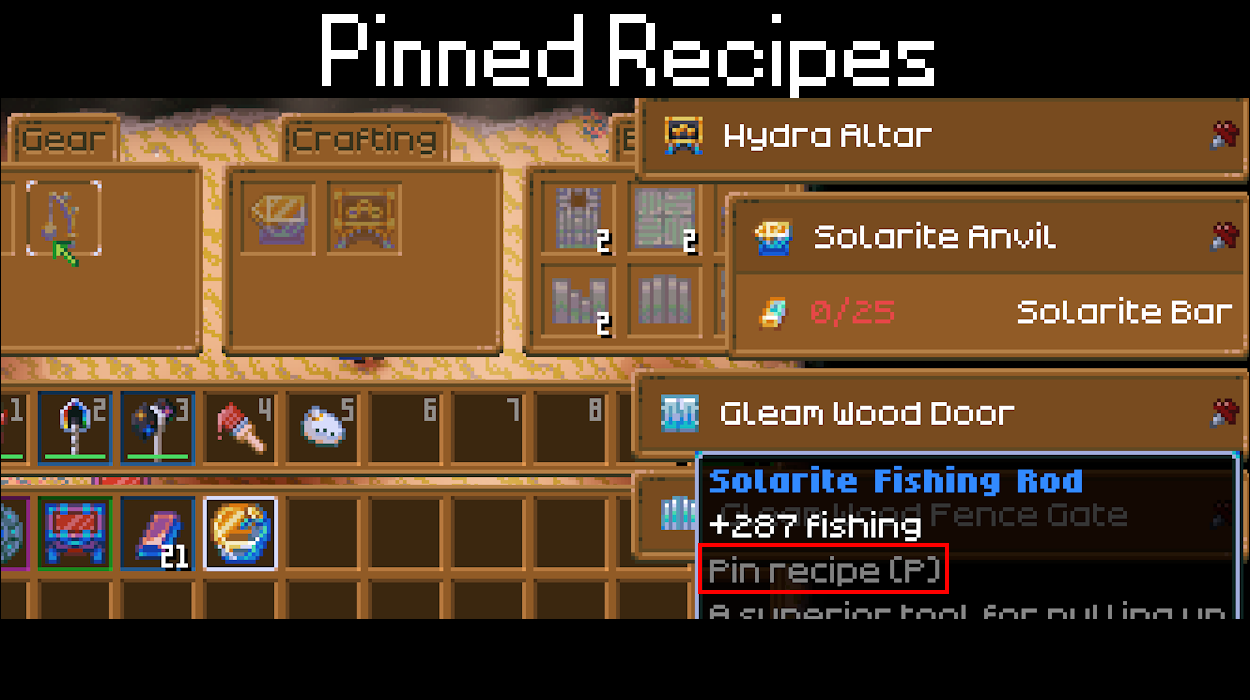

About Pinned Recipes
From mod.ioPin any recipe to your screen and see what you still need. Hover a recipe, press P, done!
Pinned Recipes
Ever walked back and forth between your chests because you forgot what that workbench needed? Not anymore!
Hover over a recipe in a workbench, shrines, the crafting tab or the cookbook and press P. A small window shows every ingredient and how many you have. Red means you still need more, green means you're good to go.
Windows
- up to 5 pinned recipes, each in its own window
- drag a window anywhere
- click the header to collapse or expand the ingredient list
- click the pin to remove the recipe
- the recipe tooltip shows "Pin recipe (P)" so you don't forget the key
Settings
The key can be changed in Options > Gameplay, at the end of the list. Select the entry and press the new key. Ctrl, Shift, Alt and AltGr work as modifiers. Escape cancels, Backspace removes the key.
Config file
The key is saved to PinnedRecipes/config.json in the game's mod config folder. Your pins and window positions are saved per character and per world in the same folder.
Good to know
- Only counts what's in your inventory, not nearby chests.
- Windows hide together with the game UI, for example when teleporting.
- Client side only. Works in multiplayer, the host doesn't need the mod.
No dependencies. Just install it and pin.
License: Free to play & stream. No re-uploads or reuse without permission.
Full license | Discord: lordofcloud
Highlights
From source dataFootprint
Rated a light load on a server.
Last update
Its author last shipped an update 17d ago.
Pinned Recipes on Nxeon
From our catalogue- One-click install
- Supported on Nxeon Core Keeper servers. We download it from mod.io, place it, and restart the server.
- Server side
- Client-only: it runs in players’ own games, so it can’t be installed on a server
- Server load
- light
- Smallest plan we suggest
- Core Keeper — 2 GB (2 GB RAM). This follows our own load rating above, not a benchmark.
- Latest build
- v1.0.0, released 2026-10-17
Run Pinned Recipes on a Core Keeper server
Pick a server or deploy a new one above; it is installed in one click.
What kind of mod it is
From the catalogQuality of life & UI
Small conveniences, tweaks and interface improvements players notice straight away.
Client-side mod
From source side supportmod.io lists Pinned Recipes as not supported on servers. It runs in players’ own games, not on your server.
Compatibility
- Game
- Core Keeper
- Runs on
- Client only
Verified at the source
- ✓mod.ioOfficial listing, checked 2026-11-03Open ↗
- ✓AuthorLordOfCloud, as published on mod.io
- ✓LicenseNot published by the sourceFree















