
About Quick Potion
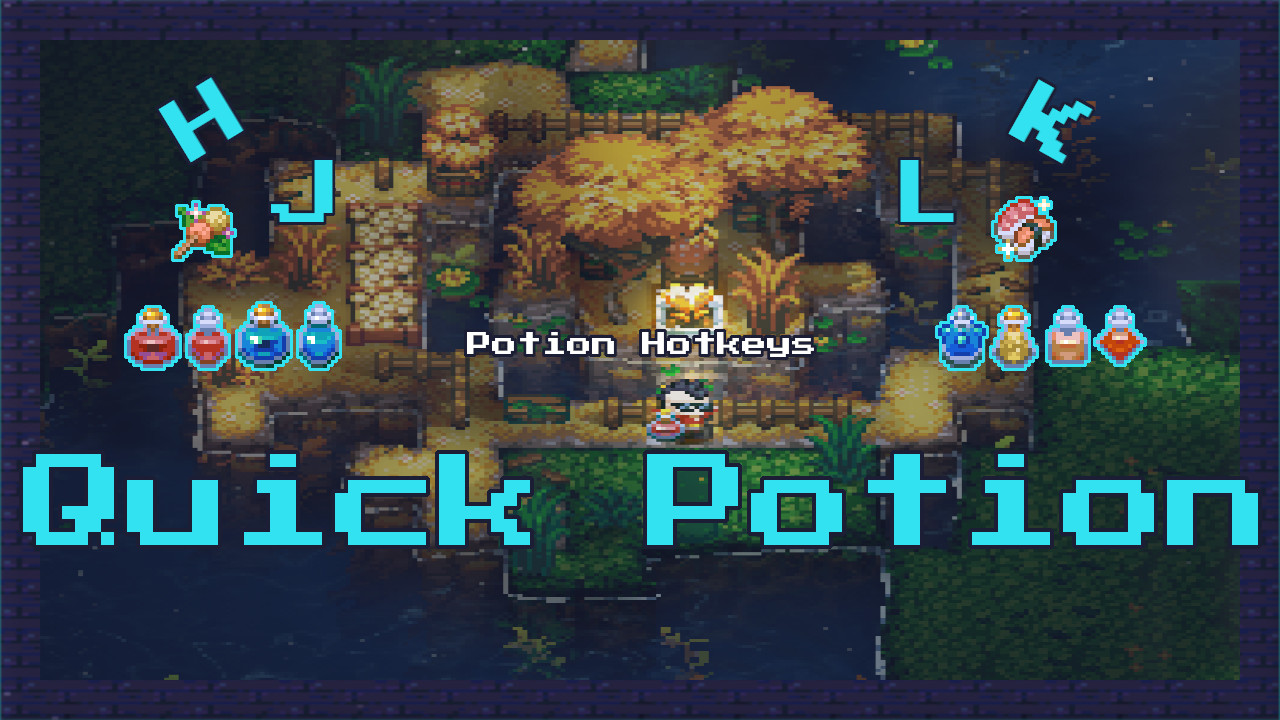
From mod.ioPotion Hotkeys: Assign quick keys to drink potions and eat food straight from your inventory. Never open the backpack in the middle of combat again.
Quick Potions (Requires CoreLib)
Quick Potion turns your inventory into an instant survival toolkit. Assign hotkeys to health, mana, and every buff potion, plus devour any cooked food at the press of a key. Never open your backpack mid‑fight again: drink, eat, and boost yourself without losing a second.
Fully configurable, so every shortcut fits your playstyle.
Works on Core Keeper 1.3+, multiplayer and dedicated servers.
100% compatible with Pouch Expansion Mod.
FEATURES
Quick Potion turns your inventory into a survival kit that responds instantly. Press a single key to drink health, mana, or any of the twelve buff potions, and also devour all the cooked food you have, always in the smartest order so the best benefits stick with you.
The keys come preset: H to heal, J for mana, K for buffs, and L for food, but you can remap them anytime from the settings menu → Controls → Mods without touching a single file.
Priority: pouches over inventory.
DEFAULT HOTKEYS (Requires CoreLib)
- H – Heal potions (Greater Healing Potion, then Healing Potion).
- J – Mana potions (Greater Mana Potion, then Mana Potion).
- K – Buff potions (Uses all buff potions in your inventory at once).
- L – Cooked foods (Uses all cooked foods in your inventory, from weakest to strongest benefit).
- Remap them anytime from Settings → Controls → Mods.
HOW IT WORKS
- Make sure your inventory has the potions or food you want to use.
- Press the quick-use key assigned to the type of consumable you need.
- The mod automatically picks the strongest potions first. For food, it eats from the weakest benefit to the strongest, so the best buffs remain active.
- Your character drinks or eats instantly: no need to open the backpack during combat.
- To change your keys, go to Settings → Controls → Mods and rebind them to your favourite layout.
CREDITS
Created by Parcew
CoreLib Commands and Hotkeys thanks to Limoka
Special thanks to the Core Keeper modding community.
FEEDBACK & SUPPORT
Discord: @parcew (preferred)
You can also leave a comment on the mod page.
LINKS
Modding guide: https://modding.corekeepergame.com/
My other mods: https://mod.io/u/parcew/
Support my work: https://ko-fi.com/parcew
LICENSE
This mod is protected by the Parcew Mod License. Re-uploading, redistributing, or including this mod (or any of its files, assets, prefabs, or other original content) in other mods or packs without written permission is not allowed.
Full license: https://github.com/parcew/modding/blob/main/LICENSE.md
Permission requests: Discord parcew
This mod is not affiliated with or endorsed by Pugstorm.
Highlights
From source dataGame versions
Built for Core Keeper 1.2.1.5.
Footprint
Rated a light load on a server.
Last update
Its author last shipped an update 44d ago.
Quick Potion on Nxeon
From our catalogue- One-click install
- Supported on Nxeon Core Keeper servers. We download it from mod.io, place it, and restart the server.
- Server side
- Required on the server
- Server load
- light
- Smallest plan we suggest
- Core Keeper — 2 GB (2 GB RAM). This follows our own load rating above, not a benchmark.
- Latest build
- 1.0.2r1, released 2026-09-21
Run Quick Potion on a Core Keeper server
Pick a server or deploy a new one above; it is installed in one click.
What kind of mod it is
From the catalogQuality of life & UI
Small conveniences, tweaks and interface improvements players notice straight away.
Runs on your server
From source side supportmod.io lists Quick Potion as required on the server. Check its mod.io page to see whether players need it too.
Compatibility
- Game
- Core Keeper
- Runs on
- Serverrequired on the server
- Game versions
- 1.2.1.5
Verified at the source
- ✓mod.ioOfficial listing, checked 2026-10-20Open ↗
- ✓AuthorParcew, as published on mod.io
- ✓LicenseNot published by the sourceFree