
About Runic Storage
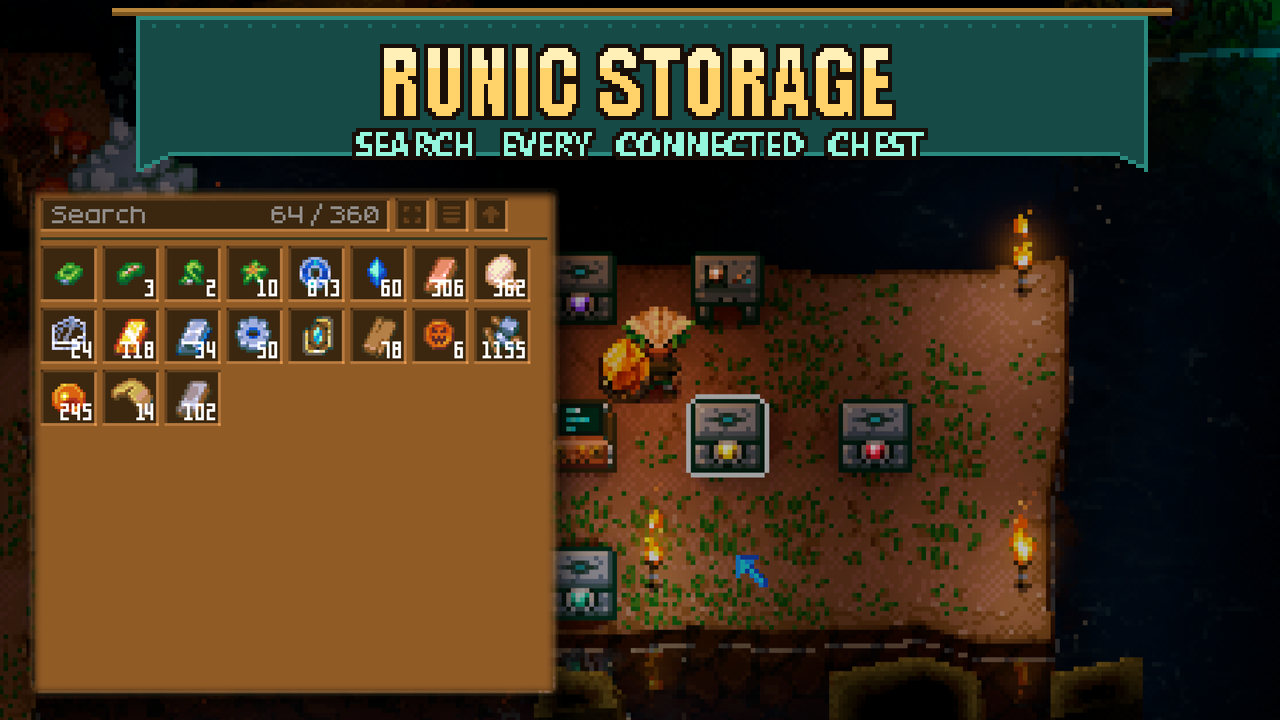
From mod.ioBuild storage that grows with your adventure. Craft a Storage Workbench, connect storage units to a terminal, and keep your items together in one searchable inventory.
Build storage that grows with your adventure. Craft a Storage Workbench, connect storage units to a terminal, and keep your items together in one searchable inventory.
Start with 40 slots per Copper unit. As you discover new materials, craft upgrade gems to add more space, up to 360 slots per Relucite unit. Each unit costs 30 copper bars, and each upgrade costs 40 bars of the next material and adds 40 slots. Upgrade through every tier in order without emptying the unit first.
Need more room? Add another unit or upgrade one you already have. Search, category filters, sorting, and quick transfers help you keep everything organized. Craft all units and upgrade gems at your Storage Workbench.
Getting started
1. At any workbench, select its wooden tier and craft a Storage Workbench from Base for 20 wood.
2. Use it to craft a Storage Terminal (10 copper bars + 20 wood) and Copper Storage Units (30 copper bars each).
3. Place units edge-to-edge. Diagonals and gaps do not connect.
4. Press E on the terminal or any unit connected to it to open that inventory. A network needs a terminal: units with no terminal connected cannot be opened. Access is local; there is no remote access.
Storage controls
- Pick up and place items with the cursor, or Shift-left-click to transfer a stack.
- Right-click takes one item; right-click the same stack again while holding it to take one more. Native modifiers take ten items or half a stack, rounded up.
- Category tabs run down the left edge of the storage panel: All, Materials, Weapons, Tools, Armor, Accessories, Food, Blocks, Furniture, Pets, Valuables and Other. Each tab shows a familiar item; the active tab is lit and the others are dimmed. One click shows only that category; click it again (or All) to see everything. Blocks are anything that places a tile (walls, floors, ground, bridges, fences, rugs, rails); Furniture is every other placeable, such as stations, chests, lights and decorations. Seeds count as Materials and pet eggs as Pets.
- Search narrows the visible items further. Scroll through larger networks or switch between grid and list views.
- Sort consolidates compatible stacks, then arranges them in tab order (materials first, other items last) and by name within each category. The direction control switches ascending/descending order.
- Slots remain stable while moving items. Reopening preserves your arrangement. Adding a node to a previously viewed network triggers one sort on the next view.
- The native quick-stack action transfers matching bag contents into the network. Bulk actions skip the hotbar and locked items.
Nearby crafting stations can use storage materials through the game's nearby-chest crafting rules. The terminal itself does not provide a crafting screen.
Upgrade tiers
Craft the next gem, select it in your hotbar, and press E on a unit. Upgrades keep its contents and require every tier in order. Only Copper units are crafted directly; each gem costs 40 bars of its material.
| Tier | Slots per unit |
|---|---:|
| Copper | 40 |
| Tin | 80 |
| Iron | 120 |
| Scarlet | 160 |
| Octarine | 200 |
| Galaxite | 240 |
| Solarite | 280 |
| Pandorium | 320 |
| Relucite | 360 |
These capacities also apply when using Double Chest Inventory. If an older version left a unit over capacity, you can still take those extra items out.
Moving your network
Mining a unit moves what fits into units still connected to the terminal. The game drops the remaining items and the unit itself. Isolated units drop their contents. Breaking a connection leaves the other units and their contents intact; reconnect them to restore access from the same terminal. Upgraded units retain their tier when mined and placed again.
Requirements
Requires CoreLib for every player.
Supports mouse and keyboard, with English labels. Access your storage locally at its terminal or connected units. Empty your storage before uninstalling the mod.
Credits
Inspired by the Magic Storage mod for Terraria.
Uses UI components adapted from moorowl's Item Browser, under the MIT license. You do not need to install Item Browser to use Runic Storage.
Highlights
From source dataFootprint
Rated a light load on a server.
Last update
Its author last shipped an update today.
Runic Storage on Nxeon
From our catalogue- One-click install
- Supported on Nxeon Core Keeper servers. We download it from mod.io, place it, and restart the server.
- Server side
- Required on the server
- Server load
- light
- Smallest plan we suggest
- Core Keeper — 2 GB (2 GB RAM). This follows our own load rating above, not a benchmark.
- Latest build
- 0.10.0, released 2026-11-03
Recent builds
| Build | Released | Game versions | Loaders |
|---|---|---|---|
| 0.10.0 | 2026-11-03 | n/a | n/a |
| 0.9.1 | 2026-10-31 | n/a | n/a |
Run Runic Storage on a Core Keeper server
Pick a server or deploy a new one above; it is installed in one click.
What kind of mod it is
From the catalogWeapons, items & crafting
New weapons, gear, items and the recipes to make them.
Runs on your server
From source side supportmod.io lists Runic Storage as required on the server. Check its mod.io page to see whether players need it too.
Compatibility
- Game
- Core Keeper
- Runs on
- Serverrequired on the server
Verified at the source
- ✓mod.ioOfficial listing, checked 2026-11-03Open ↗
- ✓Authorcoopdedoop, as published on mod.io
- ✓LicenseNot published by the sourceFree