






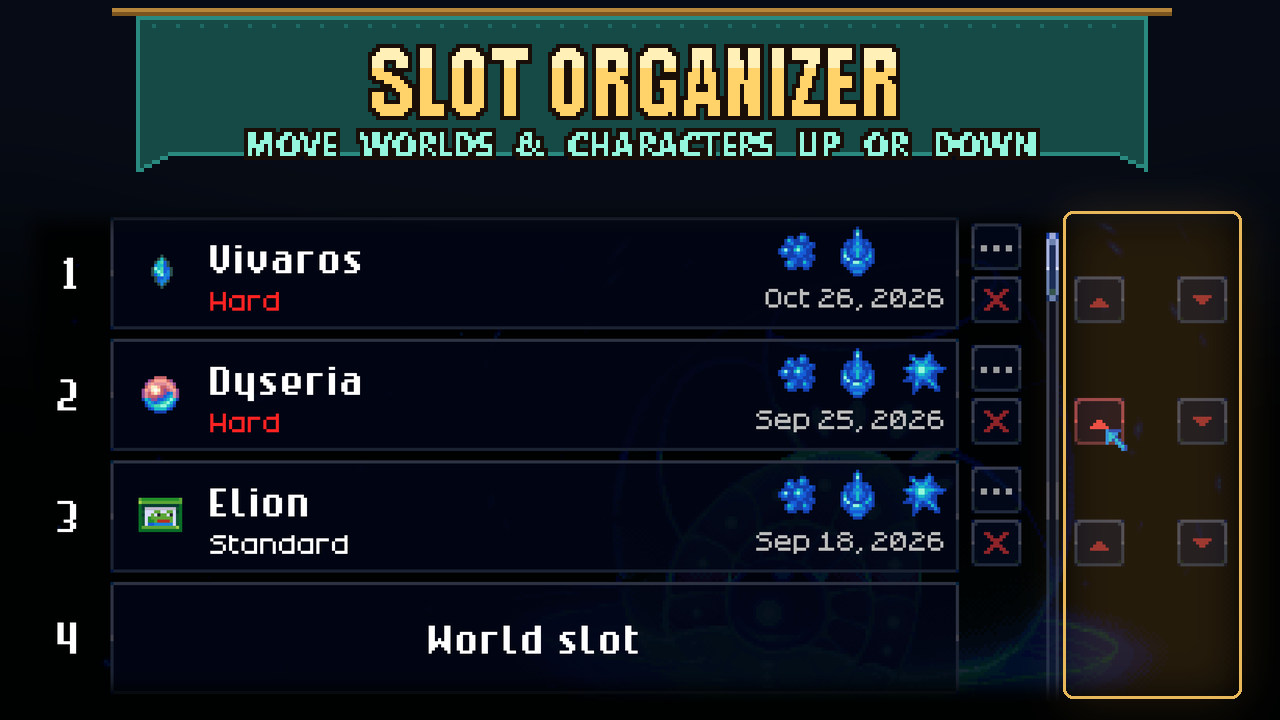

About Slot Organizer
From mod.ioReorder your worlds and characters on the main menu. Move a world from slot 4 up to slot 3, swap two characters, or close a gap, without touching the save folder.
Reorder your worlds and characters on the main menu. Move a world from slot 4 up to slot 3, swap two
characters, or close a gap, without touching the save folder.
How to use
On Load World and on the character list, every filled slot gets two arrow buttons to the right
of the trash can:
- ▲ moves that world/character up one slot
- ▼ moves it down one slot
If the neighbouring slot has a world or character, the two swap places; if it is empty, the slot just
moves there. The top slot has no ▲ and the bottom slot has no ▼. Normal and creative characters are
each reordered within their own list.
Keyboard: select (or hover) a slot and press Ctrl+Up / Page Up or Ctrl+Down / Page Down.
Requirements and multiplayer
- No other mods needed. No settings.
- Only you need it: it reorders the saves on your own PC and does nothing in game, so players joining you
don't need it (1.0.1 fixes 1.0.0, which made the game ask joining players for it).
- Not part of Sid's Overhaul; subscribe to it on its own (works fine next to the Overhaul).
- Uses elevated script access ("Script (Elevated Access)" on the Workshop): the game's mod sandbox
blocks the save-file functions this mod needs, so it runs without the sandbox.
Limits
- Characters find their worlds by an ID inside the save, not by slot number, so moving either one keeps
every character's progress and map in each world.
- A move rewrites the files of the two slots involved. The game keeps its own backups
(.pugbackup files and the backups folder), but if you are nervous, copy your save folder first.
- Uninstalling changes nothing: your saves stay in the order you left them.
How it works
A slot number is only the save file name, so the mod swaps the slot's files through the game's own
file system and reloads the save list: for a world worlds, worldinfos, worldgenparams andservermaps; for a character saves and maps/<slot>/. The arrows are copies of the slot's trash-can
button with an arrow icon; a Harmony prefix on its OnActivated moves the slot instead of opening the
delete prompt. The manifest sets skipSafetyChecks: true because the sandbox bans the game's
file-system namespace (Pug.Platform).
Source and full docs: https://github.com/Sthakur27/corekeeper-mods/tree/main/SlotOrganizer
Highlights
From source dataFootprint
Rated a light load on a server.
Last update
Its author last shipped an update 3d ago.
Slot Organizer on Nxeon
From our catalogue- One-click install
- Supported on Nxeon Core Keeper servers. We download it from mod.io, place it, and restart the server.
- Server side
- Client-only: it runs in players’ own games, so it can’t be installed on a server
- Server load
- light
- Smallest plan we suggest
- Core Keeper — 2 GB (2 GB RAM). This follows our own load rating above, not a benchmark.
- Latest build
- 1.0.1, released 2026-10-31
Run Slot Organizer on a Core Keeper server
Pick a server or deploy a new one above; it is installed in one click.
What kind of mod it is
From the catalogQuality of life & UI
Small conveniences, tweaks and interface improvements players notice straight away.
Client-side mod
From source side supportmod.io lists Slot Organizer as not supported on servers. It runs in players’ own games, not on your server.
Compatibility
- Game
- Core Keeper
- Runs on
- Client only
Verified at the source
- ✓mod.ioOfficial listing, checked 2026-11-03Open ↗
- ✓Authorcoopdedoop, as published on mod.io
- ✓LicenseNot published by the sourceFree















