About Clean & Build Advanced
From Steam WorkshopGround Cleaning Clean up your map. Remove trees, bushes, rocks, grass — and now scattered world clutter — directly in-game, with full persistence. Overview Ground Cleaning lets server admins and…
Ground Cleaning
Clean up your map. Remove trees, bushes, rocks, grass — and now scattered world clutter — directly in-game, with full persistence.
[hr][/hr]
Overview
Ground Cleaning lets server admins and players tidy up the world without touching the map files. Using ordinary tools, you can permanently remove unwanted environment objects from the terrain. Every removal is saved server-side and re-applied automatically after a restart, so the world stays exactly the way you cleaned it.
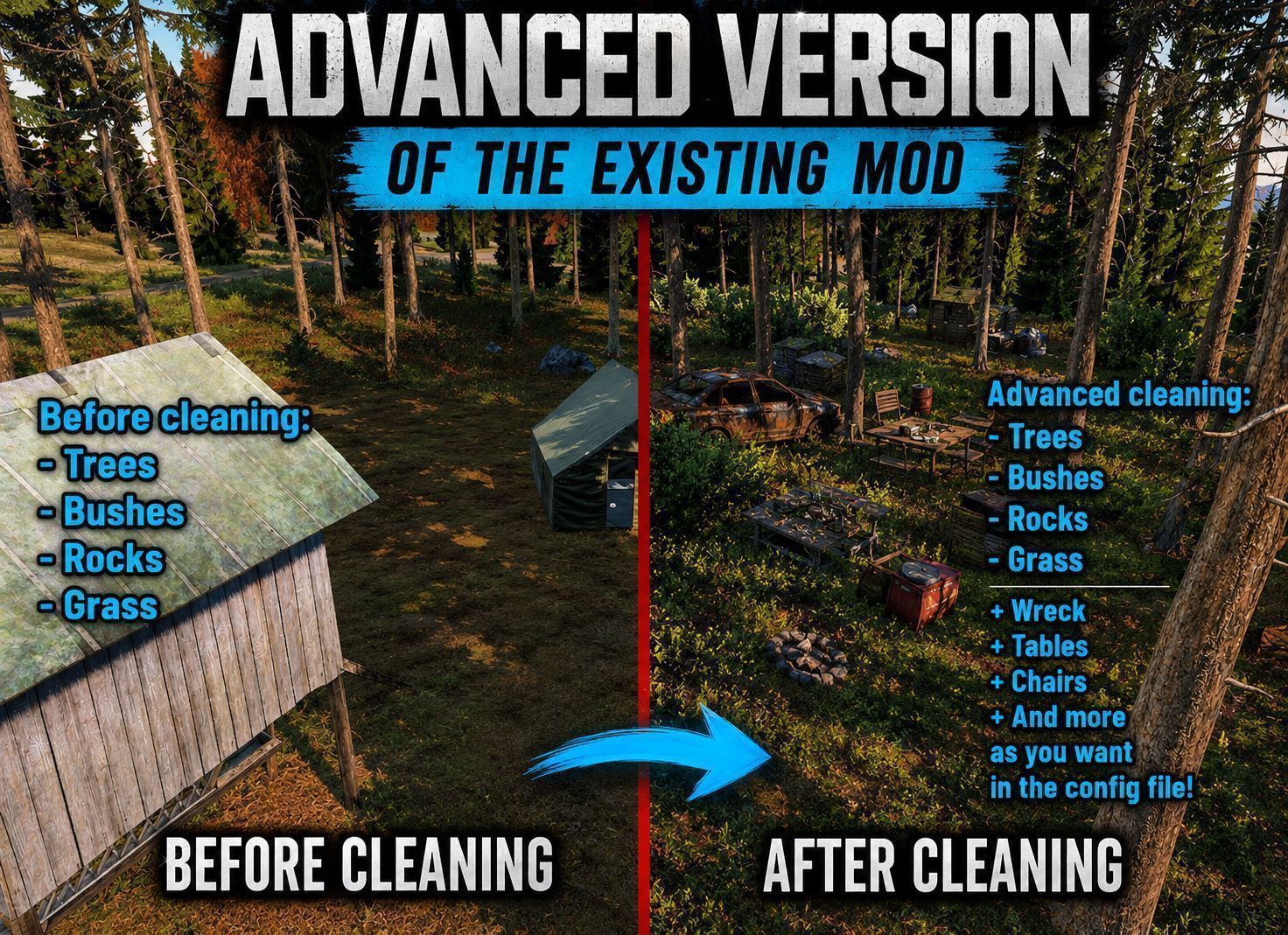
The headline feature: a placeable cleaning zone that not only clears grass, but also sweeps away configurable world clutter — garbage piles, camp tables and chairs, wrecks, and anything else you define by keyword.
[hr][/hr]
Features
- Remove trees (standing and fallen) and bushes with any axe
- Remove rocks and bushes with a shovel
- Clear grass over a 6x6 area with the farming hoe
- Sweep world clutter inside the cleaning zone — keyword based, fully configurable
- Persistent — removed objects stay gone across server restarts
- Configurable respawn timers per category (trees, rocks, grass, clutter)
- JSON configuration — keywords, radius, timers and log level, all editable
- Lightweight & quiet — coalesced disk saves, no log spam in production
- Territory restriction — limit cleaning/weeding to an area around a placed mast instead of anywhere. Weeding and cleaning are toggled separately (m_RestrictWeedToMast, m_RestrictCleanToMast).
- Configurable zone radius — m_MastZoneRadius (default 150 m) and mast classes m_MastClasses (default TerritoryFlag).
- Admin bypass — m_AdminSteamIDs is now used: admins ignore the restrictions and can act anywhere.
- Configurable tools per action — m_WeedTools / m_CleanTools (any tool, e.g. a broom).
- Configurable action duration — set how long weeding and cleaning take to perform, separately (m_WeedDurationSeconds / m_CleanDurationSeconds).
[hr][/hr]
How It Works
Axes (Hatchet, Wood Axe, Firefighter Axe)
- Remove standing trees, fallen trees and bushes
Shovel
- Remove rocks and bushes
Farming Hoe — the cleaning zone [olist] [*]Equip the farming hoe and start the cleaning-zone action [*]Position the 6x6 zone over the area you want to clean [*]Confirm — the zone clears grass and removes every configured clutter object within range [/olist]
[hr][/hr]
Clutter Removal
The cleaning zone scans a radius around its center and removes any object whose model matches one of your keywords. Defaults target the most common map clutter:
- table — camp tables
- chair — camp chairs
- pile / garbage — garbage piles and debris
- wreck — vehicle and object wrecks
Add your own keywords at any time. Players, AI, loot, vehicles and player-built structures are always protected and never removed.
[hr][/hr]
Configuration
All settings live in a JSON file generated on first launch, Please let see full configuration on discussion below : Configuration — Settings.json
[hr][/hr]
Requirements
- Community Framework (CF) — required dependency
[hr][/hr]
Installation
[olist] [*]Subscribe to this mod and to Community Framework [*]Add both mods to your server launch parameters (load CF first) [*]Start the server once to generate the configuration file [*]Edit the JSON config to taste, then restart [/olist]
[hr][/hr]
Notes & Limitations
- Only standalone world objects can be removed. Furniture baked as proxies inside a building's model is part of the building and cannot be removed individually.
- Removals are server-authoritative and saved automatically; a clean server shutdown always flushes the latest state.
[hr][/hr]
Credits
This mod is based on the original Clean & Build by its respective author. All credit for the original work goes to them — please check it out and support the original:
[hr][/hr]
Support
Found a bug or have a feature request? Leave a comment below and include your server's log output where possible — it makes diagnosis much faster.
If you enjoy the mod, a rating and a favorite are always appreciated.
Highlights
From source dataFootprint
Rated a light load on a server.
Last update
Its author last shipped an update 3 mo ago.
Clean & Build Advanced on Nxeon
From our catalogue- One-click install
- Not available. One-click install isn't available for this game's mods yet. Download it and upload it to your server in Files.
- Server load
- light
- Smallest plan we suggest
- DayZ — 6 GB (6 GB RAM). This follows our own load rating above, not a benchmark.
- Latest build
- 2026-08-11, released 2026-08-11
Game versions by loader
| Loader | Game versions | Newest |
|---|---|---|
| Workshop |
From 1 recorded build of Clean & Build Advanced.
Dependencies
- Required: CF
Declared by the newest build that lists any. Required ones are installed with it on one-click installs.
Run Clean & Build Advanced on a DayZ server
Deploy a server above, then upload the file in Files.
What kind of mod it is
From the catalogBuilding & decoration
Blocks, furniture, decorations and building tools.
Compatibility
- Game
- DayZ
Verified at the source
- ✓Steam WorkshopOfficial listing, checked 2026-11-01Open ↗
- ✓AuthorJim, as published on Steam Workshop
- ✓LicenseNot published by the sourceFree