






About Enhanced Banking
From Steam WorkshopEnhanced Banking This mod will change your Servers Economy and brings it to the next level. Even if you already had a banking mod on your Server. This is different. Features - Easy import from…
Enhanced Banking
This mod will change your Servers Economy and brings it to the next level. Even if you already had a banking mod on your Server. This is different.
Features
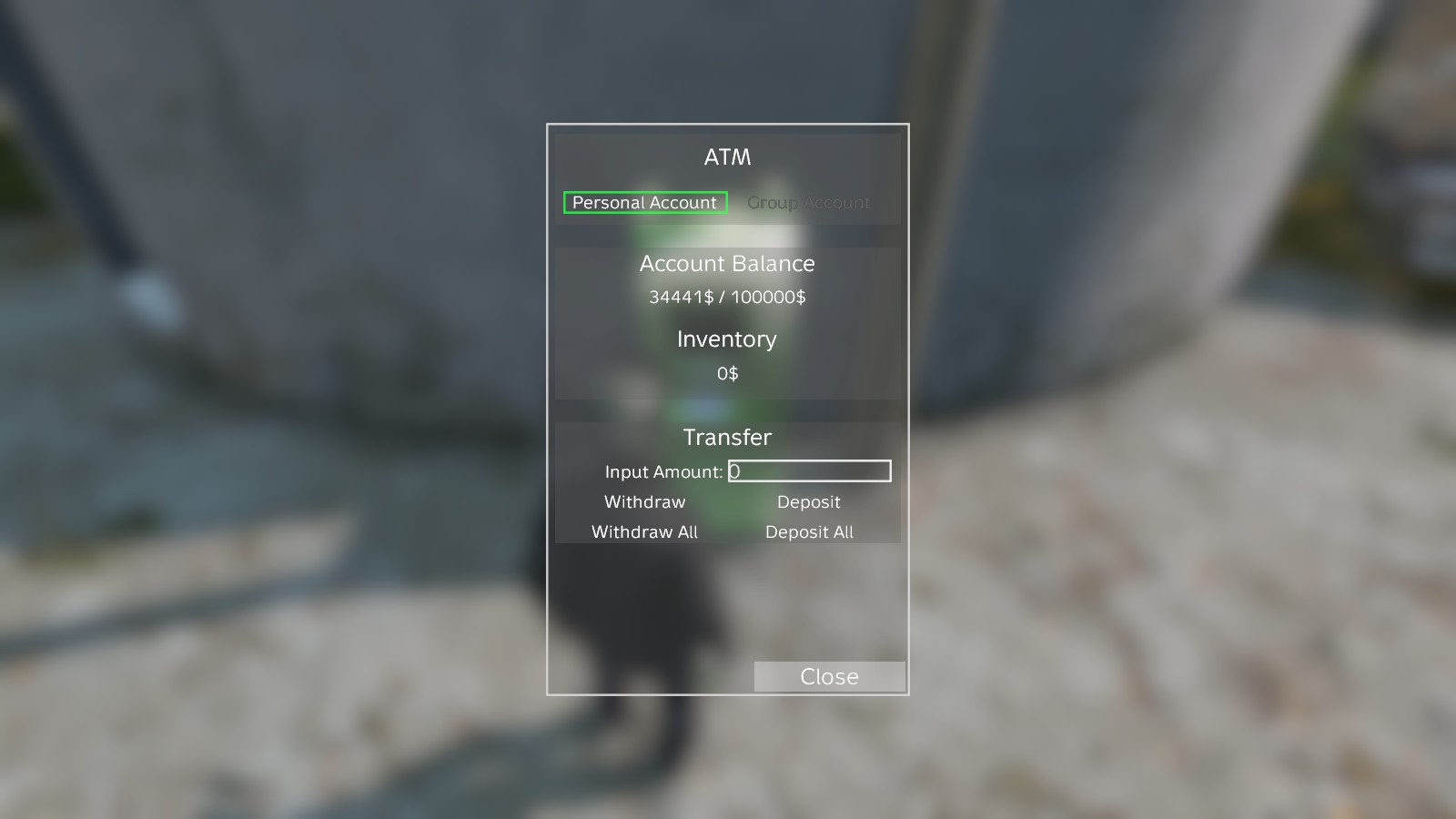
- Easy import from Deadcraft's Banking or Advanced Banking by setting one option in the config (Mod does not need to be loaded for that) - Pesonal Bank account - Option to Rob ATMs - Group Bank Account (requires Advanced Groups) - Option to required a Credit Card - Robbing ATMs depends either on luck or on how much money was deposited there (controllable via Config) - When robbing an ATM you must stay within a Radius, but you can still defend yourself - Option to announce when Player robbes an ATM and also mark it on the map - Works without a Trader Mod and with custom currencies (default are from the Trader mod) - Multipe ATM variantes included - Option to easily add your Own Models by letting the Object inherit "LB_ATM_Base"
How to install
With Advanced Groups Mod
All your config Files will be located in your profiles/LBGroup folder
Without Advanced Groups Mod
All your config Files will be located in your profiles/LBBanking folder
the two important files are
ATMConfig.json
  - importFromDeadcraftBanking: 0 -> if set to 1, Enhanced Banking will try to import all Data from Deadcraft's Banking Mod (must not be installed)
  - importFromKRBanking: 0 -> if set to 1, Enhanced Banking will try to import all Data from the Advanced Banking Mod (must not be installed)
  - personalATMAccountEnabled: 1 -> controlls if the Personal Account should be available
  - personalATMAccountMaxMoney: 100000 -> Maximum Money a player can have (+ individual Bonus Limit)
  - personalATMStartMoney: 1000 -> Money a Player get's when using the ATM the first time
  - transactionDelayMS: 2000 -> Delay in Milliseconds between Transactions to prevent Spam
  - currencySuffix: "$" -> Custom currency Suffix if you use a different currency
  - hintRobAmount: 0 -> If set to 1, a hint with an estimated amount of money will be displayed before robbing the ATM (Hint messages and limits are set in robAmountHints !)
  - robMinimalAvailableMoney: 1000 -> Money, that must be available to rob. If expected Money is lower than the limit, the ATM cannot be robbed
  - markRobbedATMOnMap: 1 -> Will Mark the Position of the robbery on the Map (Only Advanced Groups or Basic Map)
  - robmarkerName: "" -> Name of the Marker. Will replace "$PLAYERNAME$" with the actual Playername of the robbing player
  - robmarkerIcon: "" -> Path to the Icon which will be used for the Map Marker
  - robbingTimeMinutes: 15 -> Time in minutes it takes to rob an ATM
  - minPlayersOnlineToStartRobbing: 25 -> Minimum Amount of Players online to allow ATM robbing
  - notifyAllPlayersWhenATMIsRobbed: 1 -> Will send a popup notification which will be displayed at the top to all Players. Will replace "$PLAYERNAME$" with the robbers name and "%ATM_POSITION%" with the position set in the ATMs config (see below)
  - robbingFinishedNotificationMessage: "" -> Message beeing displayed for everybody when the ATM was robbed successfully
  - robAmountHints: [] -> array which defines which hint will be displayed for a specific amount of money beeing available
      - minMoney: 0 -> Minimum Money beeing available for this hint to be displayed
      - description: "Low" -> The actual text, that will be shown
  - currencyValues: [] -> array which defines the value of each currency
      - itemclassname: "MoneyRuble1" -> Classname of the Item (Case sensitive !)
      - value: 1 -> Actual Value of the Item (if stackable, it's a single item of the stack)
[u]These options only apply if used together with the Advanced Groups Mod ![/u]
  - groupATMAccountEnabled: 0 -> Enabled the Group Account feature
  - groupATMCreationCost: 10000 -> How much Money it costs to create a Group Account for the Own group (will be removed from the players inventory)
  - groupATMAccountBaseMoney: 20000 -> Maximum Money which every Group has independent of the membercount
  - groupATMAccountPerPlayer: 25000 -> Additional Amount of Maximum Money every Group has for each Member
      -> 2 Members * 25000 + BaseMoney = 50000 + BaseMoney = 70000 Maximum
      -> 5 Members * 25000 + BaseMoney = 125000 + BaseMoney = 145000 Maximum
      -> Higher Basemoney will give smaller groups an advantage
  - groupATMMinPlayers: Minimul amount of Players needed to create a Group Account. (Account can still be accessed if member count falls below this value after creating the Account)
ATMPositions.json
  - classname: "LB_ATM_Green" -> Item Classname of the ATM which will be spawned
  - position: -> Position where the ATM is located
  - orientation: -> Orientation of the ATM
  - robPosition: "Green Mountain" -> Position which will be displayed in the Robbing Notification
  - canBeRobbed: 0 -> Defines if the ATM can be robbed or not. Should not be enabled for ATMs in the Safezone
  - needLockpickToRobATM: 1 -> Forces the Robber to have a Lockpick to rob the ATM
  - minutesLockedAfterRobbing: 10 -> Time in Minutes the ATM cannot be accessed by ANYONE after robbing was finished (both if successful or not)
  - minutesNotRobbableAfterRobbing: 60 -> Time in Minutes the ATM cannot be robbed by ANYONE after robbis was finished (both if successful or not)
  - minutesRobberNeedsToWaitBeforeRobbingAgain: 1440 -> Time in Minutes the Robber needs to wait until he can rob the ATM again (default is one Day)
  - useDepositedCashToCalculateRobbedMoney: 1 -> Use deposited Cash as base for the amount of money, that can be robbed from the ATM. (details below
- cashDeposited: 0 -> Keeps track of how much money was deposited minus the withdrawn money. This value will be overwritten by the Server while runningHighlights
From source dataFootprint
A 69 MB download, rated a light load on a server.
Last update
Its author last shipped an update 4 yr ago.
Enhanced Banking on Nxeon
From our catalogue- One-click install
- Not available. One-click install isn't available for this game's mods yet. Download it and upload it to your server in Files.
- Server load
- light
- Smallest plan we suggest
- DayZ — 6 GB (6 GB RAM). This follows our own load rating above, not a benchmark.
- Latest build
- 2022-06-18, released 2022-06-18, 69 MB
Game versions by loader
| Loader | Game versions | Newest |
|---|---|---|
| Workshop |
From 1 recorded build of Enhanced Banking.
Run Enhanced Banking on a DayZ server
Deploy a server above, then upload the file in Files.
What kind of mod it is
From the catalogEconomy & shops
Currencies, shops, trading and rewards.
Compatibility
- Game
- DayZ
- File size
- 69 MB
Verified at the source
- ✓Steam WorkshopOfficial listing, checked 2026-10-10Open ↗
- ✓Author[2Low] LBmaster, as published on Steam Workshop
- ✓LicenseNot published by the sourceFree














