






About ESPPlayers
From Steam WorkshopType: mod (client + server) Authorship: 123new Compatible, tested and tested on clean versions of the game: 1.07, 1.08, 1.09,1.10,1.11,1.12,1.13,1.14,1.15,1.16 Description: A mod that adds tags with…
Type: mod (client + server) Authorship: 123new Compatible, tested and tested on clean versions of the game: 1.07, 1.08, 1.09,1.10,1.11,1.12,1.13,1.14,1.15,1.16
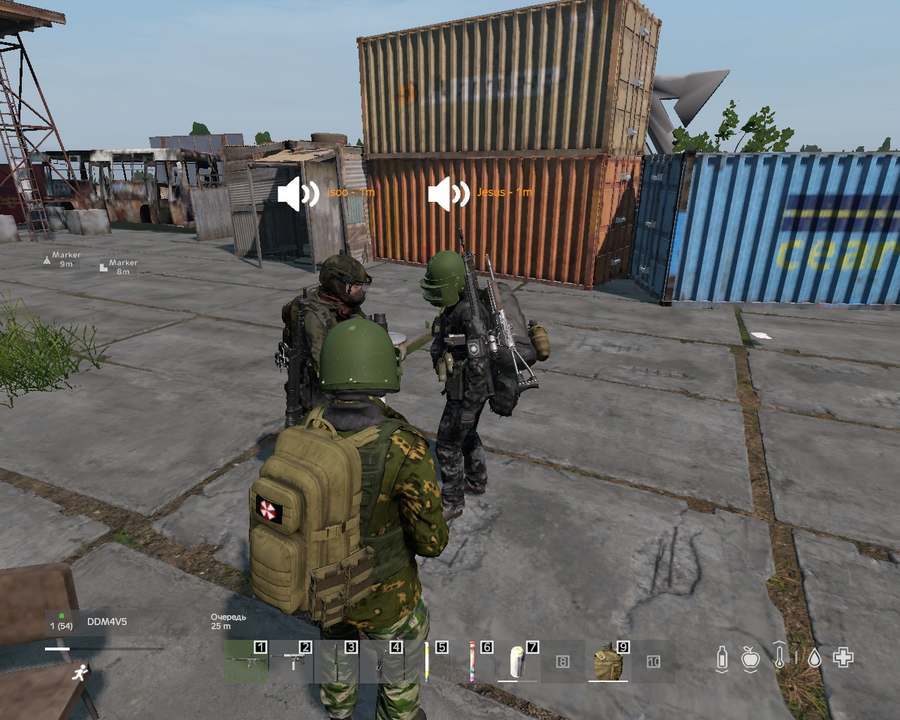
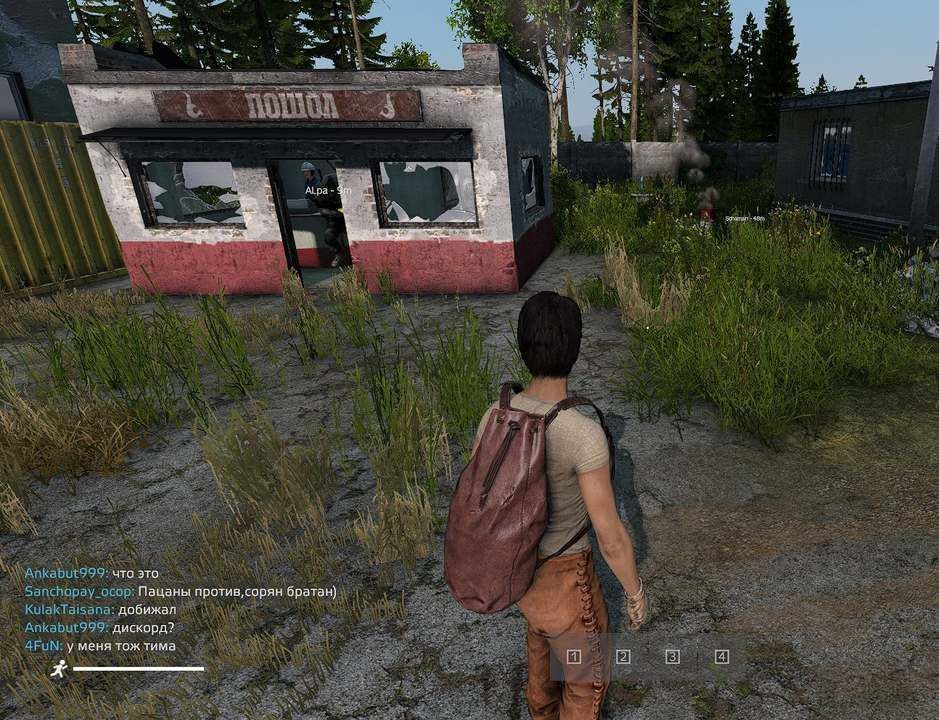
Description: A mod that adds tags with nicknames to players (ESP) for all players at a certain distance from the player himself (for example, 30 meters). You can customize the font of the labels, the color of the labels, enable the display of the distance to the player, as well as the voice chat icon for players speaking in Voice chat, the range of the labels display. The mod is required for the presence of players and is client-server. It doesn't work in a purely server bundle!!!
The mod requires an installed: https://steamcommunity.com/sharedfiles/filedetails/?id=2768779205
Opportunities: Displaying ESP tags for all players at the specified distance. When players exit the designated ESP distance zone, the tags automatically disappear from your screen. When players are removed from you by a distance exceeding the designated distance, the label is automatically deleted. The mod settings are made in the json config of the mod, which allows you to quickly configure the tags and distance themselves. If there are errors in the mod's config, it will be recreated automatically to the standard one, while the errors will be noted in the server's script log. It is recommended to keep a copy of the configuration and monitor the server logs after it starts!
Important: The script was tested on a clean version of the game version of the game at the time of publication and is operational to this day and hour. The client part of the script is protected from changes by the encryption system. Because of this, when the -dologs startup parameter is enabled, the server/client of the game will have an error requiring a mod that is not needed. To fix this problem, a fix mod is attached, which you will also need to enable (if you already have it, you do not need it again). If you don't use this parameter, you don't need this mod!
Setup: The Activate_Vioce_Icons parameter - enables and disables the display of voice chat icons when talking in the voice chat of players. The format of the values is 1 - on, 0 - off. The Activate_KeyBind parameter - enables and disables the bind key to hide the mod interface from players. The format of the values is 1 - on, 0 - off. The MenuKeyBind parameter - Sets the active key to hide the mod interface from the player. Works only when Activate_KeyBind = 1. If Activate_KeyBind = 0, then the value can not be touched! The format of the values is the text KC_ + the name of the button on the keyboard. The Radius_ESPViev parameter is the distance of the script from the player (including you). A number that is greater than zero is specified. The format of the values is a number with a dot. The Color_RGB parameter is the color format in the RGB vector (you can pick it up here, for example). All 3 values are sensitive to correctness. Specify each of the 3 values in the format from 0 to 255. The format of the values is prime numbers. The TextIsBold parameter - enables and disables the fat content of the text at the players' label. The format of the values is 1 - bold text, 0 - normal The TextIsItalic parameter - enables and disables the italics of the text at the players' placemark. The format of the values is 1 - italic text, 0 - normal The TextSize parameter sets the size of the placemark text on the screen. The format of the values is a prime number from 8 to 28 The ShowDistanceToPlayer parameter - enables and disables the distance tag next to the player's nickname in the tag. The format of the values is 1 - on, 0 - off.
Repacking, packing work and changing to your liking is PROHIBITED!
For donations: 4274 3200 7857 5100
Highlights
From source dataFootprint
Rated a light load on a server.
Last update
Its author last shipped an update 5 yr ago.
ESPPlayers on Nxeon
From our catalogue- One-click install
- Not available. One-click install isn't available for this game's mods yet. Download it and upload it to your server in Files.
- Server load
- light
- Smallest plan we suggest
- DayZ — 6 GB (6 GB RAM). This follows our own load rating above, not a benchmark.
- Latest build
- 2022-02-28, released 2022-02-28
Game versions by loader
| Loader | Game versions | Newest |
|---|---|---|
| Workshop |
From 1 recorded build of ESPPlayers.
Dependencies
- Required: ESP_Players_Trade_Fix
Declared by the newest build that lists any. Required ones are installed with it on one-click installs.
Run ESPPlayers on a DayZ server
Deploy a server above, then upload the file in Files.
What kind of mod it is
From the catalogWorkshop
Its source category doesn’t say more about what it does, so NxLabs lists it under Other.
Compatibility
- Game
- DayZ
Verified at the source
- ✓Steam WorkshopOfficial listing, checked 2026-10-10Open ↗
- ✓AuthorHaЧaJl'HиkA, as published on Steam Workshop
- ✓LicenseNot published by the sourceFree














