






About GetALifetime
From Steam WorkshopDescription Aim the white cursor at an object and press the assigned key and the remaining lifetime of that object, until it will despawn, is displayed in the bottom left corner. You have to be…
Description
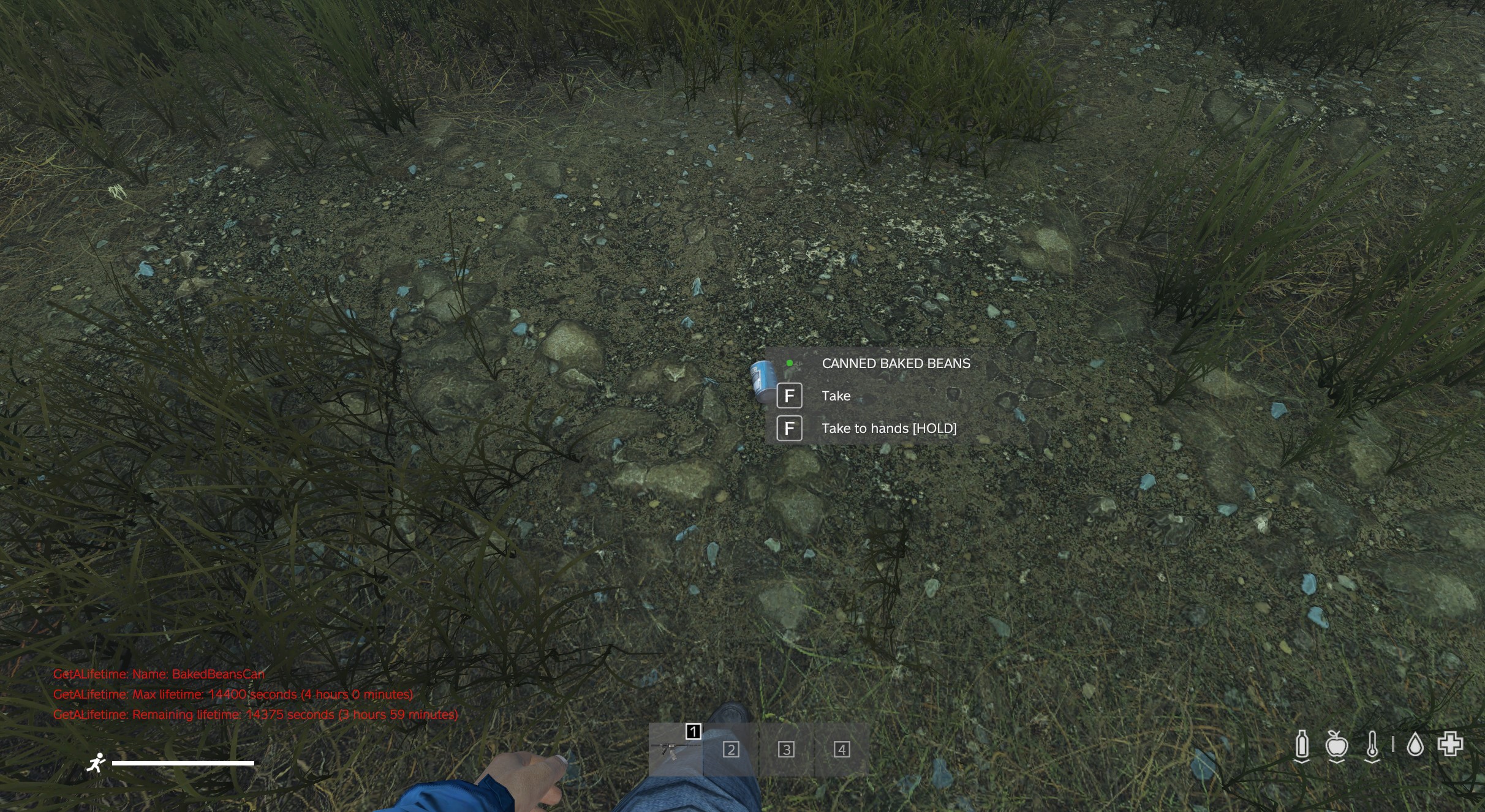
Aim the white cursor at an object and press the assigned key and the remaining lifetime of that object, until it will despawn, is displayed in the bottom left corner. You have to be really close to the object though. Like, interaction close.
Since there are so many keys already assigned by other mods, this one doesn't have one assigned by default. You have to do that yourself in the game's settings for keybindings. The option is called "Get the remaining lifetime of an object".
You have to add the steamID:s of the players you want to be able to use the mod to the file "Whitelist.txt" in the folder "GetALifetime" located in the servers profile folder. It will be created during the first startup of the server after adding the mod.
You don't need to restart the server if you add or remove a steamID from the file Whitelist.txt. The file is read every time someone tries to use the mod.
If a player assigns a key to the mod and presses it but is not in the Whitelist.txt file nothing at all will happen. No notification is sent to the player that access was denied.
I've noticed the remaining lifetime of some objects are a bit higher than defined in types.xml when I run into them in the wild, but if I pick up the same object, drop it on the ground again and then do another reading it will have the lifetime defined in types.xml. I don't know why that is. Maybe the server randomly adds time to an object when it's spawned. Or maybe I just can't code. I don't know.
This mod is kindof niche I guess. I use it when I roam the map on my server to see how long before peoples bases are going to despawn after their territory flag has reached the bottom. Just out of curiosity. Also I wanted to see if I could do it.
The mod "CF" is required for this mod to work.
The source code is included in the "SourceCode" folder within the mod.
Note: If you want to build this mod yourself you have to add *.xml to "List of files to copy directly" in the Addon Builder's options or the key mapping won't work.
Permission is granted to do whatever you want with the mod and source code.
Change Notes
v2 2022-06-16 • Fixed so the description shows up in the games "Configure keybindings" setting in DayZ 1.18.
• Removed dependence on the mod VPPAdminTools for getting the object under the cursor. Yes, I thought that was vanilla code. No, I only know what I'm doing half of the time. In a best case scenario.
v1 2022-06-05 • First upload.
Installation
• Install the mod "CF" according to its instructions.
• Copy @GetALifetime to your servers root directory
• Copy the mods keyfile, "GetALifetime.bikey", to the servers "Keys" directory.
• Edit the bat file used to start the server and add the mod to the -mod parameter, like: "-mod=@CF;@GetALifetime;@OtherMod1;@OtherMod2" etc.
• Start up the server so it can create the folder "GetALifetime" in the servers profile folder. You can keep it running.
• Go into that folder and add your steamID to the file "Whitelist.txt". You don't need to restart the server for this to take effect.
• Go into the game's options and assign a key for the mod under the title "GetALifetime".
• Now you should be able to get the remaining lifetime of an object by putting the white cursor on it and press the key you assigned to the mod.
Highlights
From source dataFootprint
Rated a light load on a server.
Last update
Its author last shipped an update 4 yr ago.
GetALifetime on Nxeon
From our catalogue- One-click install
- Not available. One-click install isn't available for this game's mods yet. Download it and upload it to your server in Files.
- Server load
- light
- Smallest plan we suggest
- DayZ — 6 GB (6 GB RAM). This follows our own load rating above, not a benchmark.
- Latest build
- 2022-06-16, released 2022-06-16
Game versions by loader
| Loader | Game versions | Newest |
|---|---|---|
| Workshop |
From 1 recorded build of GetALifetime.
Dependencies
- Required: CF
Declared by the newest build that lists any. Required ones are installed with it on one-click installs.
Run GetALifetime on a DayZ server
Deploy a server above, then upload the file in Files.
What kind of mod it is
From the catalogGame modes & minigames
Game modes, minigames and competitive formats for your server.
Compatibility
- Game
- DayZ
Verified at the source
- ✓Steam WorkshopOfficial listing, checked 2026-10-10Open ↗
- ✓AuthorMartin, as published on Steam Workshop
- ✓LicenseNot published by the sourceFree














