






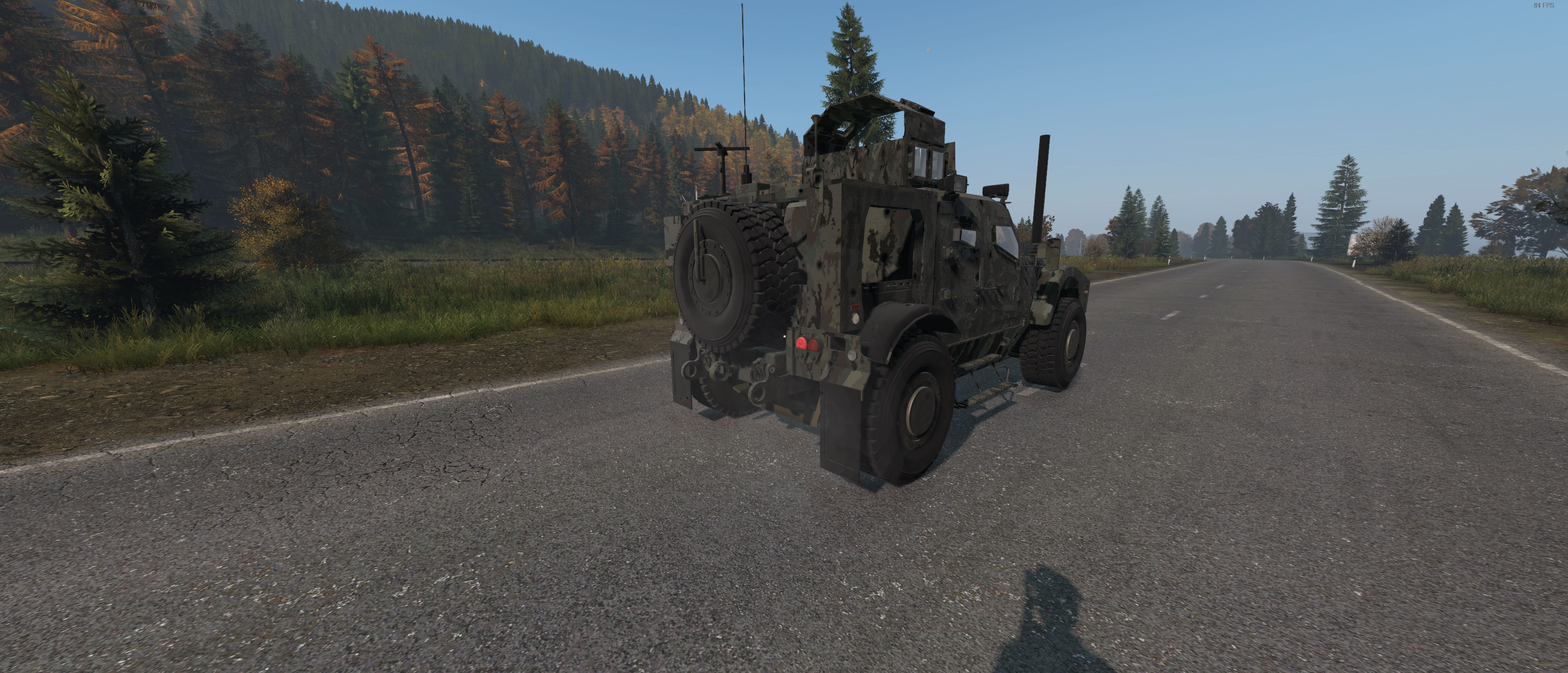

About GunnerTruckOshkosh
From Steam WorkshopWorking with 1.28 (thanks to MrBigglesWorth85 for the fix) First of all i take no credit for this vehicle it was originally made by V1ruspr☣ne and has given permission to use it as they no longer…
Working with 1.28 (thanks to MrBigglesWorth85 for the fix)
First of all i take no credit for this vehicle it was originally made by V1ruspr☣ne and has given permission to use it as they no longer mod.
Ok so this is a nice truck that drives well and has a turret on top that if you have Roadtrip Mod will allow you to stand in the turret and shoot your gun from it while driving... this will also work with expansion if vehicle attachment is on now iv added the script for that.
If you are struggling to find the fuel refill look at the 3rd picture....
The Gunner Truck will now auto select the map you are using (assuming i have added the map image texture to the mod).
3 colours:
- White Camo = GunnerTruckWhite
- Tan Camo = GunnerTruckTan[/list]
- [h2]AutomaticVersions:[/h2]
- [list][*]Green Camo Automatic = GunnerTruck_Auto
- White Camo Automatic = GunnerTruckWhite_Auto
- Tan Camo Automatic = GunnerTruckTan_Auto[/list]
- [h2]maps currently supported for navigation:[/h2]
- [list][*]Chernarus
- Deerisle
- Esseker
- Livonia
- Namalsk
- Rostow
- Takistan
- Valning
- Banov
- Iztek
- Pripyat
- NHCchernobyl
[hr][/hr]
1000 Slots cargo space
6 Seats 4 inside and one on each side of the rear, trunk door must be open (plus the turret to stand in if Roadtrip Mod is installed or using expansion)
JerryCan slot. (currently not displaying the correct slot icon unless the mod is loaded last and in some cases just displays the default but the slot itself is working, its just down to if another mod is overriding the slot iv made or not.)
Functioning spare wheel when the trunk door is attached to the truck rather than the fake wheel that couldnt be used before.
Functioning satnav/navigation
[hr][/hr][h2]I have included some files to help make life easier when installing on your server:[/h2]
Depending on the map you run theres a folder for them in the XML folder, if your map isnt listed use the chernarus one, any will work really but the chernarus is the base class. It now recognises what map you are using and changes the textures and scaling automatically so just use the chernarus folders
[h2]Types.xml[/h2] ( not a replacement for yours just copy and paste its contents and paste it between the last </type> and </types> in your types.xml and then edit the nominal and min values iv set them all to 0)
[h2]SpawnableTypes.xml[/h2] (again not a replacement copy its contents and paste it above the </spawnabletypes> at the bottom of your SpawnableTypes.xml . this isnt needed unless you are going to have the truck spawn in around the map by adding it to the Events.xml file. it is set to spawn in with all wheels and doors but have chance of having battery, radiator and sparkplug so edit this to your needs)
[h2]TraderConfig.txt[/h2] (again not a replacement copy its contents and paste it in the relevent place in your TraderConfig.txt probably " <Trader> Vehicles Trader " under the " <Category> Vehicles " if you havnt customised it.)
[h2]TraderVehicleParts.txt[/h2] (again not a replacement copy its contents and paste it in the TraderVehicleParts.txt above the //<openFile> Filename.txt at the bottom)
[h2]GunnerTruck.json, GunnerTruckTan.json, GunnerTruckWhite.json, GunnerTruck_Auto.json, GunnerTruckWhite_Auto.json and GunnerTruckTan_Auto.json[/h2] (this one is for Community Online Tools vehicle spawner. you just go to your server profile folder this is different for all servers common ones iv seen are Config and SC but whatever yours is go into that folder then open CommunityOnlineTools folder then Vehicles folder and upload this file there )
[hr][/hr]I have done my best to include everthing you might need i dont think iv missed anything or got anything wrong but you never know so if you have issues with despawning/spawning check the files for spelling mistakes, capitals in the right place ect. [hr][/hr][h1] Feedback [/h1][h2] If for any reason you don't like a mod and feel the need to give a negative rating, that's fine I cant please everyone and it would be stupid to believe i could but I would ask that if you give a negative rating... comment what was wrong. You don't have to flat out say I gave a negative rating this was why (unless you want to.), but just comment and say I feel X is an issue it would be better if X was changed to Y..... I'm not saying every change will be implemented but who knows maybe I just didn't think about it when making the mod. that way the mod can be improved. Who knows it might not even be the mods fault it could be a conflict with another mod.. I cant test them all [/h2] [hr][/hr][h1] REPACKING AND MONETISATION [/h1]
[h2]You can use it on any server but dont repack this mod into your server packs.
just incase its not clear NO REPACKING. its still being updated/fixed and repacking would cause you to miss any updates. and reflect badly on the mod. that and theres no reason to repack it.
You may use this mod on monetised servers as long as this mod or items in this mod are not monetised.
Also do not add me on steam unless i have spoken to you and asked you to add me you will be ignored.[/h2] [hr][/hr]Discord link to talk about the mod and report any bugs https://discord.gg/WMUkTsKn5Q [hr][/hr][h2] Support Me [/h2] This mod is free to use as long as you are not repacking it, but if you want to support me you can by donating, click this image below. To be clear even if you donate you will not be allowed to repack, a donation is a gift not a payment for something in return.
Highlights
From source dataFootprint
A 303 MB download, rated a light load on a server.
Last update
Its author last shipped an update 12 mo ago.
GunnerTruckOshkosh on Nxeon
From our catalogue- One-click install
- Not available. One-click install isn't available for this game's mods yet. Download it and upload it to your server in Files.
- Server load
- light
- Smallest plan we suggest
- DayZ — 6 GB (6 GB RAM). This follows our own load rating above, not a benchmark.
- Latest build
- 2025-10-27, released 2025-10-27, 303 MB
Game versions by loader
| Loader | Game versions | Newest |
|---|---|---|
| Workshop |
From 1 recorded build of GunnerTruckOshkosh.
Run GunnerTruckOshkosh on a DayZ server
Deploy a server above, then upload the file in Files.
What kind of mod it is
From the catalogAdmin & protection
Permissions, moderation, anti-cheat and land protection for the people running the server.
Compatibility
- Game
- DayZ
- File size
- 303 MB
Verified at the source
- ✓Steam WorkshopOfficial listing, checked 2026-10-10Open ↗
- ✓AuthorWilma Fingerdoo, as published on Steam Workshop
- ✓LicenseNot published by the sourceFree














