About KR_Map
From Steam WorkshopKR Map Fullscreen map with markers, compass, minimap and 3D world markers. Version 1.1.0 - author Krol. KR Map is a fullscreen map window with a side panel of markers, plus a compass at the top of…
KR Map
Fullscreen map with markers, compass, minimap and 3D world markers.
Version 1.1.0 - author Krol.
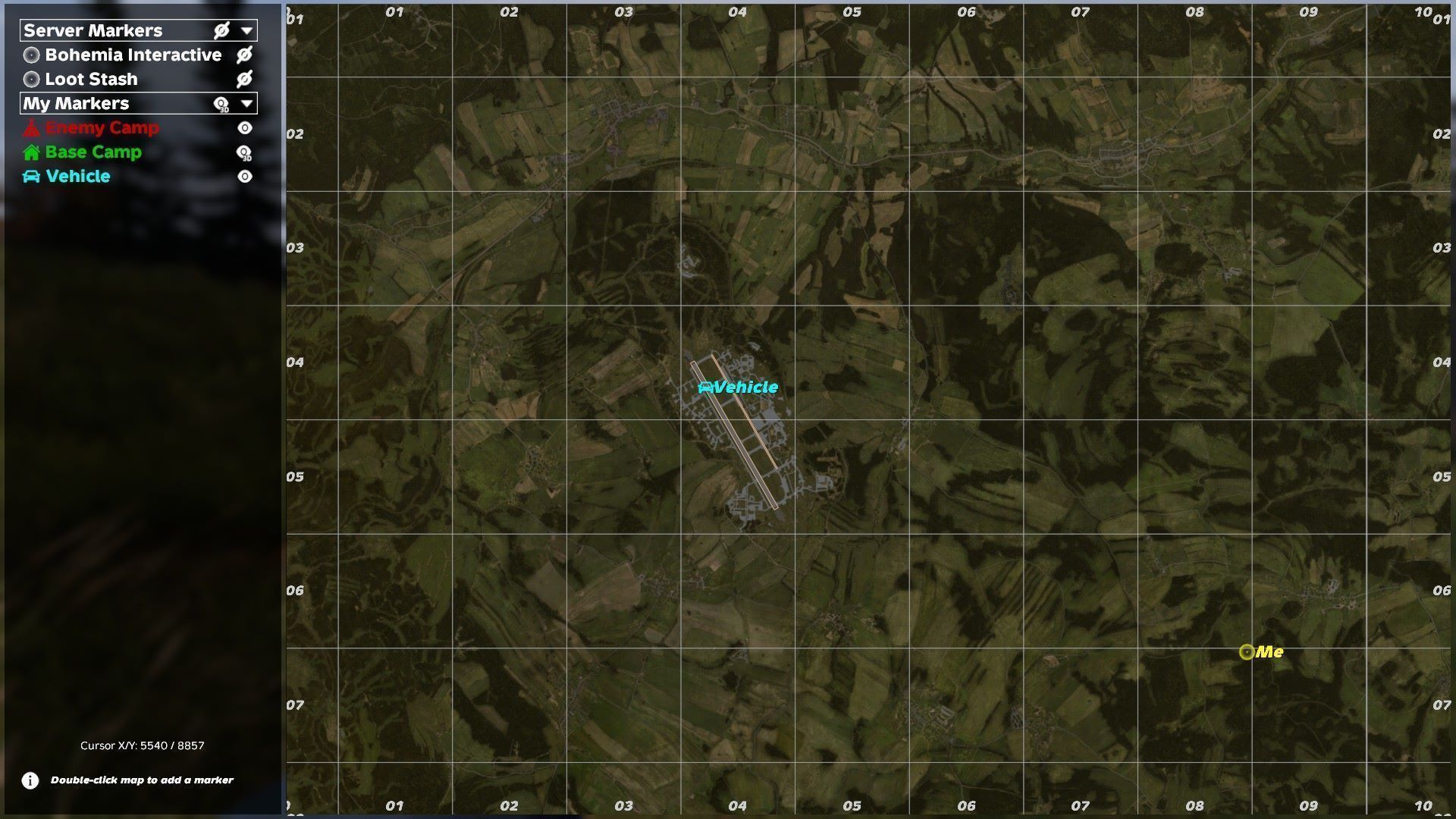
KR Map is a fullscreen map window with a side panel of markers, plus a compass at the top of the screen, a minimap and 3D markers in the world. Needs KR Core. With KR Party it also shows teammates, pings, flags and shared group markers.
Features
- Map window on M: marker panel with categories, cards, per-marker 3D switch; the map never lies under the panel, so markers can be placed at any edge.
- Personal markers (right click or double click on the map): 37 icons, color palette and RGB, show on map / compass / in 3D, optional radius circle.
- Server markers and zones (admins): visible to everyone, edited in game.
- Compass at the top of the screen and a minimap (GPS) with zoom and two corner positions.
- 3D markers in the world; K toggles them.
- With KR Party: teammates and pings on the map, own flags and zones, shared group markers (role-limited), Mark on map action on foreign flag poles.
- Admin map (admin mode): all online players and vehicles; double click to teleport (can be disabled).
- Hardcore options: map only with a map item, own position only with a GPS switched on, compass only with a compass item.
Keys
- M - map window, K - 3D map markers on/off, P - settings window of KR Core (compass and minimap settings are in its Settings tab).
Install
- Requires CF (Community Framework) on the server and on every client.
- Install KR Core first and load it before the other KR mods. Example: -mod=@CF;@KR_Core;@KR_Chat;@KR_Party;@KR_Map.
- Each mod must be on the server and on every client; copy its .bikey into the server's keys folder.
- Server data and settings are created on first start in profiles\KR_Mods\<Core|Chat|Party|Map>\ (each mod has its own folder and its own Config.json). Edit the file and restart the server.
- Every JSON file gets a .bak. An unreadable file is never overwritten: the mod runs on defaults until you fix it; broken copies are kept in Core\Broken\.
- Languages: English, Russian.
Admins
- Put your SteamID64 into profiles\KR_Mods\Core\Admins.json: { "Admins": [ "76561198000000000" ] }.
- In game press the Admin: off/on button in the top bar of the window. Admin features work only while it is on; otherwise an admin plays like everyone else.
Server config: Map\Config.json
- MapEnabled (1) - 0 turns the whole mod off.
- GroupMarkersEnabled (1), GroupMarkerMinRole (0 Member, 1 Co-owner, 2 Owner), MaxGroupMarkers (30), MarkerNameMaxLength (32) - group markers need KR Party.
- ShowForeignFlagZones (0) - show foreign protected zones near the player (needs KR Party).
- AdminTeleport (1), CompassAllowed (1), MinimapAllowed (1).
- HardcoreMap, HardcoreGPS, HardcoreCompass (0 each; admins are exempt).
- Other files in Map\: Map.json - server markers and zones. Easiest to edit in game: M > right click > type "Server". Players' personal markers are stored on their own PC (profile\KR_Mods\Map\Markers_<world>.json).
For mod authors: KR_MapAPI (client)
#ifdef KR_MAP
KR_MapAPI.AddMarker("mymod_drop1", "Airdrop", pos, 2, ARGB(255, 242, 201, 76), true, false);
KR_MapAPI.AddZone("mymod_pvp", "PvP", center, 300, ARGB(255, 235, 87, 87));
KR_MapAPI.Remove("mymod_drop1");
#endif- AddMarker(id, name, pos, iconIdx, color, onCompass = true, in3D = false); calling it again with the same id updates the marker. API markers live on the client until it leaves the server.
Questions and suggestions
Ask the author or suggest an idea on discord.
Licence
Free to use on any server; no modification, re-upload or resale without the author's written permission. Full text is in LICENSE.txt inside the mod folder.
Highlights
From source dataFootprint
Rated a light load on a server.
Last update
Its author last shipped an update 23d ago.
KR_Map on Nxeon
From our catalogue- One-click install
- Not available. One-click install isn't available for this game's mods yet. Download it and upload it to your server in Files.
- Server load
- light
- Smallest plan we suggest
- DayZ — 6 GB (6 GB RAM). This follows our own load rating above, not a benchmark.
- Latest build
- 2026-10-12, released 2026-10-12
Game versions by loader
| Loader | Game versions | Newest |
|---|---|---|
| Workshop |
From 1 recorded build of KR_Map.
Dependencies
Declared by the newest build that lists any. Required ones are installed with it on one-click installs.
Deploy a server above, then upload the file in Files.
What kind of mod it is
From the catalogMaps & scenarios
Custom maps, arenas and scenarios to play on.
Compatibility
- Game
- DayZ
Verified at the source
- ✓Steam WorkshopOfficial listing, checked 2026-10-12Open ↗
- ✓AuthorRabbit, as published on Steam Workshop
- ✓LicenseNot published by the sourceFree