






About KR_Party
From Steam WorkshopKR Party Groups, group HUD with 3D markers and pings, and flag-pole territory protection. Version 1.1.0 - author Krol. KR Party gives your server player groups with a group HUD, pings and a territory…
KR Party
Groups, group HUD with 3D markers and pings, and flag-pole territory protection.
Version 1.1.0 - author Krol.
KR Party gives your server player groups with a group HUD, pings and a territory system built on the vanilla flag pole. Needs KR Core. Works together with KR Chat (Group channel, colored tags) and KR Map (teammates, flags and group markers on the map).
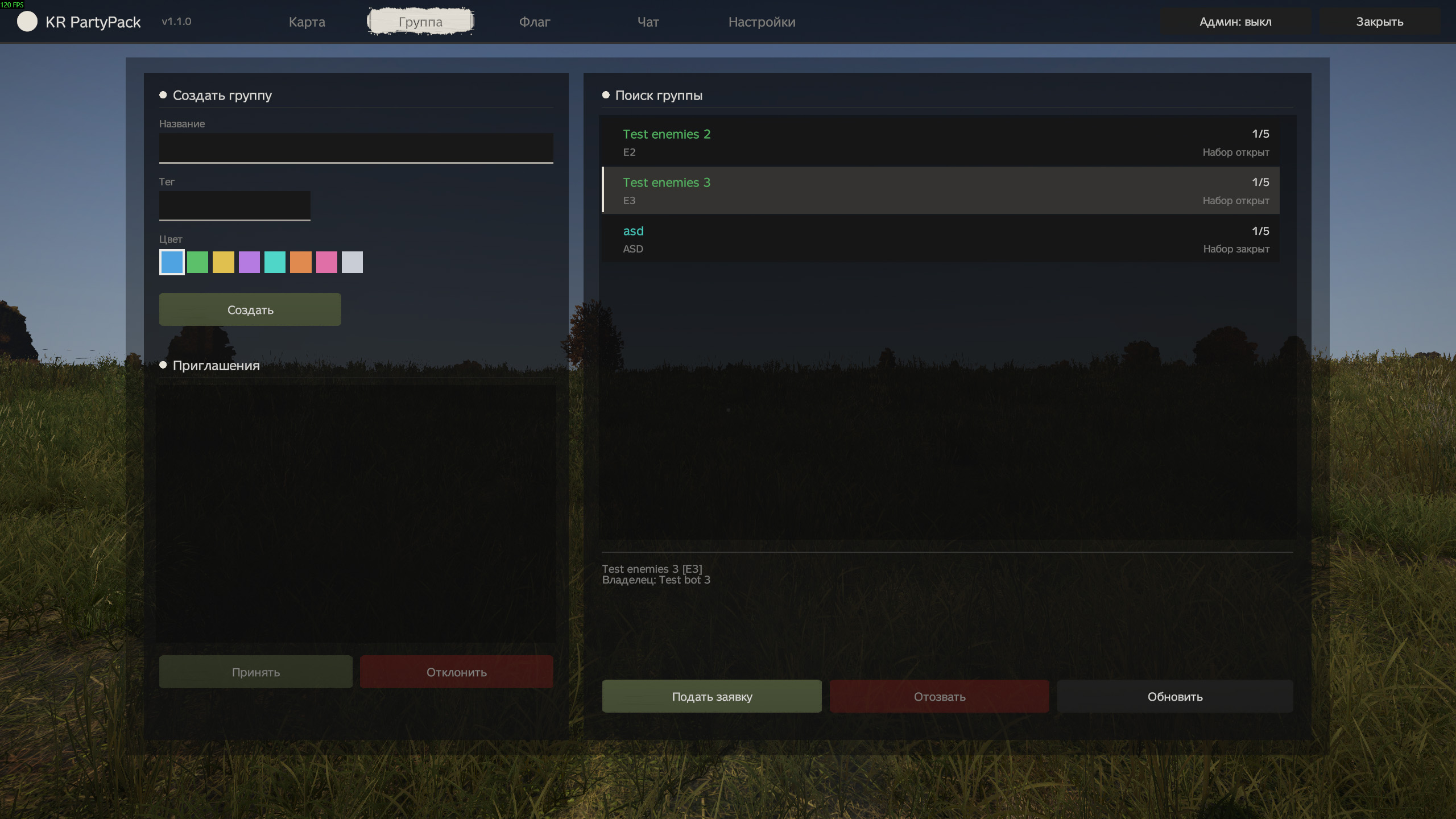
Groups
- Up to 5 players by default (MaxMembers). Roles: Owner, Co-owner, Member.
- Invite from the list of online players, applications, group search, group log, a join cooldown after leaving.
- Friendly fire between group members is off by default.
HUD and pings
- Group list on screen (top left or bottom left), health sharing, 3D markers over teammates.
- Pings: tap T to ping where you look, hold T for a radial menu of 7 types (attention, enemy, loot, danger, vehicle, gather, base). Y removes your pings, U toggles teammate markers.
- Streamer mode hides teammate names.
Territory (flag poles)
- The vanilla flag pole becomes a protected zone. The flag's height is the timer: raised to the top it holds for UptimeDays and slides down by itself.
- While protected, outsiders cannot build, dismantle or place things in the zone (a whitelist is configurable).
- Enemies lower the flag slowly; lowering/raising is blocked while the other side's players are in the zone; raising a lowered flag captures it.
- Raid rules: AllowGateRaid (locked buildings such as gates can be raided) and AllowWallRaid (walls without locks). Lock classes and a lock limit per zone are configurable.
- Owners are warned before the flag expires; the flag has a name, a log, and a 3D marker that the player can switch off.
Admin tab (admin mode)
- Lists of groups, flags and online players with a card for each: assign or change the owner of a group or flag, add a player to any group, clear a join ban, character stats, disband a group, copy IDs.
- Teleport and Show on map need KR Map.
Keys
- P - mod window, T - ping (hold for the radial menu), Y - remove my pings, U - teammate markers on/off.
Install
- Requires CF (Community Framework) on the server and on every client.
- Install KR Core first and load it before the other KR mods. Example: -mod=@CF;@KR_Core;@KR_Chat;@KR_Party;@KR_Map.
- Each mod must be on the server and on every client; copy its .bikey into the server's keys folder.
- Server data and settings are created on first start in profiles\KR_Mods\<Core|Chat|Party|Map>\ (each mod has its own folder and its own Config.json). Edit the file and restart the server.
- Every JSON file gets a .bak. An unreadable file is never overwritten: the mod runs on defaults until you fix it; broken copies are kept in Core\Broken\.
- Languages: English, Russian.
Admins
- Put your SteamID64 into profiles\KR_Mods\Core\Admins.json: { "Admins": [ "76561198000000000" ] }.
- In game press the Admin: off/on button in the top bar of the window. Admin features work only while it is on; otherwise an admin plays like everyone else.
Server config: Party\Config.json
- Switches: PartyEnabled, HudEnabled, FlagEnabled (1 each; HUD needs groups).
- Party: MaxMembers, NameMinLength / NameMaxLength, TagMinLength / TagMaxLength, InviteLifetimeSeconds, ActionCooldownSeconds, JoinCooldownSeconds, MaxApplicationsPerPlayer, LogKeep, DisableFriendlyFire.
- PartyHud: UpdateIntervalMs, ShareHealth, PingLifetimeSeconds, PingMaxDistance, PingCooldownMs, MaxPingsPerPlayer.
- Flag: Radius (50), UptimeDays (14), StepHours (24), MinFlagDistance, MaxFlagsPerParty / MaxFlagsPerPlayer, EnemyLowerStep, PresenceBlocks, AllowGateRaid, AllowWallRaid, GateSideOnly, LockClasses, MaxLocks, Whitelist, WarnBeforeExpireHours, EnterLeaveMessages, TeleportEnemiesOnLogin, AdminBypass, BlockQuickDropBulky, LogKeep.
- Other files in Party\: Groups\ (one file per group), Flags.json, TerritoryLog.txt (webhook and log switch are in Core\Config.json: TerritoryWebhookUrl, TerritoryLog).
- If you delete Flags.json, flag poles stay in the world and are re-created as neutral a minute after start; assign owners in the admin tab.
Questions and suggestions
Ask the author or suggest an idea on discord.
Licence
Free to use on any server; no modification, re-upload or resale without the author's written permission. Full text is in LICENSE.txt inside the mod folder.
Highlights
From source dataFootprint
Rated a light load on a server.
Last update
Its author last shipped an update 4d ago.
KR_Party on Nxeon
From our catalogue- One-click install
- Not available. One-click install isn't available for this game's mods yet. Download it and upload it to your server in Files.
- Server load
- light
- Smallest plan we suggest
- DayZ — 6 GB (6 GB RAM). This follows our own load rating above, not a benchmark.
- Latest build
- 2026-10-12, released 2026-10-12
Game versions by loader
| Loader | Game versions | Newest |
|---|---|---|
| Workshop |
From 1 recorded build of KR_Party.
Dependencies
Declared by the newest build that lists any. Required ones are installed with it on one-click installs.
Deploy a server above, then upload the file in Files.
What kind of mod it is
From the catalogQuality of life & UI
Small conveniences, tweaks and interface improvements players notice straight away.
Compatibility
- Game
- DayZ
Verified at the source
- ✓Steam WorkshopOfficial listing, checked 2026-10-12Open ↗
- ✓AuthorRabbit, as published on Steam Workshop
- ✓LicenseNot published by the sourceFree














