






About MiniMap Gps Requirement
From Steam WorkshopMain Feature Of The Mod Its a small mod that makes changes to and requires [url=https://steamcommunity.com/sharedfiles/filedetails/?id=2381686295] MiniMap mod or…
Main Feature Of The Mod
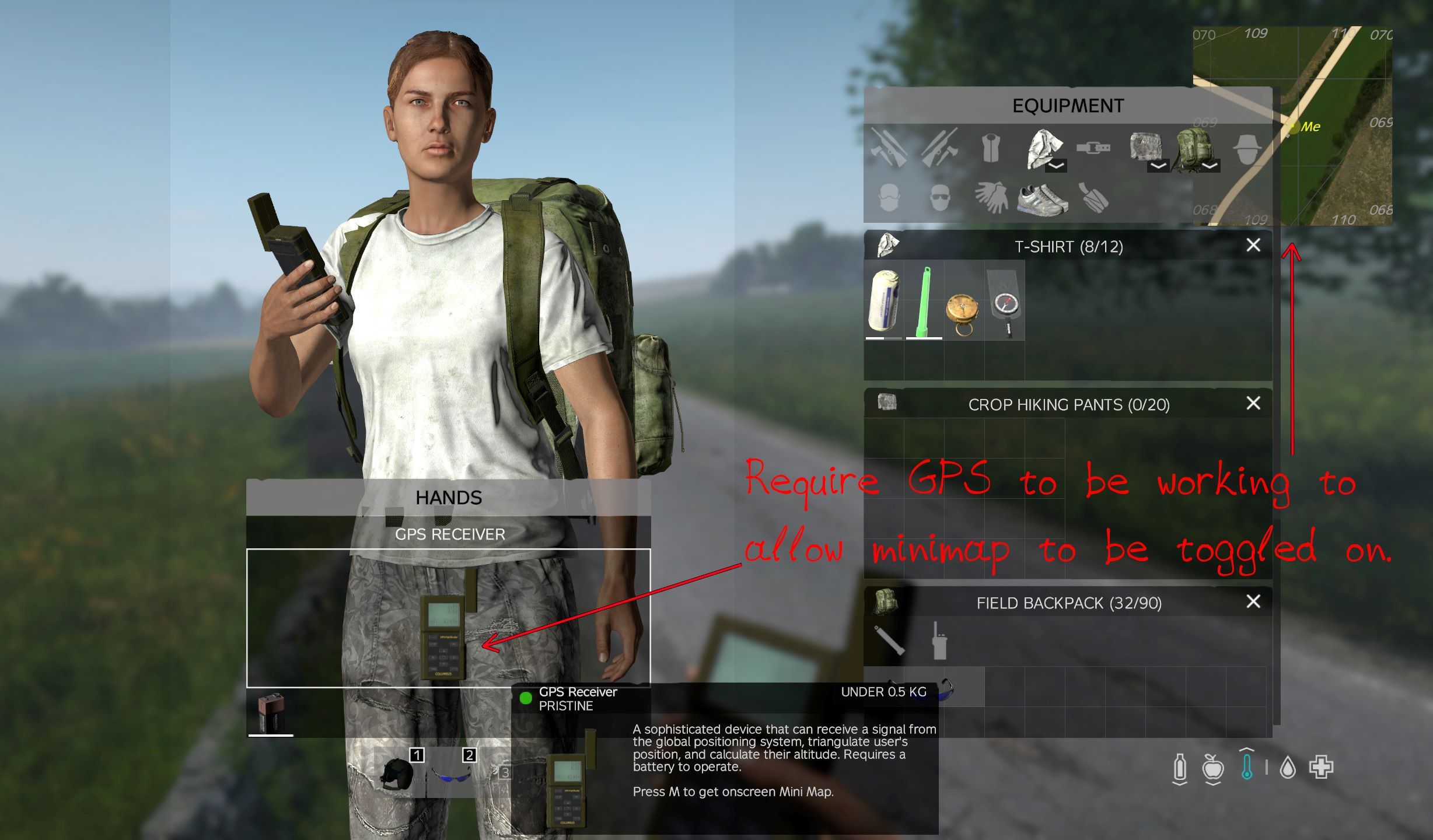
Its a small mod that makes changes to and requires MiniMap mod or MiniMap Relocated mod, which makes it so that players need a working GPS before they can toggle the minimap on So they must have a GPS with a battery and it must be turned on, if they turn it off or the battery runs out it disables the minimap
We had this running on our server since 1.19 experimental and iv since seen a few people mention it as a good idea in some discord groups and suggesting it to the owner of minimap mod as a requested feature so i thought as id already made it for the server id put out a public version for everyone to use if they want either untill it gets added to the mod or if it dosnt use it as is.
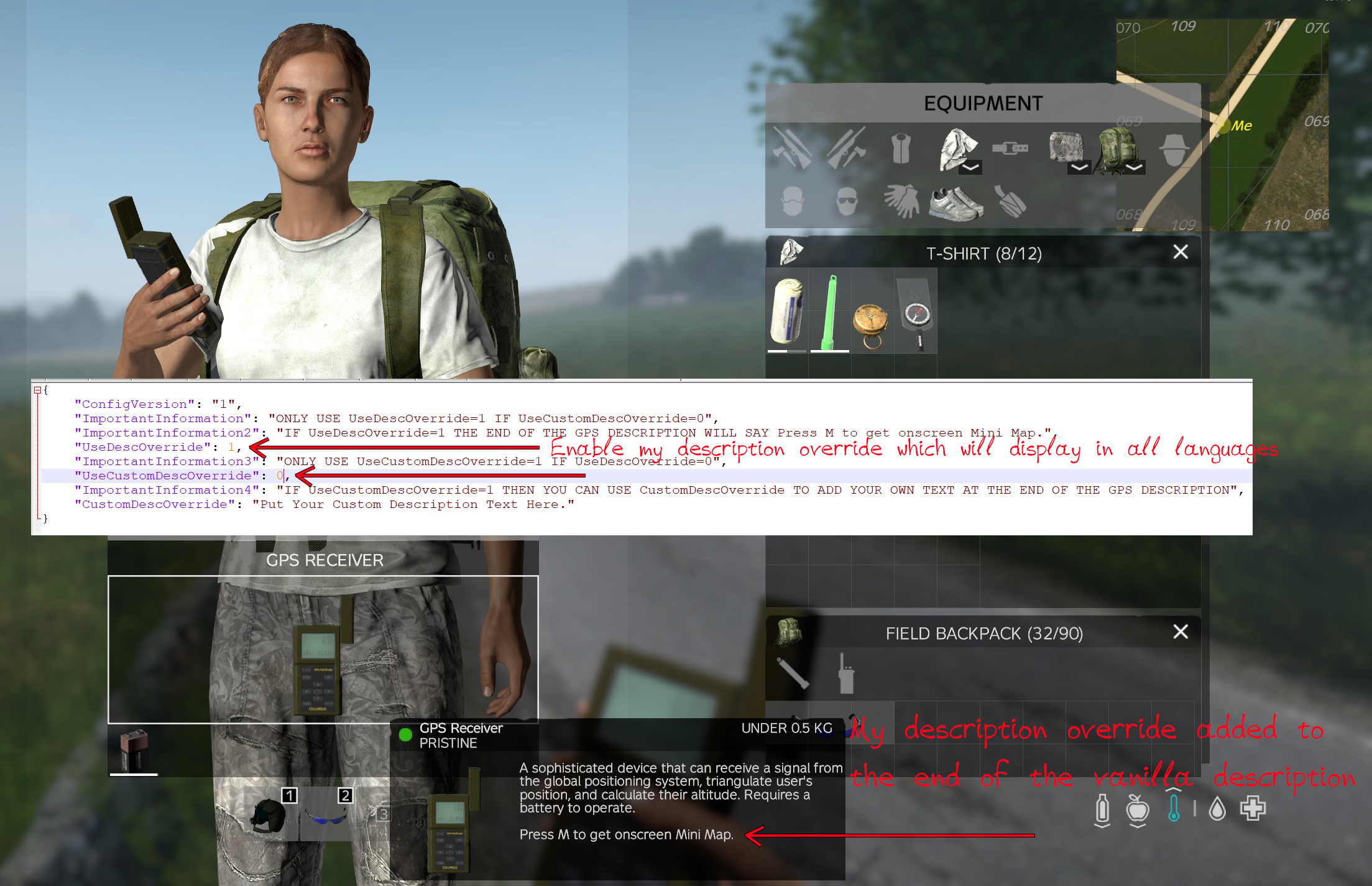
I have also included some parts i have on my server but i have made it so they can be turned on or off in the config file will automatically generate the first time you start the server after installing the mod which will be located in ServerProfile\Wilmas\Wilmas_MiniMapGPS_config.json
! Note ServerProfile could also be SC or Config or whatever you set it up / changed it to !
The Config File
{
    "ConfigVersion": "1",
    "ImportantInformation": "ONLY USE UseDescOverride=1 IF UseCustomDescOverride=0",
    "ImportantInformation2": "IF UseDescOverride=1 THE END OF THE GPS DESCRIPTION WILL SAY Press M to get onscreen Mini Map.",
    [b]"UseDescOverride": 1,[/b]
    "ImportantInformation3": "ONLY USE UseCustomDescOverride=1 IF UseDescOverride=0",
    [b]"UseCustomDescOverride": 0,[/b]
    "ImportantInformation4": "IF UseCustomDescOverride=1 THEN YOU CAN USE CustomDescOverride TO ADD YOUR OWN TEXT AT THE END OF THE GPS DESCRIPTION",
    [b]"CustomDescOverride": "Put Your Custom Description Text Here."[/b]
}
There are 3 parts that make changes and the rest is there for information.
[table] [tr] [th]UseDescOverride[/th] [th]Enables/Disables "Press M to get onscreen Mini Map." to the end of the vanilla description of the GPS.[/th] [/tr] [tr] [th]UseCustomDescOverride[/th] [th]Enables/Disables the use of a custom description you specify at the end of the description of the GPS.[/th] [/tr] [tr] [th]CustomDescOverride[/th] [th]Is what the above mentioned custom description will say.[/th] [/tr] [/table]
- If you have UseDescOverride set to 1 (true) UseCustomDescOverride must be 0 (False).
- If you have UseCustomDescOverride set to 1 (true) UseDescOverride must be 0 (False).
- If you have both UseCustomDescOverride and UseDescOverride set to 0 (False) it will just display the vanilla description.
i have added code so it shouldnt matter if you forget but best to be on the safe side.
Hotkey / Settings Menu
I have also made some changes to the hotkey, for some reason the default \ key never worked for me or my friend and iv seen some other people mention they cant get the minimap to display so i assume its a common issue. So i have made the default hotkey M (this can still be changed in the settings menu) .
Alongside this i have tidied the setting into its own submenu called MiniMap so it is more obvious where it is, i have also changed the hotkey description to work with this mod so it tells players in the menu that they must have a gps for it to work.
The settings text and the "UseDescOverride" description will display in all 13 languages, the "UseCustomDescOverride " will just display in whatever language you write it in.
I had wanted to make it so that the default hotkey could be edited from the config by the server owner but i couldnt seem to make that work, if i do get it working i will update the mod. [hr][/hr]Discord link to talk about the mod and report any bugs https://discord.gg/WMUkTsKn5Q [hr][/hr][h2] Support Me [/h2] This mod is free to use, but if you want to support me you can by donating, click this image below. 
Highlights
From source dataFootprint
Rated a light load on a server.
Last update
Its author last shipped an update 4 yr ago.
MiniMap Gps Requirement on Nxeon
From our catalogue- One-click install
- Not available. One-click install isn't available for this game's mods yet. Download it and upload it to your server in Files.
- Server load
- light
- Smallest plan we suggest
- DayZ — 6 GB (6 GB RAM). This follows our own load rating above, not a benchmark.
- Latest build
- 2022-11-13, released 2022-11-13
Game versions by loader
| Loader | Game versions | Newest |
|---|---|---|
| Workshop |
From 1 recorded build of MiniMap Gps Requirement.
Run MiniMap Gps Requirement on a DayZ server
Deploy a server above, then upload the file in Files.
What kind of mod it is
From the catalogQuality of life & UI
Small conveniences, tweaks and interface improvements players notice straight away.
Compatibility
- Game
- DayZ
Verified at the source
- ✓Steam WorkshopOfficial listing, checked 2026-10-10Open ↗
- ✓AuthorWilma Fingerdoo, as published on Steam Workshop
- ✓LicenseNot published by the sourceFree














