






About Preferred Respawn - Experimental
From Steam WorkshopSince survivors can "respawn-cycle", that is, choosing a spawn location by repeatedly F11-ing, why not automate this process in a fair and elegant way? The goal is to make the time it takes to…
Since survivors can "respawn-cycle", that is, choosing a spawn location by repeatedly F11-ing, why not automate this process in a fair and elegant way? The goal is to make the time it takes to respawn at a specific location using the Preferred Respawn mod the same time one would spend manually F11-ing to respawn at that same location in the unmodified game. The advantage is that the process is automated, allowing players to make use of that waiting time to grab a coffee, stretch, or do whatever they feel like.

Features
[hr][/hr]
- Minimal and non-intrusive changes to the vanilla user interface.
- The option to select a location only appears during respawns; the spawn experience is unmodified.
- Optional: casual mode in which the respawn time is fixed, similar to other "spawn select" mods.
How it works
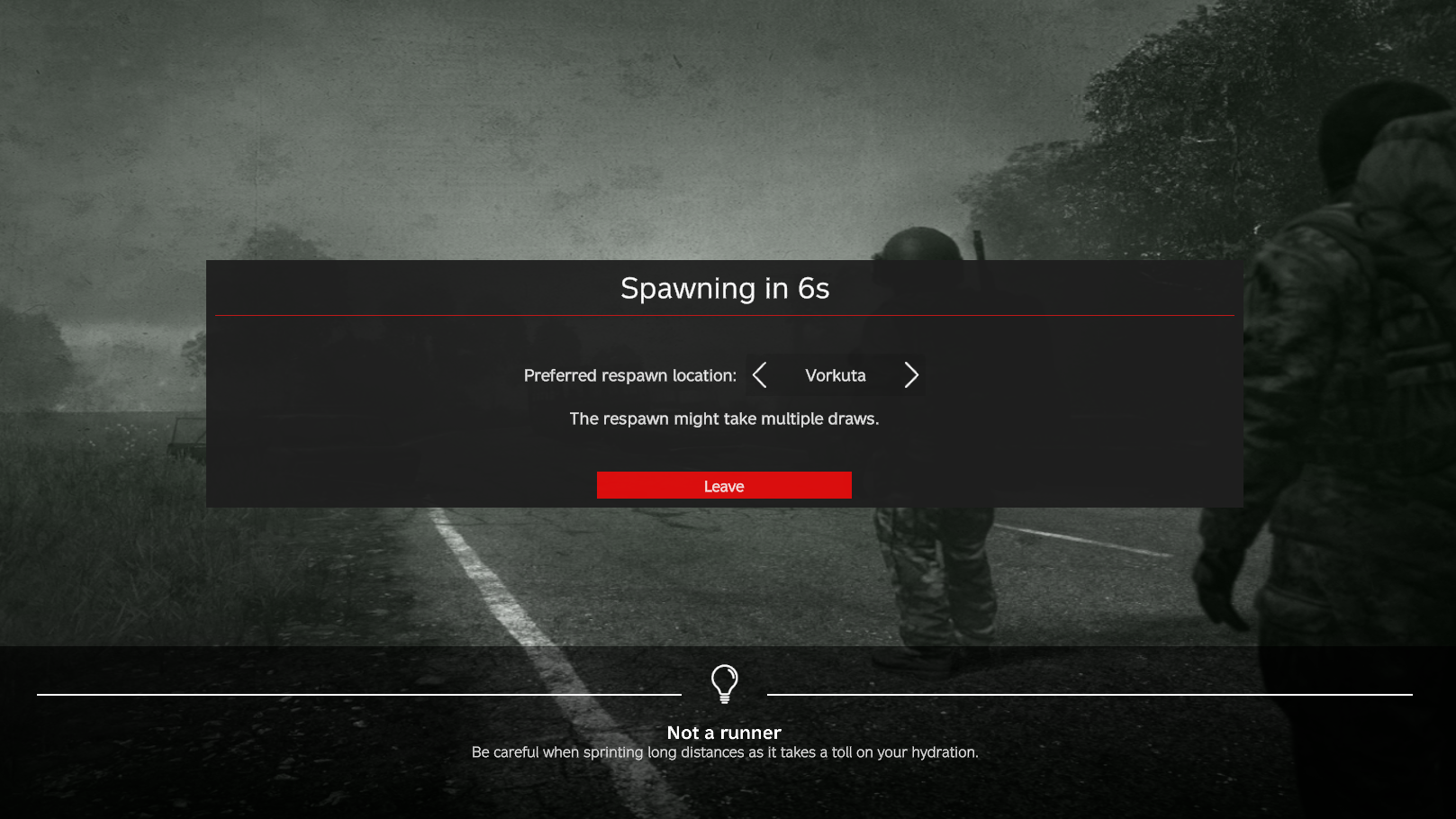
[hr][/hr] If a survivor opts in for a preferred respawn location on the countdown screen (as shown in the screenshot above), their character will not respawn until the preferred location is selected by the default DayZ randomization. This means that the countdown routine restarts every time the preferred location does not match the one chosen by the vanilla randomization, and players must wait through the countdown for each new attempt.
If the survivor does not opt in (the default setting), they respawn after the first countdown at a random location, just as in vanilla. It is also worth mentioning that players are free to choose a new location between attempts.
Optional: it is possible to add extra time to the countdown to account for the time a player would spend F11-ing. This extra time only takes effect from the second attempt onward, as players do not need to F11 if they get the desired location on the first attempt in the unmodified game.[/quote] [h1]Setup[/h1] [hr][/hr] [h3]Spawn locations[/h3] Predefined JSON configuration files for Sakhal, Chernarus, Livonia, Namalsk, and Deer Isle are automatically generated. If the cfgplayerspawnpoints.xml file used differs from the default provided with these maps, adjustments will most likely be necessary. In all cases, it is recommended to disable the vanilla "spawning groups" feature to avoid long wait times. If you wish to modify the default configuration or create a setup for a different map, start the server once after installing the mod. This action will generate configuration files, which you can then use as reference for editing. These files can be found in the <profile\config directory>\PreferredRespawnTest. Please note that the coordinates defined in the .SpawnZones.json do not necessarilly map one-to-one with the spawn points listed in the cfgplayerspawnpoints.xml. Instead, each location entry in the .SpawnZones.json represents a general area on the map and defines an option in the "preferred respawn location" selector on the countdown screen. Although locations and spawn points are not exactly the same thing, the settings in these files should remain consistent. Typically, each location should represent either a cluster of related spawn points or a single spawn point. For example, a valid configuration could have a single location entry representing a village in the .SpawnZones.json, while the cfgplayerspawnpoints.xml includes two or more spawn points for that same village. When a player selects that village as their preferred respawn location, any of the spawn points situated near the chosen location's coordinates will be considered valid respawn positions for the selection. The more spawn points a location has, the fewer countdowns a player selecting that location will typically need to wait through. For example, if one location has a single spawn point while another has two, players respawning at the second location will, on average, experience fewer countdowns. [quote]Note: an overly unbalanced number of spawn points among locations can make some areas too difficult to respawn in. That said, this mechanic can also be used creatively to steer player populations toward specific areas of the map.
Casual Mode (optional)
When noRedraws is set to true in the .Settings.json, the vanilla mechanism for the selection of spawn points is replaced, and players spawn instantly in the selected location after the first countdown reaches zero in the countdown screen. In this mode, the settings in the cfgplayerspawnpoints.xml are ignored for respawns, and players originate within 30m (~= 100ft) radius from some point specified in the .SpawnZones.json.
Additionally, when this mode is enabled, it is possible to append extra points to each location in the .SpawnZones.json. This means that when a player selects a location in the countdown screen, one of the points from the selected location is randomized as the final one where the player will respawn.
Example of a .SpawnZones.json with two locations and three spawn points for each:
[
    {
        "name": "Location_1",
        "centralPoint": [1100.0, 1100.0, 1200.0, 1200.0, 1300.0, 1300.0],
        "excludeFromRandom": 0
    },
    {
        "name": "Location_2",
        "centralPoint": [2100.0, 2100.0, 2200.0, 2200.0, 2300.0, 2300.0],
        "excludeFromRandom": 0
    },
]
Highlights
From source dataFootprint
A 245 KB download, rated a light load on a server.
Last update
Its author last shipped an update 21 mo ago.
Preferred Respawn - Experimental on Nxeon
From our catalogue- One-click install
- Not available. One-click install isn't available for this game's mods yet. Download it and upload it to your server in Files.
- Server load
- light
- Smallest plan we suggest
- DayZ — 6 GB (6 GB RAM). This follows our own load rating above, not a benchmark.
- Latest build
- 2025-02-01, released 2025-02-01, 245 KB
Game versions by loader
| Loader | Game versions | Newest |
|---|---|---|
| Workshop |
From 1 recorded build of Preferred Respawn - Experimental.
Dependencies
- Required: CF
Declared by the newest build that lists any. Required ones are installed with it on one-click installs.
Run Preferred Respawn - Experimental on a DayZ server
Deploy a server above, then upload the file in Files.
What kind of mod it is
From the catalogWorkshop
Its source category doesn’t say more about what it does, so NxLabs lists it under Other.
Compatibility
- Game
- DayZ
- File size
- 245 KB
Verified at the source
- ✓Steam WorkshopOfficial listing, checked 2026-10-10Open ↗
- ✓AuthorAkol, as published on Steam Workshop
- ✓LicenseNot published by the sourceFree














