







About VehicleRecovery
From Steam WorkshopHelp You can find me on my DayZ Development Discord . Come there if you need help or have ideas! Donations welcome If you like this mod, please consider donating ! <3 Description If you have been…
Help
You can find me on my DayZ Development Discord. Come there if you need help or have ideas!
Donations welcome
If you like this mod, please consider donating! <3
Description
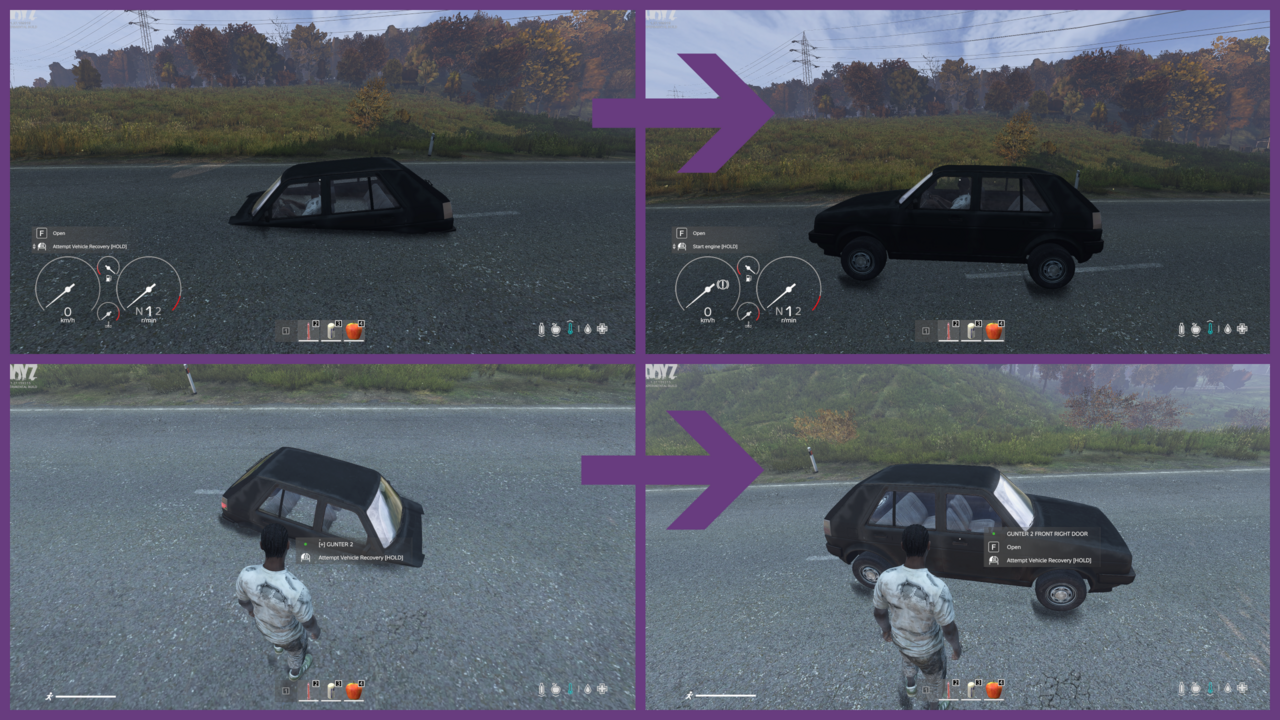
If you have been using cars in DayZ, you probably know these issues:
- Cars getting stuck in the ground
- Cars even going underground
- Extra work for admins
- Frustrated players when they lose cars
This mod aims at mitigating those things. It adds an action that can be triggered when commandeering a vehicle, or from the outside if the vehicle is unlocked.
- Tries to place the vehicle safely on the surface
- Works even if standing on rocks / ramps / over water
- Works with the 4 main locking mods (MCK, Traderplus Carlock, Trader, Expansion)
- Checks if sitting in heli or boat and refuses to work then
- Can still be operated on helis and boats when standing outside
- Works with the 3 main heli / boat mods (Expansion, Red Falcon, Sibnic)
Usage
When sitting in or pointing at a vehicle players get the action "Attempt Vehicle Recovery" on the interaction key (default is F). They may have to use the mouse wheel to scroll to it. After executing it, the mod will try to put the vehicle safely on the ground.
The action does NOT appear when sitting in a boat or helicopter, but only when pointing at them from the outside. For the outside action to work, the vehicle needs to be unlocked.
There is a special traffic cone (VehicleRecovery_Cone) that players can drop or place, and then trigger "Retrieve Nearest Vehicle" on it. The vehicle has to be unlocked and, if configured, engine off for this to work. There might be a certain exploitability to this - please let me know on my Discord, and I will improve it in further updates.
Configuration
At first install, a configuration file with these default values will be created in $profile:VehicleRecovery/VehicleRecovery.json.
{
 "version": 1,
 "environment": 1,
 "debug_log_level": 1,
 "enabled": 1,
 "enablede_as_driver": 1,
 "enabled_outside_vehicle": 1,
 "enabled_cone": 1,
 "cone_radius": 50,
 "cone_activation_time_seconds": 5,
 "require_engine_off_inside": 0,
 "require_engine_off_outside": 1,
 "target_height_above_surface_meters": 0.0
}
version
Config version. Don't change this.
environment
Can be disregarded, just for development and testing.
debug_log_level (default 1)
Amount of log output to $profile:VehicleRecovery.log (client and server). 1 means only display critical errors, while 5 makes it very chatty. On your live server, always have it on 1, unless you have to debug it. Only 1 and 5 are possible.
enabled (default 1)
Dis/enable the mod entirely.
enabled_as_driver (default 1)
enabled_outside_vehicle (default 1)
enabled_cone (default 1)
Dis/enable separate features.
cone_radius (default 50)
Radius around the cone looks for vehicles.
cone_activation_time_seconds (default 5)
On servers with vehicle damage to players, the vehicle would hurt or kill players if the vehicle was retrieved instantly, so a countdown can be configured.
require_engine_off_inside (default 0)
When players go under the map while driving at high speed, they may not be able to turn off the engine, so you can make it so they don't need to.
require_engine_off_inside (default 1)
For most scenarios, you want to engine required to be off so that any outside actions work.
target_height_above_surface_meters (default 0.0)
If there's any trouble of vehicles still staying stuck, especially on servers struggling with performance, you can try setting this to a positive value like 0.2, which would result in the vehicles being "dropped" from that height above the surface.
Types
This is the type you need to add to your types. Please note it's not a full XML file. Always validate your XML files.
<type name="VehicleRecovery_Cone">
	<nominal>5</nominal>
	<lifetime>14400</lifetime>
	<restock>1800</restock>
	<min>2</min>
	<quantmin>-1</quantmin>
	<quantmax>-1</quantmax>
	<cost>100</cost>
	<flags count_in_cargo="0" count_in_hoarder="0" count_in_map="1" count_in_player="0" crafted="0" deloot="0"/>
	<category name="tools"/>
	<usage name="Industrial"/>
</type>
Credits
- Thanks and Love to my "family" at FOG FamilyOfGamers, without their support I wouldn't be where I am today. Join their Discord for the ultimative experience of how a DayZ community should be!
- Thanks to Don Afledo for importing the Traffic Cone
- Thanks to Genriet and TheRealLowlife to help getting the Cone work ingame
- Thanks to Wardog for help with compatibility to locking and vehicle mods
Extra special thanks to AVcrazy21 for designing this awesome steam workshop page icon!
Legalese
- The mod may NOT be repacked, unless you have explicit permission (ask me)
- The mod may be used on monetized servers, as long as Bohemia's monetization guidelines are followed
- The mod may only be uploaded to the Steam Workshop under my account name (inkihh)
Copyright 2025 inkihh
Highlights
From source dataFootprint
A 2 MB download, rated a light load on a server.
Last update
Its author last shipped an update 8 mo ago.
VehicleRecovery on Nxeon
From our catalogue- One-click install
- Not available. One-click install isn't available for this game's mods yet. Download it and upload it to your server in Files.
- Server load
- light
- Smallest plan we suggest
- DayZ — 6 GB (6 GB RAM). This follows our own load rating above, not a benchmark.
- Latest build
- 2026-02-10, released 2026-02-10, 2 MB
Game versions by loader
| Loader | Game versions | Newest |
|---|---|---|
| Workshop |
From 1 recorded build of VehicleRecovery.
Dependencies
- Required: CF
Declared by the newest build that lists any. Required ones are installed with it on one-click installs.
Run VehicleRecovery on a DayZ server
Deploy a server above, then upload the file in Files.
What kind of mod it is
From the catalogChat & community
Chat, voice, Discord, clans and other community features.
Compatibility
- Game
- DayZ
- File size
- 2 MB
Verified at the source
- ✓Steam WorkshopOfficial listing, checked 2026-10-10Open ↗
- ✓Authorinkihh, as published on Steam Workshop
- ✓LicenseNot published by the sourceFree














