
About jcdcdev.Eco.ShelfLife
From mod.ioConfigure the Shelf Life Multiplier for storage
jcdcdev.Eco.ShelfLife
Control the shelf life multiplier of your storage objects in Eco.
Upgrading to Version 12
Due to changes in the core game you must delete the following folder:
./Mods/UserCode/jcdcdev.Eco.ShelfLife/UserCode
Upgrading to Version 11
Due to changes in the core game you must delete the following folder:
./Mods/UserCode/jcdcdev.Eco.ShelfLife/UserCode
Your existing configuration will remain
Install Steps
- Download the latest version of this mod from mod.io
- Download the latest version of
jcdcdev.Eco.Corefrom mod.io - Extract each zip
- Go to your Server’s root folder
- Copy the extracted content to
./Mods/UserCode - Start the server
- On first run the server will shutdown
- This is expected behaviour ✅
- Please restart your server
Configuration
You can configure the shelf life multiplier through the Server UI or directly in the config file.
You must restart the server after making changes.
The default values are the same as the vanilla game:
Icebox: 1.6Refrigerator: 1.9IndustrialRefrigerator: 2.4StorageSilo: 1.6PoweredStorageSilo: 2.4SeedBank: 4.8 - (Requires jcdcdev.Eco.SeedStorage)WoodenSeedBox: 1.6 - (Requires jcdcdev.Eco.SeedStorage)
Server UI
You can change these values to your needs, but keep in mind that higher values will make the items last longer and lower values will make them spoil faster.
<figure>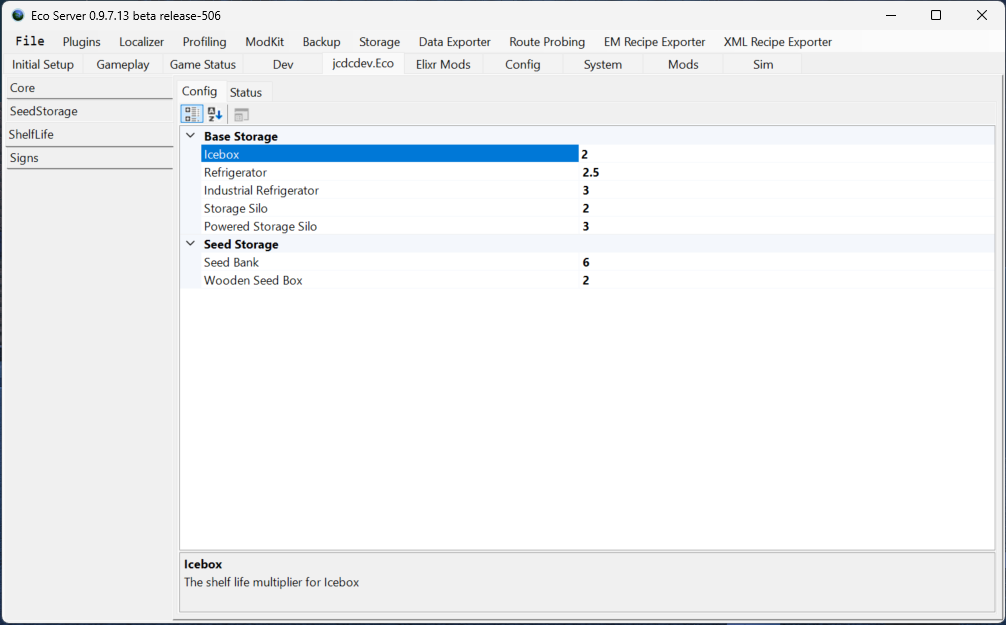 </figure>
 Config File
You can find the config file at ./Configs/jcdcdev.Eco.ShelfLife.eco.
The default values are below:
{ "Icebox": 2.0, "Refrigerator": 2.5, "IndustrialRefrigerator": 3.0, "StorageSilo": 2.0, "PoweredStorageSilo": 3.0, "SeedBank": 4.0, "WoodenSeedBox": 2.0 }</pre>You will notice that different storage containers will have different effects on the shelf life of the items stored in them. You can check the remaining shelf life of an item by hovering over it in your inventory or storage UI.
Version Table
<table> <thead> <tr class="header"> <th>Version</th> <th>Core Version</th> <th>Game Version</th> </tr> </thead> <tbody> <tr class="odd"> <td>13.0.4</td> <td>13.0.4</td> <td>13.0.4</td> </tr> <tr class="even"> <td>13.0.3</td> <td>13.0.3</td> <td>13.0.3</td> </tr> <tr class="odd"> <td>13.0.2</td> <td>13.0.2</td> <td>13.0.2</td> </tr> <tr class="even"> <td>13.0.1</td> <td>13.0.1</td> <td>13.0.1</td> </tr> <tr class="odd"> <td>13.0.0</td> <td>13.0.0</td> <td>13.0</td> </tr> <tr class="even"> <td>12.0.8</td> <td>12.0.7</td> <td>12.0.7</td> </tr> <tr class="odd"> <td>12.0.7</td> <td>12.0.6</td> <td>12.0.6</td> </tr> <tr class="even"> <td>12.0.6</td> <td>12.0.5</td> <td>12.0.5</td> </tr> <tr class="odd"> <td>12.0.5</td> <td>12.0.4</td> <td>12.0.4</td> </tr> <tr class="even"> <td>12.0.4</td> <td>12.0.3</td> <td>12.0.3</td> </tr> <tr class="odd"> <td>12.0.3</td> <td>12.0.2</td> <td>12.0.2</td> </tr> <tr class="even"> <td><aHighlights
From source dataFootprint
Rated a light load on a server.
Last update
Its author last shipped an update 4 mo ago.
jcdcdev.Eco.ShelfLife on Nxeon
From our catalogue- One-click install
- Not available. One-click install isn't available for this game's mods yet. Download it and upload it to your server in Files.
- Server load
- light
- Smallest plan we suggest
- Eco — 8 GB (8 GB RAM). This follows our own load rating above, not a benchmark.
- Latest build
- 13.0.4, released 2026-06-10
Run jcdcdev.Eco.ShelfLife on a Eco server
Deploy a server above, then upload the file in Files.
What kind of mod it is
From the catalogGameplay & overhauls
New mechanics, content and overhauls that change how the game plays.
Compatibility
- Game
- Eco
Verified at the source
- ✓mod.ioOfficial listing, checked 2026-10-16Open ↗
- ✓Authorjcdcdev, as published on mod.io
- ✓LicenseNot published by the sourceFree