
About Out of Stock ECO [14.1]
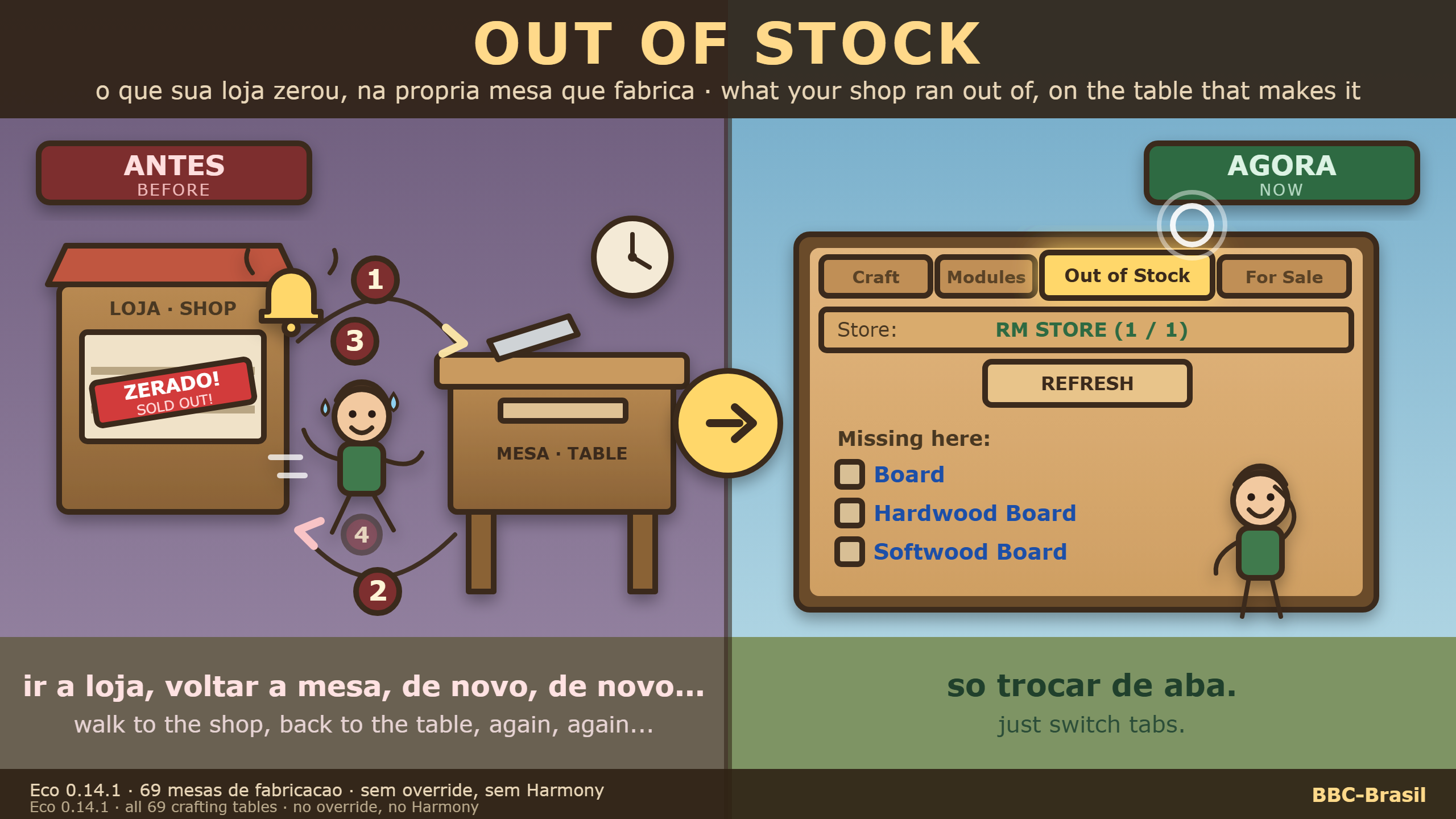
From mod.ioA tab on every crafting table listing what that table can make, is sold out in the store you picked, and you have not queued yet. Press Next store to pick the shop, Refresh to build the list. Server-side, no override, no Harmony.
Every crafting table gets a new tab listing what that table can craft, is sold out in the store you picked, and you haven't queued yet.
Português abaixo.
The whole mod is one line
<pre>MISSING = (what THIS table crafts) ∩ (what the chosen store sells and has NONE of) − (what is already queued on THIS table)</pre>Press "Next store" until you land on the shop you want. That shop is then pinned to that table — saved by name, so it survives a new shop appearing, an old one disappearing, and a server restart, and you never pick it again. Press "Refresh" to build the list.
On a table you have not set up yet the tab opens empty — it has no shop to look at until you press Next store. And Eco has no "tab was opened" hook (checked in the installed game code and in the official ModKit API), so Refresh is the button that answers show me now. The list is also rebuilt on its own when an offer in the pinned shop changes — the same instant the sold-out bell rings.
⚠ Tables from other mods need one extra step. Out of the box the tab appears on the 69 crafting tables of the base game. A table added by another mod — Mixology, IceCream, anything — only gets it after you run instalar.py on your own server. See Install. Why it exists
You keep a shop. Something sells out. The bell rings — and then you have to remember which table makes it, walk there, and find it in a list of 200 recipes. This tab answers that at the table itself: what should I be making right now?
Nothing to tick off
Queue the item on the table and it is gone from the list — because the mod reads CraftingComponent.WorkOrders, the table's own queue. Cancel the order and it comes back.
A mark the player has to make by hand is a mark the player forgets to make. Here, the thing that marks it is the act of queuing, which they were going to do anyway.
Reads state, not events. The list comes from what is on the shelf right now, not from catching the sold-out moment. So it stays correct across server restarts, and after an item sells out while you were offline.
Stock is counted per item, not per offer. A store can list the same item in more than one offer — a food shop does it on purpose: one line for the fresh dish at full price, another for the same dish below 50% freshness, cheaper. Every selling offer of that item is added up first, so an empty line no longer reports out of stock while a full line of the same item sits beside it. The item is also listed only once, however many empty offers it has.
Install
Unzip into your server folder so that it merges with Mods/:
Restart the server. No config file, no DLL, nothing to enable, no Python, and the order you installed your mods in does not matter: Eco compiles the whole of Mods/UserCode in a single pass at every startup. Uninstall: delete the folder and restart — nothing is written to the world.
Tables from other mods — one extra step, on your machine
ForaDeEstoqueMesas.cs ships ready-made and covers the 69 crafting tables of the base game (Eco 0.14.1.1). A table added by another mod is not in it, and its line cannot be shipped: a file naming a mod you don't have doesn't compile, and a server that doesn't compile doesn't start. So that line is written on your own server, from what you actually have.
The script is not in the zip — it comes from the repository, and needs Python 3 and nothing else (no pip, no dependency; Linux and Windows):
<pre>python3 instalar.py --seco # says what it would do, writes nothing python3 instalar.py # writes ForaDeEstoqueMesasDeMod.cs</pre>It finds the server on its own. Run it again whenever your set of table mods changes — above all when you remove one: the line still names a type that is gone, which is CS0246, and the server will not start. Delete that line, or the whole generated file. The same is written in MESAS-DE-MOD.txt, inside the package.
No override, no Harmony
This mod uses only the two techniques the Strange Loop Mods/UserCode/README.md puts first: a new : WorldObjectComponent class holding the tab, and [RequireComponent(...)] public partial class XObject {} to hang it on each table.
An .override.cs is a frozen copy of a game file: when Eco updates that file, your copy silently goes stale. A mod built on partial class survives updates.
What it does NOT do
- Buy offers — a table crafts, it doesn't purchase. Sell offers only.
- Tag offers — specific items only.
- Ship modded tables in the package — the package covers the 69 base-game tables. Modded tables are supported, but their line is generated on your machine by
instalar.py: shipping a reference to a mod you might not own would stop your server from compiling at all.
Highlights
From source dataFootprint
Rated a light load on a server.
Last update
Its author last shipped an update 25d ago.
Out of Stock ECO [14.1] on Nxeon
From our catalogue- One-click install
- Not available. One-click install isn't available for this game's mods yet. Download it and upload it to your server in Files.
- Server load
- light
- Smallest plan we suggest
- Eco — 8 GB (8 GB RAM). This follows our own load rating above, not a benchmark.
- Latest build
- 2.1.0, released 2026-09-20
Run Out of Stock ECO [14.1] on a Eco server
Deploy a server above, then upload the file in Files.
What kind of mod it is
From the catalogTechnology & automation
Machines, power, logistics and automation.
Compatibility
- Game
- Eco
Verified at the source
- ✓mod.ioOfficial listing, checked 2026-10-16Open ↗
- ✓AuthorDartangn, as published on mod.io
- ✓LicenseNot published by the sourceFree