
About Trade Info
From mod.ioTrade Info that adds pricing tooltips to items, tags and stores: a price range, trend, best buy/sell prices with the actual stores, taxes, and an estimated production cost - in the few most-used currencies. Limited storage and limited funds.
What players see
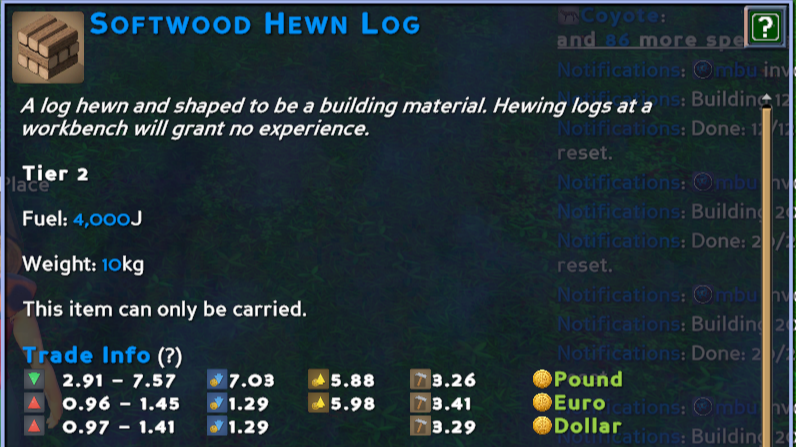
On items and tags, a Trade Info section showing, per currency:
- a Price Trend marker - rising, falling, or stable - hover it for the day-by-day price history;
- a Price Range built from recent realized sales, weighted toward the latest days;
- the best Buy and Sell Stores, ordered low to high and adjusted for tax - hover either to list the actual stores (distance, quantity, tax, and a flag when a store is low on funds or storage);
- an Estimated Production Cost (items only - a tag isn't craftable) - hover for the full crafting-cost breakdown.
On store objects, the store's own tooltip adds:
- Limited Funds - buy orders the store can't fully pay for, and how many it can actually afford;
- Limited Storage - buy orders it has no room to receive;
- Tax Information - the sales taxes that apply when you trade there.
Everything is derived live from real activity. Completed sales build a price range weighted toward recent days, a background scan tracks every store's standing offers, and prices are shown in the one or two currencies your economy actually uses (currencies are ranked by how many distinct players trade, hold, and run stores in them). Taxes are player-specific, accounting for both settlement sales tax and Civics trade-tax laws.
No configuration required - drop it in Mods/UserCode/TradeInfo and it works.
A (?) link explains every icon.
Player commands
- /ti - lists the player commands.
- /tihide - hides the Trade Info tooltips for you only; run again to show them.
- /tiexplain
<item>, <currency>- full price breakdown and recent sales for an item. (Hold or toolbar-select the item to skip the name.) - /tiexplaincraft
<item>, <currency>- the complete crafting-cost tree, every material expanded. - /ticalories
<currency>- how the labor (calorie) cost is worked out in that currency.
Admin commands
/tiadmin - displays all admin commands (there are a lot)
A few:
/ticurrencyscores </pre> Lists every currency's adoption score (distinct traders / holders / stores) and which are currently shown — handy for understanding why specific currencies appear.
/titaxlaws <currency> </pre> Diagnoses the sales-tax breakdown at the nearest store: settlement tax, each Civics tax law, and the effective total.
/tiscan </pre> Forces an immediate market rescan.
/ticlearall </pre> Clears all Trade Info data (price history, market cache, manual seeds) — use to reset.
For testing on a new or quiet world, /tifakeeconomy spawns a sample market and /timakedominant exercises the currency ranking; run /ti as an admin to see the full toolset.
Highlights
From source dataFootprint
Rated a light load on a server.
Last update
Its author last shipped an update 4 mo ago.
Trade Info on Nxeon
From our catalogue- One-click install
- Not available. One-click install isn't available for this game's mods yet. Download it and upload it to your server in Files.
- Server load
- light
- Smallest plan we suggest
- Eco — 8 GB (8 GB RAM). This follows our own load rating above, not a benchmark.
- Latest build
- tradeinfo-7zju.zip, released 2026-06-30
Run Trade Info on a Eco server
Deploy a server above, then upload the file in Files.
What kind of mod it is
From the catalogTechnology & automation
Machines, power, logistics and automation.
Compatibility
- Game
- Eco
Verified at the source
- ✓mod.ioOfficial listing, checked 2026-10-16Open ↗
- ✓AuthorObtuseRock, as published on mod.io
- ✓LicenseNot published by the sourceFree