







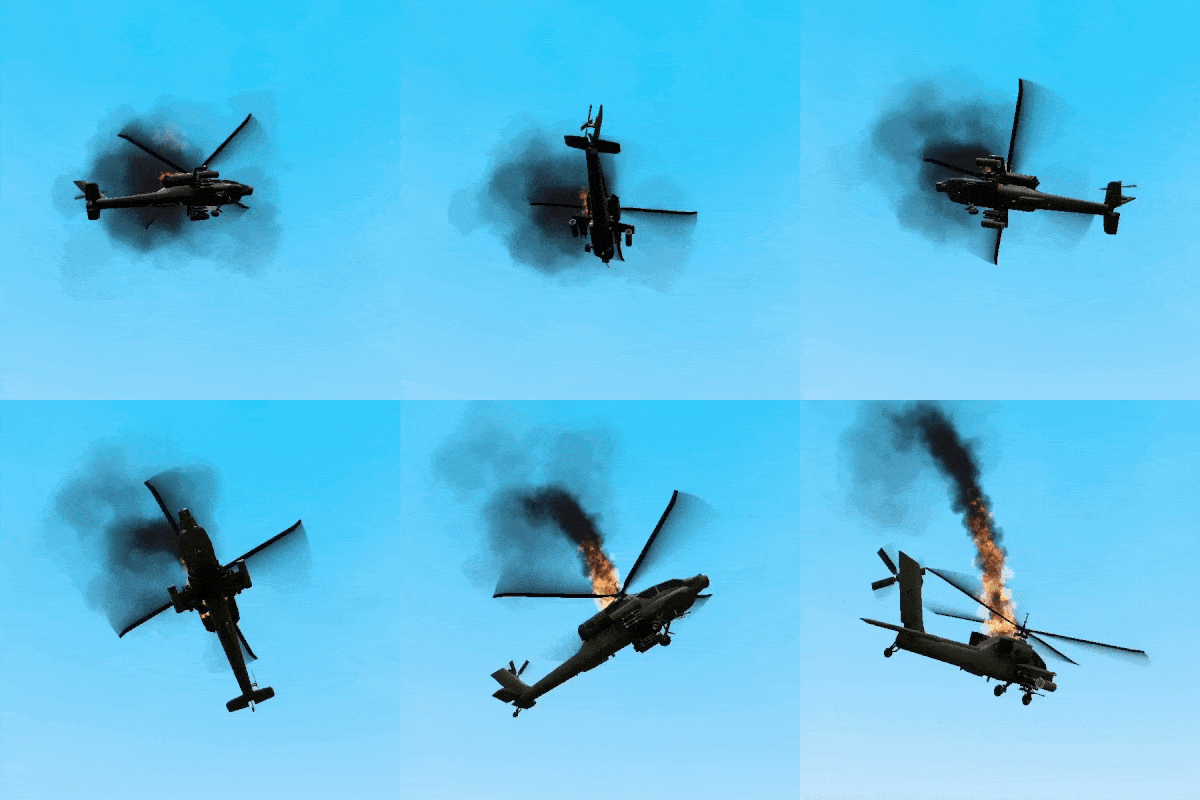
About [LVS] - Crash Cutscene
From Steam Workshop"Mayday! Mayday! We're going down!" ⬣ Introduction ⬣ This addon moves ” – Helicopters ” one step towards realism by implementic cinematic-like helicopter crashes. All LVS Helicopters instead…
"Mayday! Mayday! We're going down!" [/quote] [h1] ⬣ Introduction ⬣ [/h1] This addon moves ”[LVS ] – Helicopters” one step towards realism by implementic cinematic-like helicopter crashes. All LVS Helicopters instead exploding mid-air after their destruction, will now fall towards the ground while spinning, leaving behind a trail of thick black smoke behind them. [h1] ⬣ Features ⬣ [/h1] [list] [*] Cinematic helicopter crashes. [*] Compatible with all current [LVS] Helicopters. [*] Togglable voicelines played when your helicopter spins out of control. [*] Set a chance of a crash cutscene occuring. [*] Set a speed of helicopter in crash cutscene. [/list] [h1] ⬣ Addon Customization ⬣ [/h1] You can customize the addon to your liking by going to: [code] Spawn Menu / Settings / LVS – Crash Cutscene[/code] Alternatively you can use the following console commands: [table] [tr] [th]Command[/th] [th]Value(s)[/th] [th]Local/Server[/th] [th]Description[/th] [/tr] [tr] [td] lvs_crash_cutscene [/td] [td]0/1[/td] [td]Server[/td] [td]Enable or disable crash cutscene addon.[/td] [/tr] [tr] [td] lvs_crash_cutscene_chance [/td] [td]0-100[/td] [td]Server[/td] [td] A chance of helicopter crash cutscene occuring. [/td] [/tr] [tr] [td] lvs_crash_cutscene_voicelines [/td] [td]0/1[/td] [td]Client[/td] [td] Toggle localside voicelines played once your helicopter is shot down. [/td] [/tr] [/table] [h1]☢ Troubleshooting ☢[/h1] Before reporting any bugs make sure you have followed these steps. Go further down the line if specific solutions didn't work. [olist] [*] Make sure that you are using an LVS Helicopter. [*] Ensure that all required addons are enabled. [*] Ensure that no other mods conflict with this addon. [*] Open a Garry's mod session with ONLY this addon and required ones enabled. If it suddenly starts working at this point then most likely one of the addons you've used before conflicts with this addons. [*] Restart Garry's Mod. [*] Restart Computer. [/olist] [h1]⬣ Discord ⬣[/h1] Get a heads-up on newest addons – Join Harion’s Addons Discord [h3]https://discord.gg/M49ewrbmFn[/h3] If you want to add support to your custom LVS base, dm me in discord. Thanks DRIV for making good description.
Highlights
From source dataFootprint
Rated a light load on a server.
Last update
Its author last shipped an update 4 yr ago.
[LVS] - Crash Cutscene on Nxeon
From our catalogue- One-click install
- Supported on Nxeon Garry's Mod servers. We download it from Steam Workshop, place it, and restart the server.
- Server load
- light
- Smallest plan we suggest
- Garry's Mod — 2 GB (2 GB RAM). This follows our own load rating above, not a benchmark.
- Latest build
- 2023-03-13, released 2023-03-13
Game versions by loader
| Loader | Game versions | Newest |
|---|---|---|
| Workshop |
From 1 recorded build of [LVS] - Crash Cutscene.
Dependencies
- Required: [LVS] - Framework
- Required: [LVS] - Helicopters - Pack
Declared by the newest build that lists any. Required ones are installed with it on one-click installs.
Run [LVS] - Crash Cutscene on a Garry's Mod server
Pick a server or deploy a new one above; it is installed in one click.
What kind of mod it is
From the catalogListed on Steam Workshop as “Workshop”
Vehicles & ships
Cars, boats, aircraft, ships and other things to drive or fly.
Compatibility
- Game
- Garry's Mod
Verified at the source
- ✓Steam WorkshopOfficial listing, checked 2026-10-10Open ↗
- ✓AuthorHari, as published on Steam Workshop
- ✓LicenseNot published by the sourceFree














