


Description
FORK OF SQUACKETY'S MOD. ADDS NEW FEATURES, CHANGES SOME THINGS AND FIXES OTHERS ORIGINAL MOD
CHANGES FROM ORIGINAL:
- Moving actors and dupes is now smooth
- You're able to modify or delete any actor in the level/save through the menu
- Support for progress actors (You can set any mesh in the game as a progress actor attached to a crank)
- Added placeable possess portals that can be configured by interacting
- Using them you can set up portals that will transform whoever walks through them into the character you selected or a clone of yourself
- Added npc spawners with configurable respawn timer (Only works with demon horde enemies)
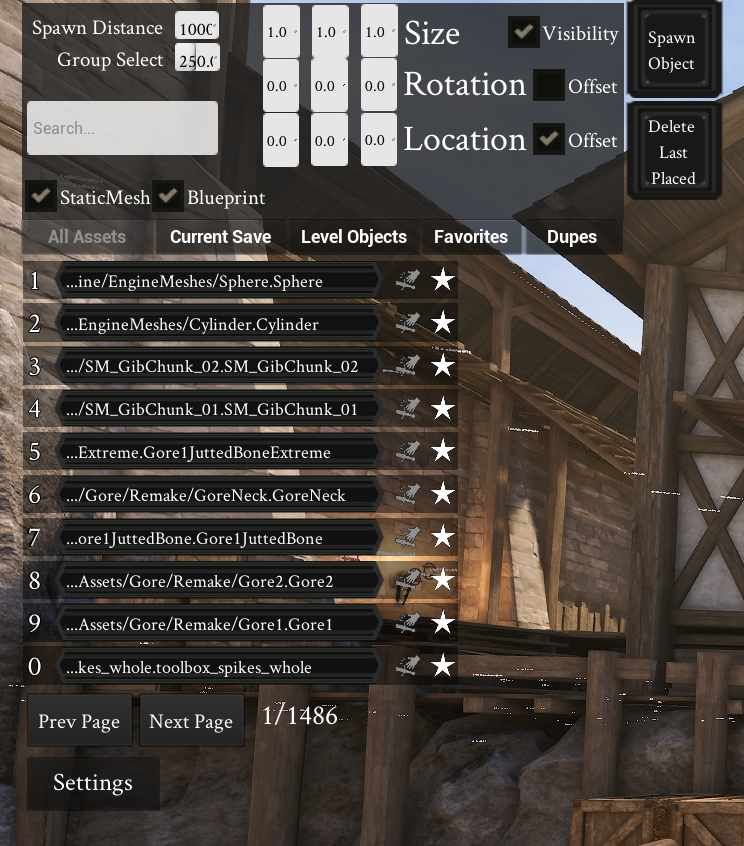
- Menu is now sorted into tabs
- There's now a button to go back to previous page in the menu
- Ability to list all objects placed by the mod from the menu
- Ability to list all level objects in the map from the menu
- Saves load in quicker
- Assets for the clients load in much quicker
- Added a button inside the menu to delete last placed object
- Teleporting no longer requires you to be full hp and stam
- Save list, Teleport list and Help command now display in one message block rather than several messages
- All actors now hide properly when closing the menu
- This includes player starts that would not hide in the original version
- All invisible actors now have names visible on them and a capsule component for easy selection
- All blueprints are now properly replicated to the clients
- Mod messages don't appear as the player sent them anymore
- Weapon spawners no longer lose their spawn class when overwriting a save file with them
- Added chat commands for setting and deleting chat teleports
'.ptb addtp' '.ptb deltp'
All commands now start with '.ptb':
.ptb menu | Opens the mod menu
.ptb toolbox | Spawns a toolbox with custom buildables
.ptb save | Saves all current actors on the map
.ptb load | Loads a specified save. Type '.ptb load list' to see a list of all available saves
.ptb clear | Clears all placed objects from the map. Typing a save name deletes that save's objects
.ptb dl | Deletes last placed object
.ptb usetb | Specifies actors to use this mod's tags
.ptb allow | Adds a player to the allow list of the mod. Use playfab ID
.ptb togal | Toggles autoloading for current the map
.ptb togaldef | Toggles default state of autoloading for all future maps
.ptb random | Specify a save to be added to random load list
.ptb version | Prints the current server version of the mod
.ptb help | Shows all available commands
.ptb addtp | Adds a teleport at player location with the specified name
.ptb deltp | Deletes a teleport with the specified name
INSTALLATION
Step 1: Under
> [/Script/Mordhau.MordhauGameMode]
Add:
> SpawnServerActorsOnMapLoad=/PermanentToolboxRW/PermaTB.PermaTB_C
Step 2: Under
> [/Script/Mordhau.MordhauGameSession]
Add:
> Mods=5778618
Step 3. Ensure that you are an admin on your own server
Step 4. Type anyone of the chat commands above to get started
SERVER SIDE ONLY ALTERNATE INSTALLATION INSTRUCTIONS
ONLY DO THIS WAY IF YOU DO NOT WANT YOUR SERVER TO BE LISTED AS MODDED
WARNING Clients will need to install the mod manually to be able to use the menu.
Step 1, for both Server file, and Admin client's file
> Create a CustomPaks folder inside of Mordhau>Content
Step 2, for both Server file, and Admin client's file
> Extract pak from zip file below into Mordhau > Content > CustomPaks
Step 3, only for server
> Under > > [/Script/Mordhau.MordhauGameMode] > > Add: > > SpawnServerActorsOnMapLoad=/PermanentToolboxRW/PermaTB.PermaTB_C
FAQ
Q: Can this be used as a server side only mod?
A: Yes! Look above for the instructions of setting it up as a server side only mod
Q: How do I go about adding content from other mods into this?
A: Any static mesh from any mod will load with no problems. Specific blueprint classes will have to be added manually. These can be added to the menu in game by using the favorite looked at item keybind, or by loading a map where these modded objects already exist. If the object cannot be saved via these methods, then it can be added by manipulating the client's game ini which can be found in "Appdata>Local>Mordhau>Saved>Config>WindowsClient".
Underneath [FavoriteActors] add List=objectpath. This is an advanced method, finding object paths requires using tools like UMODEL and manipulating the package paths found from there. Instructions for this can be found in the Generic Admin Menu Guide, underneath the, "How to find a weapons file path to get weapons from any mod into the menu", section.
Q: Can saves be shared?
A: Yes! To access your save files, please navigate to "Mordhau>Saved>SaveGames", inside of here, you will find files with a map name, saved, and a save identifier tag if it were specified. These save files can be shared simply by uploading that. People would have to drop the downloaded file in the same place.
BASIC HOW TO USE
Step 1. Follow instructions above
Step 2. Start by either typing ".ptb menu" in chat or ".ptb toolbox"
Step 3. Place objects using either of these options
Step 4. Save these objects by typing ".ptb save"
Step 5. Whatever you have placed will now autoload whenever this map loads. This can be disabled on this map by typing ".ptb togal"
MENU KEYBINDS
type .ptb menu in chat first.
L to hide or open menu. Press console bind to show mouse. MODKEY is whatever key is set in the menu. Default is thumbmouse2 MODKEY + Z = Favorite asset that is currently looked at MODKEY + X = Updates preview, add optional SHIFT to make rotation of preview use both X and Y rotation instead of just Z MODKEY + C = Create object based on preview MODKEY + V = Delete object, must be an asset managed by mod. MODKEY + ALT = Clear offset textboxes MODKEY + G = Group select objects. Used to group objects for duplication, or easy deletion.
WANT TO SHARE OR FIND SAVES CREATED
Ratings & reviews
Sign in to leave a rating or comment.


