
About Slomo Manager v2
From mod.ioSlomo Manager v2 allows you to set Slowmotion in your server in 3 ways - General, X Seconds Before End & at End. Also allows you to set WarmupTime, SlowSpawning & MapChangeTime. It's a SERVER-ONLY Mod.
Working for Mordhau Patch #22
Note: Does not work as intended in Skirmish Mode!
Slomo Manager v2 allows you to set Slowmotion in your server in 3 ways - General, X Seconds Before End & at End. Also allows you to set WarmupTime, SlowSpawning & MapChangeTime. It's a SERVER-ONLY Mod.
This is v2 of my older Slow Motion Manager which was able to only set a general slomo. !DELETE THE OLD ONE IF YOU INSTALL THIS!
1.) Add the mod to your server. You can do it as you do it with a normal mod. Or you can just download the Pak File & move it into Mordhau/Content/CustomPaks of your Server. I prefer just uploading it to the server, since it's an server actor & therefor there is no need for the user to download anything at all and with that, avoid any mod.io related issues. If you already use any other mod, forget my last sentence.
2.) In your Servers Game.ini, add following line to the ALREADY EXISTING Section [/Script/Mordhau.MordhauGameMode]:
SpawnServerActorsOnMapLoad=/Game/Mordhau/Maps/Taki7o7/Slomo/Slomo.Slomo_C</pre>
3.) Now in your Game.ini, you can add multiple sections for each Feature-Set, with some variables (if not defined, it will be disabled):
[TakiSlomo-General] Enabled=True Speed=1.5
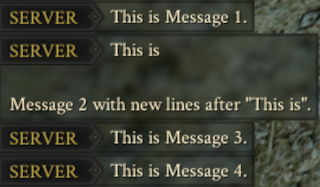
[TakiSlomo-BeforeEnd] Enabled=True Speed=0.5 Seconds=30 Message=SLOWLY cronch heads now!
[TakiSlomo-End] Enabled=True Speed=1.0 Message=Enough SLOW cronching! Match Ended...
[TakiSlomo-Misc] WarmupTime=5.0 MapChangeTime=25.0 SlowSpawning=False
</pre>
Desc.:
[TakiSlomo-General]
Enabled=Bool | Enables/Disables Slomo when round starts.
Speed=Float | Sets the speed for this mode
[TakiSlomo-BeforeEnd]
Enabled=Bool | Enables/Disables Slomo X seconds before match ends
Speed=Float | Sets the speed for this mode
Seconds=Int | Sets the time in seconds (before match ends) at which this mode should be activated
Message=String | Set Message to send when this mode starts | Optional - It sends no message if not defined
[TakiSlomo-End]
Enabled=Bool | Enables/Disables Slomo set when match ends.
Speed=Float | Sets the speed for this mode
Message=String | Set Message to send when this mode starts | Optional - It sends no message if not defined
[TakiSlomo-Misc]
WarmupTime=Float | The time in seconds, players are "freezed" when a new round starts.
MapChangeTime=Float | The time in seconds, to stay on the MatchEnd/MapVote screen (watch out this actually runs down faster/slower with the slomo speed).
SlowSpawning=Bool | Enables/Disables respawn cooldown.
Checkout my other Serverside Mods:
Highlights
From source dataFootprint
Rated a light load on a server.
Last update
Its author last shipped an update 3 yr ago.
Slomo Manager v2 on Nxeon
From our catalogue- One-click install
- Not available. One-click install isn't available for this game's mods yet. Download it and upload it to your server in Files.
- Server load
- light
- Smallest plan we suggest
- Mordhau — 4 GB (4 GB RAM). This follows our own load rating above, not a benchmark.
- Latest build
- 2.0.0, released 2021-09-16
Run Slomo Manager v2 on a Mordhau server
Deploy a server above, then upload the file in Files.
What kind of mod it is
From the catalogServerside Only
Its source category doesn’t say more about what it does, so NxLabs lists it under Other.
Compatibility
- Game
- Mordhau
Verified at the source
- ✓mod.ioOfficial listing, checked 2026-10-30Open ↗
- ✓AuthorTaki7o7, as published on mod.io
- ✓LicenseNot published by the sourceFree