






About Color (nearly) Everything
From Steam WorkshopFull Description: What can you do? Recolor nearly everything, tiles, objects, pets, mounts, clothes, weapons, tools, liquids, terrain, really, pretty much anything The Regions for which to apply a…
Full Description:
What can you do?
Recolor nearly everything, tiles, objects, pets, mounts, clothes, weapons, tools, liquids, terrain, really, pretty much anything
The Regions for which to apply a different color (5 regions max right now) get automatically detected via algorithm
If one object has incorrectly assigned regions or you want to add more or just change them in general to e.g. generate wallpapers (watch the video) then you can use the pixel editor to do all this yourself and either apply a unique design on a single object or apply it automatically to all objects of that type (they need to be recolored for the pixel edited variants to show though, an uncolored object will always default to vanilla colors / regions)
All variants you create get stored in a library so you can either apply them from there again or even set them as default for all objects of said type (or delete the variant altogether)
The color picker to select colors has a hex field for direct hex input, 24 favorite fields for your most used colors for you to assign and a color picker if you want to select a vanilla color, in case you just want a color a bit brighter or darker or something
There is a config file where you can adjust the parameter of the algorithm and the one for color application if you are brave and want to play around with it but it took me weeks to fine tune this and this is the best i came up with so caution is advised here
All info gets stored per world
Fully dedicated multiplayer compatible!
/////////////////////////////////////////////////
Important info for dedicated / multiplayer only:
The ability to set a new variant as default for all objects is reserved to at least moderator privileges (or admin / owner) as this shows for every person on the server for the same object / tile
If multiple people color the same object / tile then each will see their own
if multiple people colored something but you didnt yourself then the coloration of the first person to color it shows (but you can also remove it for yourself and return to vanilla if you want)
if an object gets destroyed, the color info gets removed for everyone, so a new placed object will have vanilla colors again
//////////////////////////////////////////////
How to use?
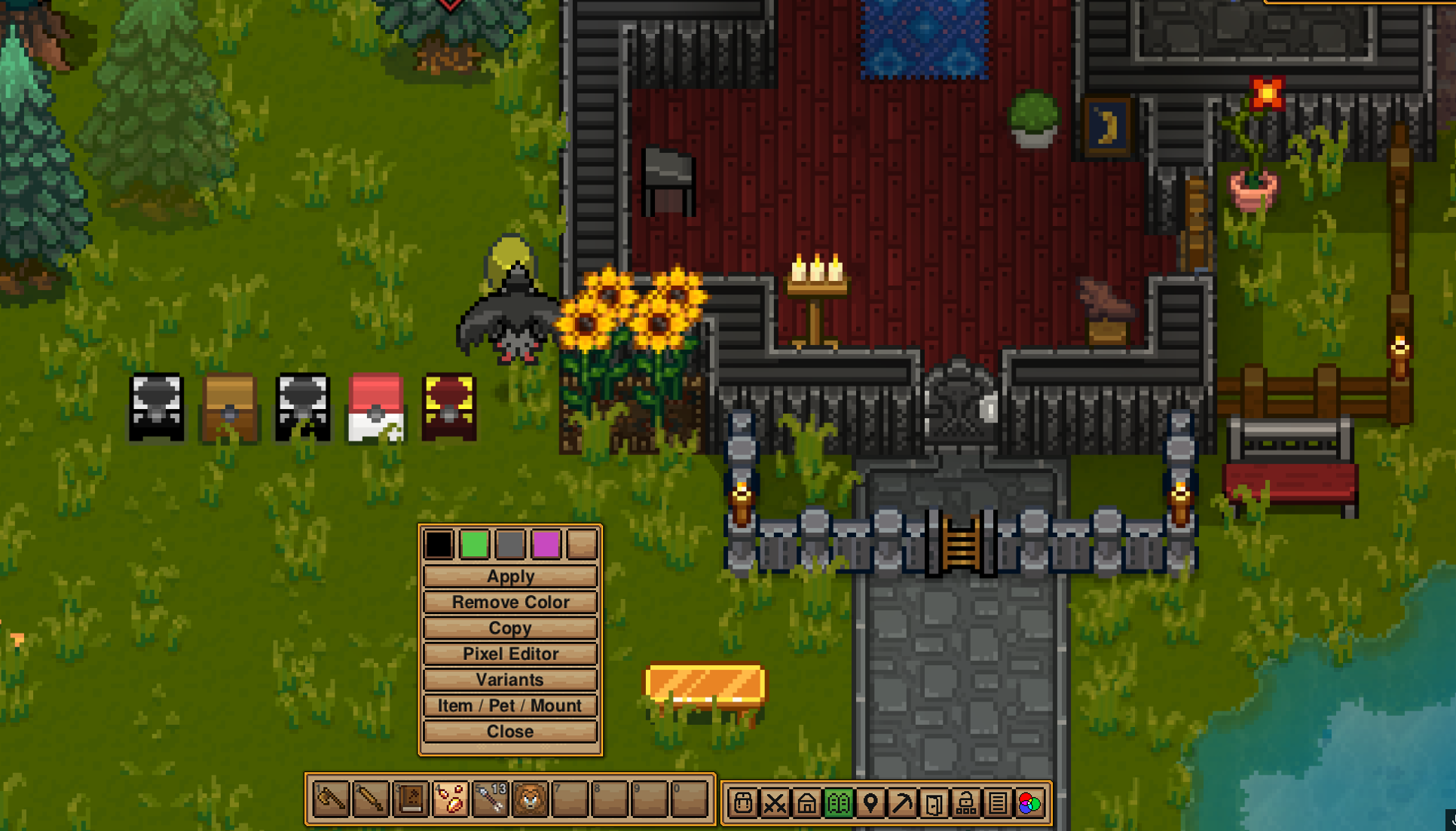
Press N or click on the color menu button to open the main window
Select the slots at the top to pick the color you want. an empty slot will just use vanilla colors for that region
Hit apply and select the object / tile you want to color
You can hit R when selecting the object to cycle through the layers to pick the item you want. by default it picks objects first. if you want to get to the tiles, hit R, even if no object is there (this might be subject to change)
The color selection window has a + sign at the left in front of 6 slots each. clicking the + will add the currently selected color to the favorites. if you add more to a row then there are slots the last one will be moved out.
There is also a color picker on the color selection window to pick the visible color under the cursor
Clicking copy will let you pick an object / tile with the first click and then lets you select another area or single tile to apply the same color / region variant to only the exact same object type
Clicking remove color will let you (surprise) remove colors and a potential region variant from an object or tile. back to vanilla.
Clicking on pixel editor will give you the option to select an object or tile to create your own color region variant of it and either apply it to all objects of that type for a general change or to just this specific selected object / tile
You can zoom into each picture in the pixel editor with your scroll wheel and pan around with holding your right mouse button
the pixel editor also has multiple tools, like 1, 3 and 5 pixel brush and line tool as well as an undo and redo button
to change the regions just select the color region in the tool that you want to apply and just draw over the color region map (or chose the color with the X to remove parts of the color region map to keep it vanilla colored)
you can apply the changed region to either just this instance of the object or all instances of this object via the toggle
The Variant Browser is a catalogue of all your existing variants for you to directly apply them from there, set them as default for all tiles or delete them altogether
Item / Mount / Pet does exactly what it sounds like. it opens a new window where you can select pretty much any item that has a visual representation in the world (like clothes / cosmetics, armors, weapons, tools, pets, mounts) and lets you color them or apply your own color region variants to them
the item / pet / mount changes get saved in the item data itself so if you color your katana and hand it over to your friend, it will still have the same coloration
////////////////////////////////////////////
General info:
the mod needed a lot of different ways to handle different item types (liquids, terrain, path tiles, normal tiles, objects, multitile objects, wall objects, fence objects, walls, doors, windows, beds, flowers, seeds, grass) which means there might be still things missing that arent colorable right now. let me know so i can add them
all that also means that despite heavy testing, i might miss a bug here and there where maybe a certain item is not colorable or variants not being applied to water grass or something. i tried my best but if you notice something unusual, let me know and i will have a look at it
If you find any bugs in general, please let me know what you did and to what you did it. This is by far my biggest mod to date so please let me know if you like it :)
////////////////////////////////////////////////
Currently known limitation:
Highlights
From source dataFootprint
Rated a light load on a server.
Last update
Its author last shipped an update 18d ago.
Color (nearly) Everything on Nxeon
From our catalogue- One-click install
- Supported on Nxeon Necesse servers. We download it from Steam Workshop, place it, and restart the server.
- Server load
- light
- Smallest plan we suggest
- Necesse — 1 GB (1 GB RAM). This follows our own load rating above, not a benchmark.
- Latest build
- 2026-09-28, released 2026-09-28
Game versions by loader
| Loader | Game versions | Newest |
|---|---|---|
| Workshop |
From 1 recorded build of Color (nearly) Everything.
Run Color (nearly) Everything on a Necesse server
Pick a server or deploy a new one above; it is installed in one click.
What kind of mod it is
From the catalogCreatures & NPCs
Adds or changes creatures, NPCs and how they behave.
Compatibility
- Game
- Necesse
Verified at the source
- ✓Steam WorkshopOfficial listing, checked 2026-10-16Open ↗
- ✓AuthorTheAlmightyLootius, as published on Steam Workshop
- ✓LicenseNot published by the sourceFree









