







About MultiTools
From Steam WorkshopMultiTools Adds the Planner and tiered Pivelaxes to aid in building and mining. The Planner features automatic placement of placeable items filling a rectangular dimension, while Pivelaxes offer…
MultiTools
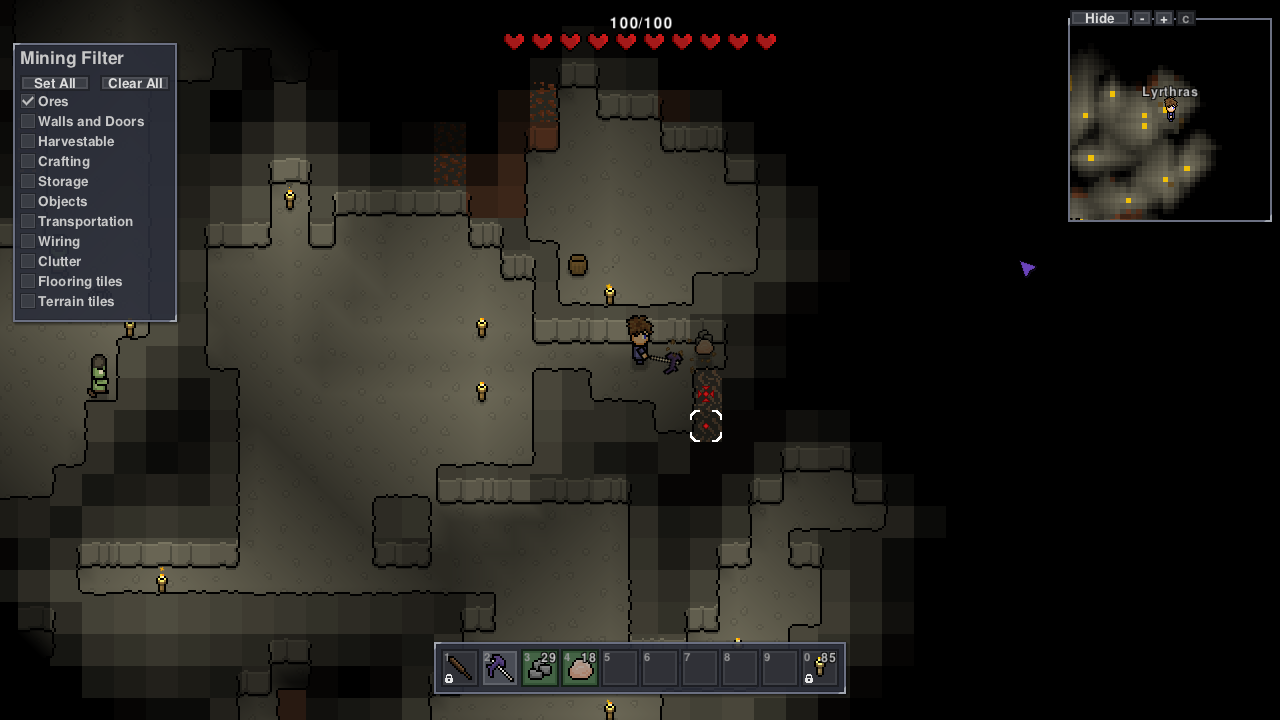
Adds the Planner and tiered Pivelaxes to aid in building and mining. The Planner features automatic placement of placeable items filling a rectangular dimension, while Pivelaxes offer simultaneous and queued mining, and additionally a mining filter to suit any need.
Singleplayer and multiplayer-tested with local server.
Crafting
The Planner is crafted at a workstation using 4 Map Fragments and 1 Gold Bar. Tiered Pivelaxes require 1 pickaxe, 1 axe, and 1 shovel of the respective tier. The last tier Pivelaxe (hidden) requires 2 pickaxes of that tier.
Usage
The Planner:
- Click (or equivalent) in your inventory to open the container slot for the Planner.
- Place a stack of a placeable item (walls, tiles, buckets, 1x1 objects) into the Planner. NOTE: The Planner always keeps a single item in it unused, so make sure to put more than one!
- Click anywhere on the world to specify the first corner of the rectangle you want to fill.
- Click on the world the the other corner of the rectangle to be filled. Automatic placement starts.
- With the automatic placement process, come near the crosshair marks (often at the corners) to see the items placed!
- Do note that placement always begins at the corners of the rectangle you specify, and continues where the crosshairs are marked at.
- Click again to clear the targets. You can start to create another rectangle somewhere.
Pivelaxes: [*] With a Pivelaxe held, a pane to the left of the screen allows you to filter what you can mine with the tool. (Filter settings are saved per tool!) [*] Hover over a filter item to see what that filter corresponds to: it will highlight tiles on the world that the hovered item can break. [*] Check the boxes of the tiles or objects you want to break. [*] Mining without smart mining: Hold-click on top the tiles you want to break. If it's within the filter, indicators will show. It won't target tiles not in the filter. [*] Mining with smart mining: Hold-click far from the player to auto-target mineable blocks (within the filter), moving the smart mine cursor to next valid tiles after locking targets. Holding click near the player manually targets tiles you hover on instead. [*] A crosshair indicator shows that a tile is being mined/broken. [*] A solid dot indicator shows that a tile is queued, meaning it'll be mined soon after current ones successfully break. [*] A semitransparent dot indicator means a tile is targeted but you are too far from it. [/list]
Tiers
Note that Pivelaxes have 80% of the corresponding Pickaxe mining speed to balance out simultaneous mining. That means vanilla Pickaxes still breaks a singular tile faster than a Pivelaxe. Pivelaxes can only be crafted from the Gold tier and up, with each tier with improved stats.
- Gold: up to 2 tiles being mined simultaneously, up to 6 targets in queue.
- Frost: up to 3 tiles being mined simultaneously, up to 8 targets in queue.
- Demonic: up to 4 tiles being mined simultaneously, up to 10 targets in queue.
- Ivy: up to 5 tiles being mined simultaneously, up to 12 targets in queue.
- Tungsten: up to 6 tiles being mined simultaneously, up to 16 targets in queue. +1 tile added mining range.
- ???: up to 8 tiles being mined simultaneously, up to 24 targets in queue. +2 tiles added mining range.
[hr][/hr] Github source repository: github.com/DraSouls/Necesse-MultiTools
Bugs and feedback welcome! Use the Discussion below to report bugs. (P.S. Again, I'm not a spriter, do tell if the sprites are good or bad, or what can be improved with the textures!)
Other mods
Check out other mods made by us ^^ NullStorage - Automatically delete excess items in pouch or storagebox form. StackReplaceTweak - Automatically replace a stack on hand when it depletes.
Highlights
From source dataFootprint
A 209 KB download, rated a light load on a server.
Last update
Its author last shipped an update 4 yr ago.
MultiTools on Nxeon
From our catalogue- One-click install
- Supported on Nxeon Necesse servers. We download it from Steam Workshop, place it, and restart the server.
- Server load
- light
- Smallest plan we suggest
- Necesse — 1 GB (1 GB RAM). This follows our own load rating above, not a benchmark.
- Latest build
- 2023-03-31, released 2023-03-31, 209 KB
Game versions by loader
| Loader | Game versions | Newest |
|---|---|---|
| Workshop |
From 1 recorded build of MultiTools.
Run MultiTools on a Necesse server
Pick a server or deploy a new one above; it is installed in one click.
What kind of mod it is
From the catalogWeapons, items & crafting
New weapons, gear, items and the recipes to make them.
Compatibility
- Game
- Necesse
- File size
- 209 KB
Verified at the source
- ✓Steam WorkshopOfficial listing, checked 2026-10-10Open ↗
- ✓AuthorLyrthras, as published on Steam Workshop
- ✓LicenseNot published by the sourceFree









