






About Sapphire Beam
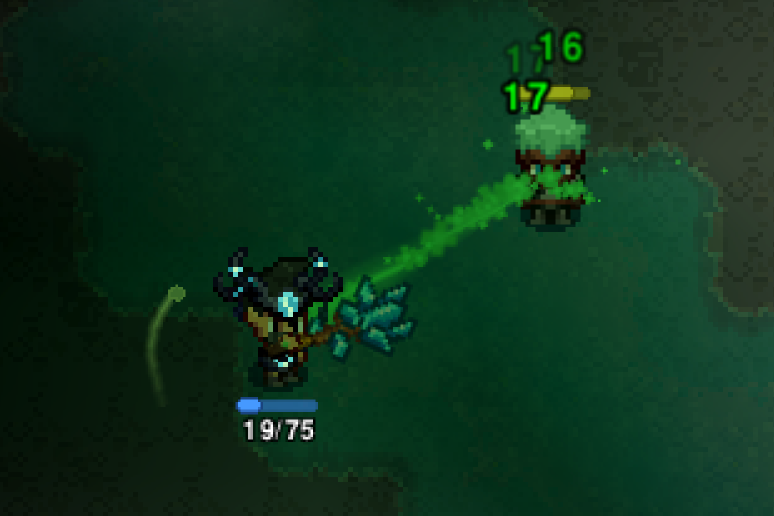
From Steam WorkshopReworks the Sapphire Staff into a fully featured support weapon: a chaining beam on left-click and a two-mode channeled beam on right-click, both paid for out of your life essence. Left-click - chain…
Reworks the Sapphire Staff into a fully featured support weapon: a chaining beam on left-click and a two-mode channeled beam on right-click, both paid for out of your life essence.
Left-click - chain beam
- Replaces the crystal bolt with a beam that snaps to the nearest enemy and chains through up to 3 targets.
- Slows enemies (30% for 2.5s).
- Grants life essence on the same budget the vanilla bolt used.
Right-click - channeled beam, two modes
Press the mode key (Y by default, rebindable in Settings -> Controls) to swap. The current mode is shown on the essence gauge below your character.
- Heal (green) - hold right-click to lock onto the most wounded ally near your cursor and channel healing into them. Auto-releases the moment they hit full health, so you never waste essence. Falls back to yourself when no ally is near the cursor - and a self-heal chains out too.
- Empower (amber) - hold right-click on an ally to give them attack speed, damage, and a flat share of your own staff's damage on every hit they land
Both modes chain to a second ally near your target, and drain life essence fractionally (each essence orb is 15 internal stacks)
Gear matters
- Life essence gain gear (Runic hat and set bonus, Essence of Perspective / Rebirth) scales your healing power - half the bonus becomes healing, so +250% essence gain is +125% healing.
- Life Essence Duration percentage slows the rate the beam burns life essence.
- The same gear walks Empower up its curve: from +20% attack speed / +15% damage / 10% of your staff's damage per hit at no essence gain, to +45% / +30% / 20% at +300%.
- At +150% essence gain the beam unlocks a second chain, running caster -> target -> ally -> ally.
- The full Runic set adds +10 armor penetration to everyone you Empower.
- Upgrading the staff adds up to +50% healing at max tier, the way the old glyph scaled.
Configuration file
cfg/mods/etto.sapphirebeam.cfg (in the game's config folder; on a dedicated server with -localdir it's in the server folder). Edit and restart.
Channel:
- healPercentPerSecond - default 5.0, range 0.5-100. Percent of the target's max health healed per second.
- essenceStacksPerSecond - default 5.0, range 0.5-150. Stacks drained per second while healing (15 stacks = 1 essence orb).
- chainEnabled - default true. chainRangeTiles - default 6. chainExtraStacksPerSecond - default 5.0, extra drain while a chain is actively working.
- beamRangeTiles - default 20, range 4-40. Max beam length from the caster.
- cursorSnapTiles - default 4, range 1-16. How close to your cursor an ally must be to get locked on.
- allowSelfHeal - default true. Heal mode only.
- upgradeHealBonusAtMax - default 0.5. Extra healing on a fully upgraded staff.
- essenceGainHealScaling - default 0.5, range 0-5. How much life essence gain gear boosts healing. 0 disables.
- secondChainEssenceGainBonus - default 1.5. Essence gain bonus needed to unlock the second chain.
- channelAnimMillis - default 160, range 60-1000. Cast animation length while channeling; lower feels snappier (the staff's own default is 650).
- channelKeepAliveMillis - default 400, range 150-2000. How long the beam persists after you let go.
Empower:
- Each pair below is the value with no essence gain gear and the value at empowerMaxEssenceGain, interpolated in between.
- [list]
- empowerAttackSpeedPercent / empowerAttackSpeedPercentMax - defaults 20 and 45.
- empowerDamagePercent / empowerDamagePercentMax - defaults 15 and 30.
- empowerDamageSharePercent / empowerDamageSharePercentMax - defaults 10 and 20. Percent of the caster's staff damage added flat to each of the ally's hits.
- empowerMaxEssenceGain - default 3.0 (+300%). Where the curve tops out.
- empowerStacksPerSecond - default 5.0. Essence drained per second while empowering.
- empowerRunicArmorPen - default 10, range 0-200. Flat armor penetration granted while the caster wears the full Runic set. 0 disables.
Left-click beam:
- attackRangeTiles - default 20. attackMaxTargets - default 3. attackChainRangeTiles - default 8, max jump between enemies.
- attackDamageMultiplier - default 0.85. Multiplier on the staff's damage per target, paying for the fact that the beam always connects and applies a free slow.
- attackSlowPercent - default 30. attackSlowSeconds - default 2.5.
- attackEssenceHits - default 2. How many hits per cast grant life essence (matches the vanilla projectile).
- attackManaCost - default 2.25.
Multiplayer
Server and all players need the mod installed. The server's balance settings are what the beam actually uses - healing, empowering, damage and targeting are all server-authoritative.
Highlights
From source dataFootprint
A 430 KB download, rated a light load on a server.
Last update
Its author last shipped an update 2 mo ago.
Sapphire Beam on Nxeon
From our catalogue- One-click install
- Supported on Nxeon Necesse servers. We download it from Steam Workshop, place it, and restart the server.
- Server load
- light
- Smallest plan we suggest
- Necesse — 1 GB (1 GB RAM). This follows our own load rating above, not a benchmark.
- Latest build
- 2026-08-11, released 2026-08-11, 430 KB
Game versions by loader
| Loader | Game versions | Newest |
|---|---|---|
| Workshop |
From 1 recorded build of Sapphire Beam.
Run Sapphire Beam on a Necesse server
Pick a server or deploy a new one above; it is installed in one click.
What kind of mod it is
From the catalogWeapons, items & crafting
New weapons, gear, items and the recipes to make them.
Compatibility
- Game
- Necesse
- File size
- 430 KB
Verified at the source
- ✓Steam WorkshopOfficial listing, checked 2026-10-16Open ↗
- ✓AuthorEtto, as published on Steam Workshop
- ✓LicenseNot published by the sourceFree









