






About Auto Loot B41
From Steam WorkshopWith this mod looting is done automatically. With this mod store your loot in one click. So you are here ? Ah.. you're bored of spending your life looting dead corpses and searching through…
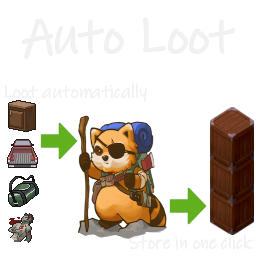
With this mod looting is done automatically. With this mod store your loot in one click.
So you are here ? Ah.. you're bored of spending your life looting dead corpses and searching through furnitures.. You've come to the right place.
How to access your loot selection
You can (and should) change your configuration. You can access the configuration page:
- Whenever, by pressing the key selected under options >> key bindings tab >> UI >> Auto Loot Config (default key is NONE).
- From Game, press escape >> select options >> select mods tab >> under Auto Loot part >> click on Change Configuration tick box.
- From Main Menu, select options >> select mods tab >> under Auto Loot part >> click on Change Configuration tick box.
How to modify your loot selection
On the configuration page, you have tools to help you change your configuration quickly:
- Filter on unique ID.
- Filter on displayed name.
- Filter on category through a combo box.
- Filter on display category through a combo box.
- Green and red buttons apply on current filter.
- Double click on an item for individual selection.
See this video for a full exemple of the configuration interface. Alternatively -I do not recommend but- you can add/remove an item type through contextual menu.
Toggle ON / OFF
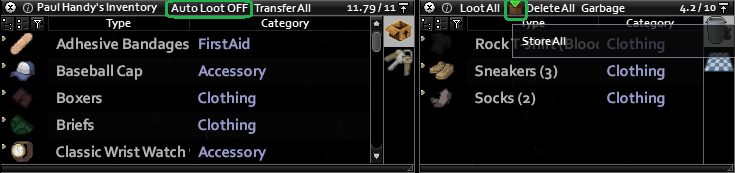
- Toggle Auto Loot ON / OFF by pressing the text button on vanilla inventory window.
- Toggle Auto Loot ON / OFF by pressing the key selected under options >> key bindings tab >> UI >> Auto Loot Toggle (default key is NONE).
How to store your loot ?
This functionnality is an evolution of the great mod SmartStack. By clicking on Store All icon/button, all items that are not equipped or favorite will be spread onto any reachable container that already has an instance of the same item.
Annex functions
- ModOptions allows to tune the mod a lot.
- Sandbox option Loot Mode allows select one single mod for the whole server.
- Sandbox options allows to deactivate bag priority option (if you find the function useless and do not wanna clog your contextual menu).
- Sandbox options allows to deactivate bag filter option (if you find the function useless and do not wanna clog your contextual menu).
- Sandbox options allows to deactivate bag activation/inhibition option (if you find the function useless and do not wanna clog your contextual menu).
- Sandbox options allows to deactivate item type add/remove option (if you find the function useless and do not wanna clog your contextual menu).
- You can permanently inhibit Auto Loot on a furniture or vehicle through a contextual "Inhibit/Activate" toggle.
- Inventory tooltip is added to Item List (both for the vanilla Debug and for the Autoloot configuration).
- Inventory icon of modded item is corrected in the Item List (for the Autoloot configuration).
- Inventory weight overlap is corrected.
You have questions ?
- Works in solo and multiplayer.
- Can be added / removed mid game.
- The mod still works, it will be tagged obsolete otherwise.
- Check the tutorial video.
- Any other question should be answered in the FAQ.
Tips & Limitations
- Keep default settings (except loot configuration) for a vanilla friendly experience.
- Set Auto Loot OFF in order to not plunder your own carefully ordered base.
- KeyRing has the highest priority: "1" and cannot be changed.
- If you wanna use Necroforge mod without Necroforge breaking the Vanilla Item List, activate AutoLoot mod after Necroforge mod. Moveables are mostly deactivated.
- In case of mismatch between client and server in multiplayer, Follow the steps here.
Credits
- YingSuHuaKai for the tests and reports.
- Snlon for Smart Stack.
That's it.
Why are you still here ? What ? You also wanna loot burnt Zs before they are consumed with their precious loots while being chased by a horde of runners ? I guess if you play with runners I can give you a secret.. you can activate the Instant Loot mode through ModOptions.. but beware ease is a close friend of boredom.
If you still have questions, ask on Official PZ Discord: mod_support channel.
Workshop ID: 2577903374 Mod ID: AutoDrop
Highlights
From source dataFootprint
Rated a light load on a server.
Last update
Its author last shipped an update 3 yr ago.
Auto Loot B41 on Nxeon
From our catalogue- One-click install
- Supported on Nxeon Project Zomboid servers. We download it from Steam Workshop, place it, and restart the server.
- Server load
- light
- Smallest plan we suggest
- Project Zomboid — 6 GB (6 GB RAM). This follows our own load rating above, not a benchmark.
- Latest build
- 2023-07-01, released 2023-07-01
Game versions by loader
| Loader | Game versions | Newest |
|---|---|---|
| Workshop |
From 1 recorded build of Auto Loot B41.
Dependencies
- Required: Mod Options (Build 41)
Declared by the newest build that lists any. Required ones are installed with it on one-click installs.
Run Auto Loot B41 on a Project Zomboid server
Pick a server or deploy a new one above; it is installed in one click.
What kind of mod it is
From the catalogQuality of life & UI
Small conveniences, tweaks and interface improvements players notice straight away.
Compatibility
- Game
- Project Zomboid
Verified at the source
- ✓Steam WorkshopOfficial listing, checked 2026-11-01Open ↗
- ✓AuthorTchernobill, as published on Steam Workshop
- ✓LicenseNot published by the sourceFree















