






About Auto Mechanics B41
From Steam WorkshopSo you are here ? Ah.. you wanna play with cars but you lack experience. You've come to the right place. At least if you are using B41 or previous versions.…
So you are here ? Ah.. you wanna play with cars but you lack experience. You've come to the right place.
At least if you are using B41 or previous versions. The version for B42 and further versions if here. All questions that are not answered below will be answered by the community on the Official Project Zomboid Discord mod_support channel.
How to ?
- Get a Screwdriver, a Wrench, a Lug Wrench and a Jack.
- Ensure you've read the book associated with your car.
- Find a car you can spare, and just start training with serenity.
- On vehicle mechanics menu, right click any mounted part and left click on Train Mechanics button.
Mod Options
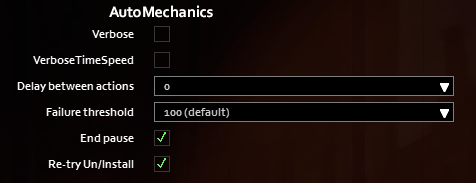
- When using the awesome ModOptions, you'll have access to these options.
- Verbose options are logs that reduce (a lot) performances: only for debug analysis.
- If your character does not reinstall desinstalled parts: increase the "Delay between actions".
- You can select a threshold for uninstall attempts depending on risks of breaking the part.
- You can use or not a pause at the end of all actions (e.g. when using time speed increase for a full training).
- You can re-try vanilla Uninstall and Install actions until they succeed.
Sandbox Options
- You can enfore the failure threshold server side in multiplayer.
- The lowest (most limiting) value between the client value (mod option) and the server value (sandbox option) is used.
- It is 0 by default.
Tips and Tricks
- Remember there is no need to train more than once a day (per car).
- You can increase game speed in solo mode.
- A mismatch between client and server with B41 Multiplayer? Follow the steps here.
- The training can reach a stall due to pathfinding. Keep a lot of free space around the car to avoid this.
- Broken items will be dumped. (items you uninstalled and cannot reinstall will not be. e.g. a tire will not be reinstalled nor dropped if the suspension is broken and dropped)
- Make sure to disable re-equipment before "Train Mechanics" if you're using the Tidy Up Meister mod.
- This mod can be added to or removed from any save (both MP and solo).
- Project Zomboid gives much freedom to players and modders, but there are tricky stuff I will not explain a thousand times in the comments below.
Credits
- Compatible B40&B41 multiplayer thanx to MamaKonda.
- Uninstall all integrated from Deadly_Shadow's "hack".
On Lockdown This mod cannot be modified by anyone else, for anything else, at all, ever. Even if the user disappears, he or she would much rather you didn't touch the fruits of their hard labour.
That's it.
Why are you still here ? There is nothing more for you here. Get lost ! .. let me remember my first student, sweet Kaylee..
Workshop ID: 2588598892 Mod ID: AutoMechanics
Highlights
From source dataFootprint
Rated a light load on a server.
Last update
Its author last shipped an update 2 yr ago.
Auto Mechanics B41 on Nxeon
From our catalogue- One-click install
- Supported on Nxeon Project Zomboid servers. We download it from Steam Workshop, place it, and restart the server.
- Server load
- light
- Smallest plan we suggest
- Project Zomboid — 6 GB (6 GB RAM). This follows our own load rating above, not a benchmark.
- Latest build
- 2024-09-16, released 2024-09-16
Game versions by loader
| Loader | Game versions | Newest |
|---|---|---|
| Workshop |
From 1 recorded build of Auto Mechanics B41.
Run Auto Mechanics B41 on a Project Zomboid server
Pick a server or deploy a new one above; it is installed in one click.
What kind of mod it is
From the catalogQuality of life & UI
Small conveniences, tweaks and interface improvements players notice straight away.
Compatibility
- Game
- Project Zomboid
Verified at the source
- ✓Steam WorkshopOfficial listing, checked 2026-11-01Open ↗
- ✓AuthorTchernobill, as published on Steam Workshop
- ✓LicenseNot published by the sourceFree















