







About [B41&B42] Show Wall Health
From Steam WorkshopB41 and B42 version AVAILABLE NOW! Have you ever wondered how long your gate/wall/anything lasts? Well, now you know and you can prepare for the next horde. Just right click on whatever you've built,…
B41 and B42 version AVAILABLE NOW!
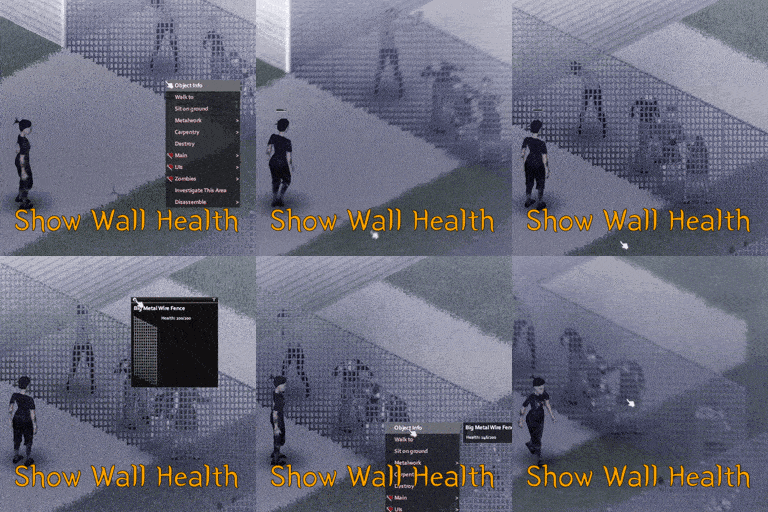
Have you ever wondered how long your gate/wall/anything lasts? Well, now you know and you can prepare for the next horde.
Just right click on whatever you've built, then hover on the "Check Status" menu, and if you're closer you can just hover over his options to see its health.

Details
- Works in Multiplayer / Coop / Singleplayer
- Safe to be added / removed for any save.
- Checking health works for everything you built from right click menu and some other objects like doors.
- Have preview like generator, so you can see on which wall you looking.
- If you're too far, you won't have the health on hover. You need to click on the button or get closer by yourself.
- Cool-looking menu.
- Sandbox settings
Known Issues
- Some names might be junky like "MetalWindow1", they named them like that. I might do my translation after some time.
Mod Compatibility
- Every mod that adds/change "Destroyable" things should work with it.
- (Examples: Destroyable World Fences)
- If you want to make sure the mod is compatible, the object instance must be "IsoThumpable" / "IsoDoor".
Want more?
Join me on Discord to stay up to date! You can suggest or report anything there, you can also join the pz modding community ;).


Made by Kamer * Workshop_ID: 3002666175 * Mod_ID: KAMER_WallHealth * Version: 2.1
Highlights
From source dataFootprint
Rated a light load on a server.
Last update
Its author last shipped an update 36d ago.
[B41&B42] Show Wall Health on Nxeon
From our catalogue- One-click install
- Supported on Nxeon Project Zomboid servers. We download it from Steam Workshop, place it, and restart the server.
- Server load
- light
- Smallest plan we suggest
- Project Zomboid — 6 GB (6 GB RAM). This follows our own load rating above, not a benchmark.
- Latest build
- 2026-09-28, released 2026-09-28
Game versions by loader
| Loader | Game versions | Newest |
|---|---|---|
| Workshop |
From 1 recorded build of [B41&B42] Show Wall Health.
Run [B41&B42] Show Wall Health on a Project Zomboid server
Pick a server or deploy a new one above; it is installed in one click.
What kind of mod it is
From the catalogQuality of life & UI
Small conveniences, tweaks and interface improvements players notice straight away.
Compatibility
- Game
- Project Zomboid
Verified at the source
- ✓Steam WorkshopOfficial listing, checked 2026-11-01Open ↗
- ✓AuthorKamer, as published on Steam Workshop
- ✓LicenseNot published by the sourceFree















