






About [B42]DebugMenu
From Steam WorkshopDebugMenu — Build 42 A comprehensive debug toolset for Build 42. Access everything from the right-click context menu. Features Brush Tools — Tile brush, fire brush, removal brush for map editing…
DebugMenu — Build 42
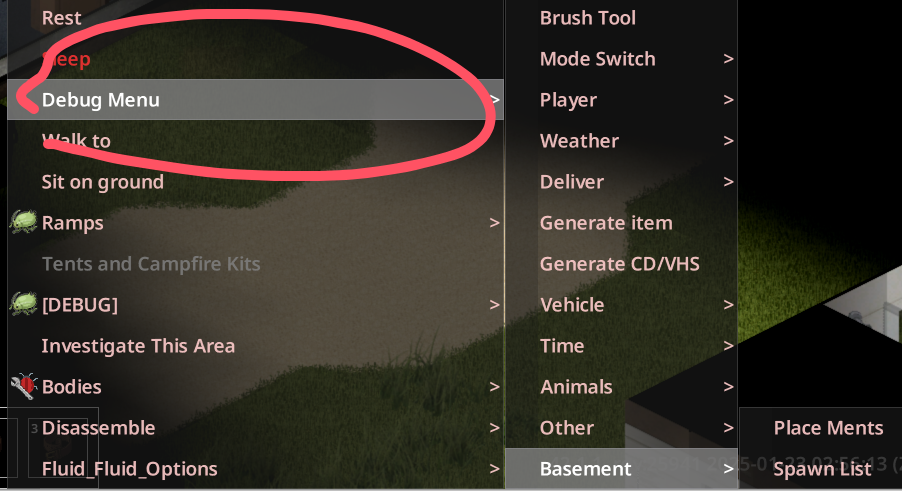
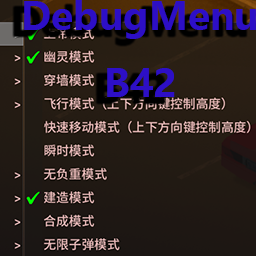
A comprehensive debug toolset for Build 42. Access everything from the right-click context menu.[/quote] [hr][/hr] [h2]Features[/h2] [list] [*]Brush Tools — Tile brush, fire brush, removal brush for map editing [*]Player Debug — Modify stats, skills, traits, and professions [*]Item Generator — Visual interface to search and spawn any item [*]CD / VHS Generator — Spawn all skill media items in one click [*]Vehicle Management — Spawn and debug vehicles [*]Weather Control — Change weather on the fly [*]Time Control — Fast-forward, pause, or reverse game time [*]Teleport System — Coordinate teleport, respawn point teleport [*]Basement Debug — View and teleport to all generated basements [*]Animal Debug — Support for B42 animal system [*]Mode Toggle — God mode, no-clip, and more [*]Misc Tools — Item duplication, deletion, crafting debug [*]Multiplayer Support [*]Chinese Localization [/list] [hr][/hr] [h2]How to Use[/h2] [olist] [*]Enable the mod and enter the game [*]Right-click on the ground or any object [*]Select "Debug Menu" from the context menu [*]Choose a function from the submenu [/olist] [h3]Cheat Features — Extra Steps[/h3] In single-player, features like God Mode require manual file replacement: [olist] [*]Navigate to your game directory and locate projectzomboid.jar [*]Open the jar file with compression software (WinRAR / 7-Zip) [*]Drag the zombie folder from the mod directory into the jar and overwrite [*]Restart the game [/olist] [hr][/hr] [h2]Changelog[/h2] [list] [*]Fixed synthesis, construction, and mode issues [*]Fixed item duplication [*]Fixed respawn point teleport [*]Added item deletion [*]Added animal debugging [*]Added basement debugging [*]Fixed "obtain all recipes" failure [*]Item generator now uses double-click to spawn [*]Fixed multiplayer issues [*]May 16 — Adapted to B42.18 [/list] [hr][/hr] [h2]Notes[/h2] [list] [*]Build 42 only [*]In multiplayer, only admins can use the debug menu [*]Multiplayer servers are supported but untested [/list] Workshop ID: 3386556284 Mod ID: QNWDebugMenuB42
Highlights
From source dataFootprint
Rated a light load on a server.
Last update
Its author last shipped an update 3 mo ago.
[B42]DebugMenu on Nxeon
From our catalogue- One-click install
- Supported on Nxeon Project Zomboid servers. We download it from Steam Workshop, place it, and restart the server.
- Server load
- light
- Smallest plan we suggest
- Project Zomboid — 6 GB (6 GB RAM). This follows our own load rating above, not a benchmark.
- Latest build
- 2026-08-08, released 2026-08-08
Game versions by loader
| Loader | Game versions | Newest |
|---|---|---|
| Workshop |
From 1 recorded build of [B42]DebugMenu.
Run [B42]DebugMenu on a Project Zomboid server
Pick a server or deploy a new one above; it is installed in one click.
What kind of mod it is
From the catalogListed on Steam Workshop as “QoL”
Quality of life & UI
Small conveniences, tweaks and interface improvements players notice straight away.
Compatibility
- Game
- Project Zomboid
Verified at the source
- ✓Steam WorkshopOfficial listing, checked 2026-11-01Open ↗
- ✓Author耄耋耄耋耄, as published on Steam Workshop
- ✓LicenseNot published by the sourceFree















