






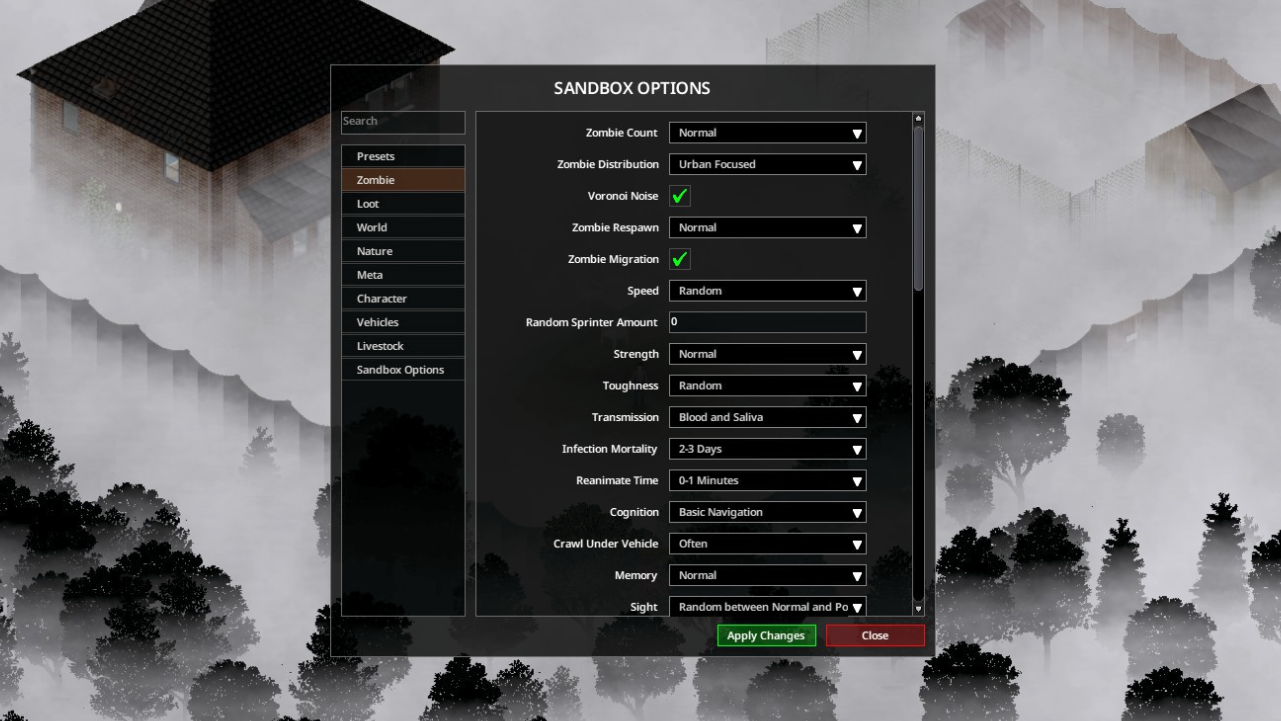
About [B42+] Sandbox Options
From Steam Workshop🛠️ Reminder! This mod is made for Build 42+. This mod allows you to open the Sandbox Options menu that is already built into the game. You don’t need to use this mod in multiplayer, since the…
🛠️ Reminder!
This mod is made for Build 42+.
This mod allows you to open the Sandbox Options menu that is already built into the game.
You don’t need to use this mod in multiplayer, since the Sandbox Options menu is already available in the Admin Panel.
If any options in the Sandbox Options Menu are missing or not working, wait for the next game updates.
---

--
⚙️ How to Use
- You can change the keybind from: Options > Mods section. - To disable the right-click context menu option or to turn off the advanced options, uncheck the corresponding setting under the Sandbox Options category in the Sandbox Options. > ⚠️After unchecking, exit to the main menu and reload your save for the change to take effect.
---
👥Multiplayer Instructions
❕You don’t need this mod in multiplayer, as you can access the Sandbox Options directly through the Admin Panel.
If you want to use this mod in multiplayer, you must be an admin to make changes in Sandbox Options.
To become an admin, type in the chat: /setaccesslevel "playerName" admin
If you want to revert to a normal player, type: /setaccesslevel "playerName" user
⚠️Keep in mind that even in singleplayer, after making changes, you need to exit and re-enter your save for the changes to work properly. In multiplayer, doing this could disrupt your gameplay, so be aware.
---
💡 If the mod does not work on an existing save
Follow these steps: [olist] [*]From the main menu, click *Load* [*]Select the save you want to use the mod with [*]Click *More* (bottom-right corner) [*]Choose *Mods* (top-left corner) [*]Enable this mod from the mod list [*]Enter the save where you have activated the mod. [/olist]
Once enabled, right-click anywhere in-game and you’ll see Sandbox Options will be among the options that appear.
---
📦 Extra
Want to save your Sandbox settings?
[B42] Sandbox Preset Saver

Workshop ID: 3386906181 Mod ID: SandboxSettings
Highlights
From source dataFootprint
Rated a light load on a server.
Last update
Its author last shipped an update 31d ago.
[B42+] Sandbox Options on Nxeon
From our catalogue- One-click install
- Supported on Nxeon Project Zomboid servers. We download it from Steam Workshop, place it, and restart the server.
- Server load
- light
- Smallest plan we suggest
- Project Zomboid — 6 GB (6 GB RAM). This follows our own load rating above, not a benchmark.
- Latest build
- 2026-10-03, released 2026-10-03
Game versions by loader
| Loader | Game versions | Newest |
|---|---|---|
| Workshop |
From 2 recorded builds of [B42+] Sandbox Options.
Recent builds
| Build | Released | Game versions | Loaders |
|---|---|---|---|
| 2026-10-03 | 2026-10-03 | n/a | Workshop |
| 2026-08-08 | 2026-08-08 | n/a | Workshop |
Run [B42+] Sandbox Options on a Project Zomboid server
Pick a server or deploy a new one above; it is installed in one click.
What kind of mod it is
From the catalogQuality of life & UI
Small conveniences, tweaks and interface improvements players notice straight away.
Compatibility
- Game
- Project Zomboid
Verified at the source
- ✓Steam WorkshopOfficial listing, checked 2026-11-01Open ↗
- ✓AuthorZky, as published on Steam Workshop
- ✓LicenseNot published by the sourceFree















