






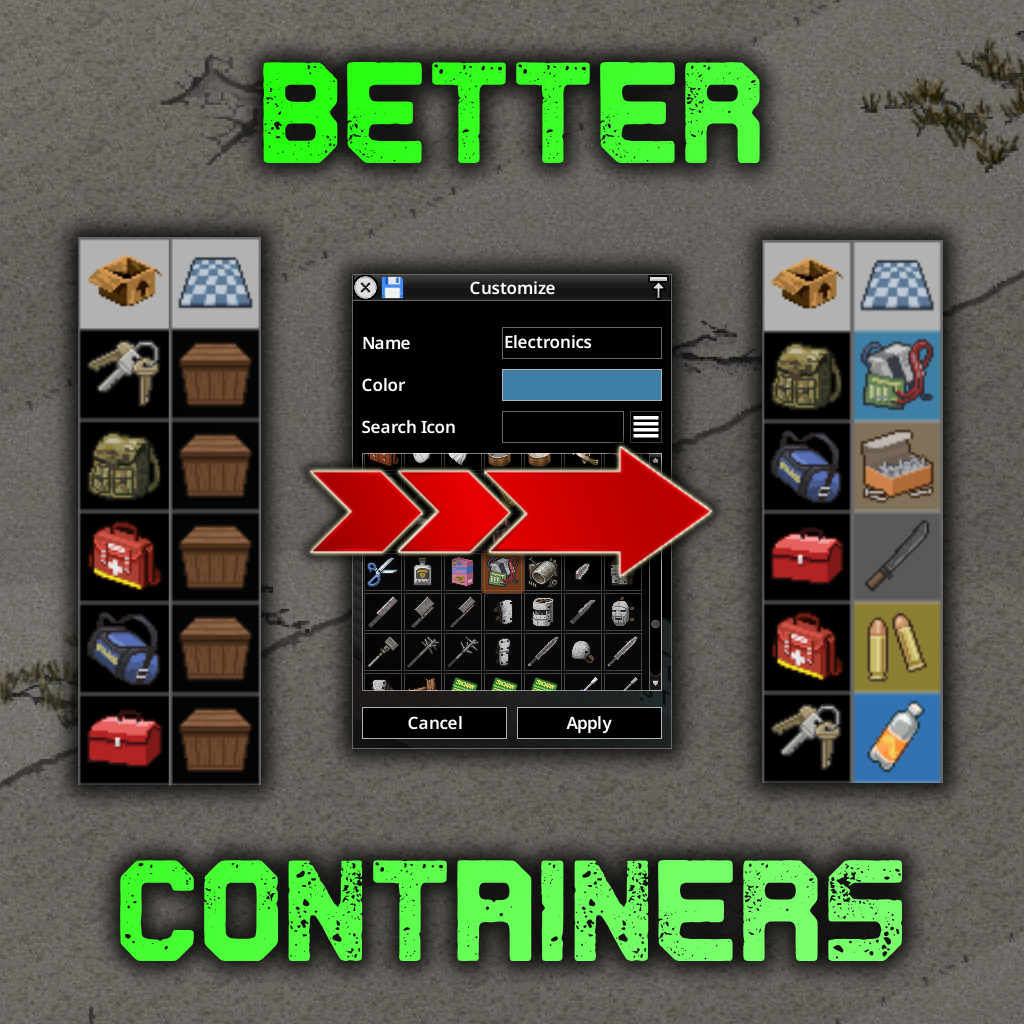

About Better Containers
From Steam WorkshopBetter Containers An inventory enhancement mod for controlling container order, searching inventories, locking inventory windows, improving item Display Categories, pinning item types, customizing…
Better Containers
An inventory enhancement mod for controlling container order, searching inventories, locking inventory windows, improving item Display Categories, pinning item types, customizing container buttons, browsing nested containers, and showing nearby containers or corpses through Proximity Inventory. MOD ID CHANGE for 42.13+ - it is now EURY_CONTAINERS
[hr][/hr]
Features:
Search
- Use the Search bar to find items
- Enabled by default - disable via Mod Options
Lock
- Use the Padlock icon to Lock/Unlock Player or Loot Inventory Windows
- Also prevents moving or resizing locked inventory windows
- Enabled by default - disable via Mod Options
Swap
- Independently switch Player or Loot Container Button Panels to the left or right via Mod Options
Re-order
- Drag and drop container icons for the player and loot windows into the layout you prefer (when the lock is off).
- Once set, containers will remember their position even if you unequip and later re-equip them.
- For finer control, containers can be assigned a number for sorting priority.
- Select a container and click the priority icon next to the lock icon.
- By default, dragging and dropping automatically manages the sorting priorities.
Categorize
- Advanced Display Categories for items (enabled by default - disable via Mod Options)
- Left-click the filter button to filter by Display Category; right-click to access the original weight-sorting menu
- Category Blacklist option prevents Better Containers from recategorizing configured script DisplayCategory names
Pin
- Pinned Item Types, previously Category Favourites, are brought to the top of supported inventory lists
- Pinned Item Types display a small marker icon
- Toggle Pinned Item Type visibility in the player inventory via Mod Options
Customize
- Alter container button Name, Icon and Colour (enabled by default - disable via Mod Options)
- Customize both world containers (crates etc.) and placed bags
- Customized bag icons are also visible when equipped
- Save, copy, paste, reset and re-use container presets
Proximity Inventory
- Choose Proximity Inventory, Corpse Only Inventory, or Dual mode to show both
- Optionally hide Corpse Only Inventory when no corpses are in range
- Sandbox Options can override default behaviour and player permissions
- Proximity Inventory (can be locked) Displays the contents of all inventories within range
- Corpse Only Inventory (can be locked) Displays the contents of all corpse inventories within range
- Easily switch Proximity on/off, Corpse/Proximity and lock/unlocked with key bindings in Mod Options
- Corpse Only mode (when locked) will only be locked to view if corpses are in range.
- Auto-lock mode to override/simplify lock and unlock - browse containers at will - snaps back to proximity when no other containers exist or every 10 ingame minutes unless a container was recently (10sec) selected.
- Smart Deposit - drop items onto the Proximity Inventory to send them into nearby matching containers where possible
- Smart Deposit prefers containers with the same item type, then matching Display Categories, while respecting capacity, favourites, locked containers and access rules
- Optionally include nested container contents in Proximity Inventory - requires Loot Nested Containers to be enabled
Nested Containers
- View and browse containers stored inside other containers directly from the inventory
- Nested containers can be opened without unpacking or moving them first
- Separate Mod Options for player and loot nested containers, both disabled by default
- Configurable nested container depth, parent icons and player inventory filtering
- Works alongside Re-order, Categorize and Customize where supported
- Multiplayer has additional loot-side restrictions - see Multiplayer Support below
Multiplayer Support (Build 42.21)
- Better Containers supports multiplayer, but nested container browsing is more limited than in singleplayer
- Player Nested Containers supports bags inside your own inventory and carried bags, subject to your configured depth and player inventory filter
- In multiplayer, Loot Nested Containers deliberately hides bags inside world containers, on corpses, and bags on the ground because these nested loot inventories cannot be reliably resolved by the server for transfers
- The multiplayer loot-side exception is a bag directly inside an eligible vehicle compartment; deeper bags inside that bag are not supported
- Vehicle seats and containers with types containing Trunk, TruckBed or Trailer are excluded from nested loot browsing in both singleplayer and multiplayer
- To browse an unsupported loot bag, move it into your own inventory and enable Player Nested Containers
- Increasing nested depth or enabling Include Nested Containers for Proximity Inventory does not bypass these restrictions
Weight Column
- Optional Weight column for player and loot inventory windows - enable via Mod Options
- Click the weight icon to switch between ascending and descending weight sorting
- Drag the column divider to resize it
- Shows stack totals and individual item weights in expanded stacks
Loot Actions
- Drop items directly from loot containers using the Drop and Drop All hover buttons
- Move To Floor is also available in Proximity and Corpse Only inventories
- Move To Floor respects TwisTonFire's Blacklist when its mass-action filtering option is enabled, including corpse-only and damaged-clothing settings
Highlights
From source dataFootprint
Rated a light load on a server.
Last update
Its author last shipped an update 4d ago.
Better Containers on Nxeon
From our catalogue- One-click install
- Supported on Nxeon Project Zomboid servers. We download it from Steam Workshop, place it, and restart the server.
- Server load
- light
- Smallest plan we suggest
- Project Zomboid — 6 GB (6 GB RAM). This follows our own load rating above, not a benchmark.
- Latest build
- 2026-10-30, released 2026-10-30
Game versions by loader
| Loader | Game versions | Newest |
|---|---|---|
| Workshop |
From 7 recorded builds of Better Containers.
Recent builds
| Build | Released | Game versions | Loaders |
|---|---|---|---|
| 2026-10-30 | 2026-10-30 | n/a | Workshop |
| 2026-10-28 | 2026-10-28 | n/a | Workshop |
| 2026-10-23 | 2026-10-23 | n/a | Workshop |
| 2026-10-18 | 2026-10-18 | n/a | Workshop |
| 2026-10-16 | 2026-10-16 | n/a | Workshop |
| 2026-10-07 | 2026-10-07 | n/a | Workshop |
Run Better Containers on a Project Zomboid server
Pick a server or deploy a new one above; it is installed in one click.
What kind of mod it is
From the catalogQuality of life & UI
Small conveniences, tweaks and interface improvements players notice straight away.
Compatibility
- Game
- Project Zomboid
Verified at the source
- ✓Steam WorkshopOfficial listing, checked 2026-11-01Open ↗
- ✓AuthorEurymachus, as published on Steam Workshop
- ✓LicenseNot published by the sourceFree















