






About BetterFPS_B42
From Steam WorkshopAfter many years, I’ve decided to step away from maintaining mods for Project Zomboid. The project has been in early access for a very long time, development is slow, and direction remains unclear. A…
[H3]After many years, I’ve decided to step away from maintaining mods for Project Zomboid. The project has been in early access for a very long time, development is slow, and direction remains unclear. A large number of mods now exist mainly to compensate for core issues, and frequent updates often break existing work.
At this point, I no longer have the time or motivation to continue maintaining BetterFPS. I invite you to switch to the following alternative Zed's Better FPS - https://steamcommunity.com/sharedfiles/filedetails/?id=3622986450
Thanks for all the support, subscriptions, and feedback over the years. [/H3]
BetterFPS Now with In Game settings !
This mod require a manual installation by replacing an existing Project Zomboid File
Once installed you have to enable it like others mods and choose your settings directly in game
This mod works on Steam or GOG version Should works on any OS This mod is Client side and is not required to be installed on server This mod works and have been tested in both SP and MP
HOW THIS WORKS ??
Project Zomboid render a 152x152 (was 190x190 in B41) tiles zone around the player This mod allow you to costomize the size of this zone and avoid loading not nexcessary square This way you can expect 40% to 70% perfs increase. (or burn your PC by increasing this zone up to 344x344)

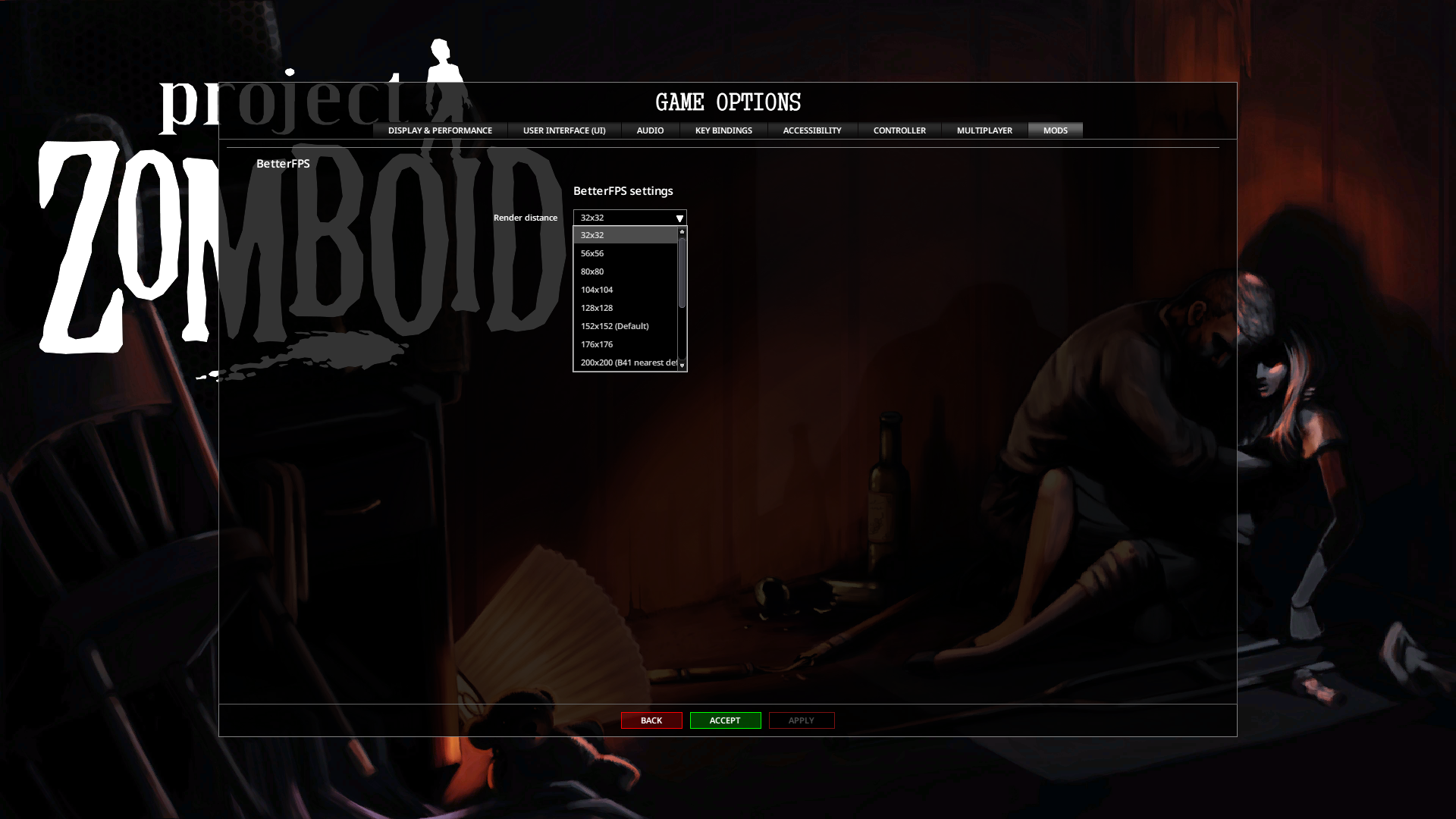
14 Differents Settings to choose from, directly InGame
32x32 56x56 80x80 104x104 128x128 152x152 (Default) 176x176 200x200 (B41 nearest default value) 224x224 248x248 272x272 296x296 320x320 344x344
HOW TO INSTALL ON WINDOWS
- locate your 'Project Zomboid' installation folder (by default should be something like: "C:\Program Files (x86)\Steam\steamapps\common\ProjectZomboid")
- open the "\zombie\iso" folder
ex:
Program Files (x86
└───Steam
    └───steamapps
        └───common
            └───ProjectZomboid
                └───zombie
                    └───iso
- in another window open the mod folder (by default should be: "C:\Program Files (x86)\Steam\steamapps\workshop\content\108600\3423115544\mods\BetterFPS_B42\42.0\media\")
ex:
Program Files (x86
└───Steam
    └───steamapps
        └───workshop
            └───content
                └───108600
                    └───3423115544
                        └───mods
                            └───BetterFPS_B42
                                └───42.0
                                    └───media
                                        └───zombie
                                            └───iso
- copy this folder content
- paste it in the same folder inside Project Zomboid installation folder
ex: replace "C:\Program Files (x86)\Steam\steamapps\common\ProjectZomboid\zombie\iso" with "C:\Program Files (x86)\Steam\steamapps\workshop\content\108600\3423115544\mods\BetterFPS_B42\42.0\media\zombie\iso"
This will overwrite the original file with patched one
HOW TO INSTALL ON OSX
- Copy content of this mod archive 'zombie\iso' into your Project Zomboid game folder 'zombie\iso' (replace existing files) - GoToFolder > ~/Library/Application Support/Steam/
Library
└───Application Support
    └───Steam
        └───common
            └───ProjectZomboid
- Right-clic > Show Package Content > Open Content
  [code]
        Java
                └───zombie
                    └───iso
- select the most relevant render zone for your config, or just re set the default settings directly in Options
- launch the game (or quit and reload your save) - Enjoy
For any problem/question, feel free to contact me on ProjectZomboid Official Discord
https://discord.gg/theindiestone
Workshop ID: 3423115544 Mod ID: BetterFPS_B42
Highlights
From source dataFootprint
Rated a light load on a server.
Last update
Its author last shipped an update 12 mo ago.
BetterFPS_B42 on Nxeon
From our catalogue- One-click install
- Supported on Nxeon Project Zomboid servers. We download it from Steam Workshop, place it, and restart the server.
- Server load
- light
- Smallest plan we suggest
- Project Zomboid — 6 GB (6 GB RAM). This follows our own load rating above, not a benchmark.
- Latest build
- 2025-11-05, released 2025-11-05
Game versions by loader
| Loader | Game versions | Newest |
|---|---|---|
| Workshop |
From 1 recorded build of BetterFPS_B42.
Run BetterFPS_B42 on a Project Zomboid server
Pick a server or deploy a new one above; it is installed in one click.
What kind of mod it is
From the catalogQuality of life & UI
Small conveniences, tweaks and interface improvements players notice straight away.
Compatibility
- Game
- Project Zomboid
Verified at the source
- ✓Steam WorkshopOfficial listing, checked 2026-11-01Open ↗
- ✓AuthorAlree, as published on Steam Workshop
- ✓LicenseNot published by the sourceFree















