






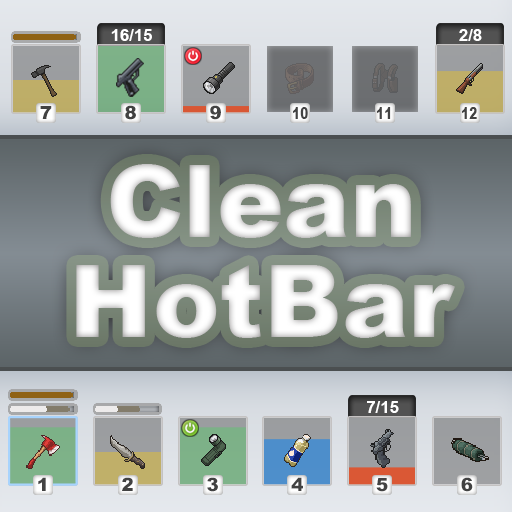

About Clean HotBar [B42]
From Steam WorkshopProject Zomboid Build 42.12.3–42.22.0 | SP / MP Clean Hot Bar improves Project Zomboid's hotbar and hand-equipped UI with clearer item information, cleaner visuals, customizable scaling and opacity,…
Project Zomboid Build 42.12.3–42.22.0 | SP / MP
Clean Hot Bar improves Project Zomboid's hotbar and hand-equipped UI with clearer item information, cleaner visuals, customizable scaling and opacity, optional auto-hide, controller support, compatible-slot highlighting, and built-in slot reordering.
The goal is simple: show useful information at a glance without turning the hotbar into visual clutter.
[hr]
Item Status at a Glance

CHB can display:
- Overall condition through slot backgrounds and status colors
- Weapon head condition and sharpness
- Firearm status: loaded ammo, spare ammo, chamber state, and jams
- ON / OFF state for flashlights and other activatable items
- Remaining contents for drainable items and liquid containers
- Battery level for battery-powered walkie-talkies and radios
- Compatible attachment slots while dragging items
For applicable weapons, the white section represents sharpness, while the remaining colored section represents head condition above that value.
Firearms and Chambered Ammo
Ammo can be displayed in two styles:
- 15+1/15 — chambered round shown separately
- 16/15 — compact combined display
The selected format is used by both the hotbar and hand-equipped UI. Longer values automatically adapt to the available space.
Hand-Equipped UI

Items equipped in the main hand, off hand, or both hands can show status information even when they are not attached to a belt, back, holster, or other hotbar slot.
Available indicators include item condition, weapon status, ammunition, liquid contents, radio battery level, and activation state.
Hotbar and hand-equipped indicators and tooltips can be configured separately.
Visual Feedback

- Items briefly shake and flash when condition decreases
- Liquids use a smooth drain animation
- An optional warning appears when an equipped weapon loses durability
- Dragging an item highlights compatible visible slots and possible replacements
- Equipped items use the vanilla-style equipped marker
Hotbar Auto-Hide
CHB includes an optional built-in Hotbar Auto-Hide system.
When enabled, the hotbar fades out after a configurable delay and reappears when the pointer approaches its normal position or the lower screen edge. It also remains available while dragging items or using CHB settings.
Auto-hide is disabled by default.
If Minimal Hotbar is detected, CHB leaves auto-hide control to that mod instead of running both systems simultaneously.
Settings

Move the pointer over the hotbar and click the three-horizontal-lines button that appears on its right side.
Settings include:
- Condition, sharpness, ammunition, and other indicators
- Separate or compact chambered-round display
- Status-bar height and ammunition-text size
- Hotbar and hand-equipped tooltips
- Weapon-condition warning
- Hotbar opacity from 20% to 100%
- Hotbar scale from 0.6x to 2.0x
- Hotbar Auto-Hide and hide delay
- Built-in slot reordering
CHB settings are client-side.
Controller Support
Clean Hot Bar supports controller hotbar visibility and settings navigation.
By default, the hotbar remains available while using a controller. It temporarily hides while inventory/loot panels are open or while driving, then restores automatically.
CHB settings can also be opened from the controller Back/View radial menu.
That radial shortcut can be enabled or disabled from:
Start > Options > Mods > Clean Hot Bar
Empty Slots and Extra Attachments
The circular-arrow button on the left side of the hotbar shows or hides empty attachment slots.
This is especially useful when equipment or other mods add many attachment locations, including Authentic Z backpack upgrades.
Built-in Hotbar Reordering
Unlock reordering in CHB settings, then drag slots to rearrange them:
- Swap — exchanges two positions
- Insert — moves one slot and shifts the others
- Lock — prevents accidental changes
The selected order is saved automatically.
If Reorder The Hotbar is detected, CHB leaves reordering to that mod.
If you use QoL Compendium, disable its Change quick access bar order option when using CHB's built-in reordering.
[hr]
Compatibility
- Project Zomboid Build 42.12.3 through 42.22.0
- Singleplayer
- Multiplayer Host
- Dedicated servers
- Compatible with CleanUI
- Compatible with NeatUI Framework and NeatUI Equipment
- NeatUI is not required
- Supports additional attachment slots
- No framework dependency
Compatibility handling is included for:
- [B42] Better Flashlights
- Sling On Back
- Minimal Hotbar
- Reorder The Hotbar
Conflicts are most likely with mods that heavily modify hotbar rendering, attachment-slot behavior, drag-and-drop, equipping/unequipping, or the hand-equipped UI.
Languages
CHB supports all current Project Zomboid Build 42.21/42.22 translation languages.
Installation
Clean Hot Bar works on Build 42 only.
For an existing save:
Main Menu > Load > select save > More... > Choose Mods...
For multiplayer servers:
Mods=...;CleanHotBar;... WorkshopItems=...;3461263912;...
Fully restart the server after changing its mod configuration or after Workshop updates.
Highlights
From source dataFootprint
Rated a light load on a server.
Last update
Its author last shipped an update 5d ago.
Clean HotBar [B42] on Nxeon
From our catalogue- One-click install
- Supported on Nxeon Project Zomboid servers. We download it from Steam Workshop, place it, and restart the server.
- Server load
- light
- Smallest plan we suggest
- Project Zomboid — 6 GB (6 GB RAM). This follows our own load rating above, not a benchmark.
- Latest build
- 2026-10-29, released 2026-10-29
Game versions by loader
| Loader | Game versions | Newest |
|---|---|---|
| Workshop |
From 5 recorded builds of Clean HotBar [B42].
Recent builds
| Build | Released | Game versions | Loaders |
|---|---|---|---|
| 2026-10-29 | 2026-10-29 | n/a | Workshop |
| 2026-10-22 | 2026-10-22 | n/a | Workshop |
| 2026-10-12 | 2026-10-12 | n/a | Workshop |
| 2026-10-07 | 2026-10-07 | n/a | Workshop |
| 2026-09-14 | 2026-09-14 | n/a | Workshop |
Run Clean HotBar [B42] on a Project Zomboid server
Pick a server or deploy a new one above; it is installed in one click.
What kind of mod it is
From the catalogQuality of life & UI
Small conveniences, tweaks and interface improvements players notice straight away.
Compatibility
- Game
- Project Zomboid
Verified at the source
- ✓Steam WorkshopOfficial listing, checked 2026-11-01Open ↗
- ✓AuthorRocco, as published on Steam Workshop
- ✓LicenseNot published by the sourceFree















