







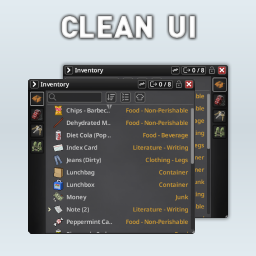
About CleanUI [B42]
From Steam WorkshopProject Zomboid Build 42.12.3–42.22.0 — SP / MP CleanUI is a streamlined Inventory and Loot interface overhaul for Project Zomboid Build 42. It keeps the familiar vanilla workflow while making both…
Project Zomboid Build 42.12.3–42.22.0 — SP / MP
CleanUI is a streamlined Inventory and Loot interface overhaul for Project Zomboid Build 42.
It keeps the familiar vanilla workflow while making both panels cleaner, more compact, easier to read, and highly configurable.

[hr]
Requirements
- NeatUI Framework is required and must load before CleanUI.
- NeatUI Framework v1.0.6 or newer is recommended.
- Build 42 only.
Server configuration:
Mods=NeatUI_Framework;CleanUI
WorkshopItems=3508537032;3437629766
Restart the server fully after changing its mod configuration.
[hr]
Main Features
- Cleaner and more compact Inventory and Loot panels.
- Independent Top / Bottom title bar position for Inventory and Loot.
- Configurable container-button position, scale, opacity, and layout.
- Drag-and-drop container reordering with persistent player-specific order in MP.
- Auto-collapse plus manual pin / collapse controls.
- Transfer All / Take All with capacity information.
- Search by item name, category, or both.
- Matching search results are highlighted and moved to the top.
- Single-menu or split quick-transfer controls.
- Sorting, configurable text, automatic truncation, and optional Weight column.
- Merged hotbar items under Equipped Items.
- Quick switch between CleanUI and the vanilla inventory.
- Extensive client-side layout, color, scale, transfer, and interface settings.
- Translations for all 28 current Project Zomboid languages.
CleanUI also includes compatibility adjustments for newer Build 42 inventory behavior, controller APIs, journals, locked containers, map reading, localization, selection handling, and other UI changes while retaining support for earlier B42 versions.
[hr]
Interface Layout
Inventory and Loot can each use their own title bar position:
- Top — classic CleanUI layout and the default.
- Bottom — keeps the title bar anchored while the panel expands upward.
Bottom mode includes adapted auto-collapse, top-right resizing, dedicated NeatUI icons, and matching panel corners.
Container buttons can be repositioned, resized, and reordered directly by dragging them. CleanUI remembers the chosen order between sessions and keeps it player-specific in multiplayer.
The Floor container remains fixed at the end of the Loot container list.
[hr]
Search, Sorting and Transfer
Right-click the search box to choose between:
- Name
- Category
- Name + Category
Matching rows are highlighted and moved to the top for faster access.
Transfer controls can use either one compact menu or separate quick buttons for item names, categories, and Move To Floor. Supported actions can target the selected container or nearby containers.
The toolbar also provides quick access to sorting, stack expand/collapse, and Hide/Show Equipped Items controls.
[hr]
Interface Guide

- (1) Transfer: quick-transfer actions or transfer menu.
- (2) Transfer All / Take All: moves all items and displays capacity.
- (3) Lock: prevents dragging and resizing the window.
- (4) Search: filters using the selected search mode.
- (5) Divider: adjusts column widths.
- (6) Sort: opens item-sorting options.
- (7) Collapse / Expand: controls grouped item stacks.
- (8) Equipped Items: hides or shows the equipped-items section.
Switch back to the vanilla inventory: Right-click the open-box icon in the left button bar and toggle Use CleanUI Inventory.

CleanUI settings: ESC > Options > Mods > CleanUI
Settings are client-side, so every player can configure their own interface.
[hr]
Build 42 Compatibility
CleanUI supports Project Zomboid 42.12.3 through 42.22.0 using multibuild compatibility branches where required.
B42.22 support includes compatibility with updated inventory APIs, map-reading behavior, and selection restoration without changing the compatibility code used by earlier supported builds.
[hr]
Mod Compatibility
Most gameplay, item, map, vehicle, and content mods should work normally.
Conflicts are more likely with mods that replace or heavily modify inventory / loot UI files, context menus, row rendering, sorting, or container behavior.
Tested compatibility includes:
Better Containers and Proximity Inventory are not compatible with each other.
CleanUI overlaps with mods such as Reorder Containers, Search Container, Smart Stack, and Auto Drop n' Loot.
Other inventory overhauls, Bigger Inventory Container Icon, and JB Max Capacity Override may also conflict or cause display issues.
Compatibility can depend on mod versions, load order, game build, and server configuration.
[hr]
Controller Support
CleanUI preserves vanilla controller behavior where possible and includes compatibility fixes for newer Build 42 controller APIs and container cycling after reordering.
Controller users may also try: Clean UI Menu Support
[hr]
Troubleshooting
Highlights
From source dataFootprint
Rated a light load on a server.
Last update
Its author last shipped an update 2d ago.
CleanUI [B42] on Nxeon
From our catalogue- One-click install
- Supported on Nxeon Project Zomboid servers. We download it from Steam Workshop, place it, and restart the server.
- Server load
- light
- Smallest plan we suggest
- Project Zomboid — 6 GB (6 GB RAM). This follows our own load rating above, not a benchmark.
- Latest build
- 2026-11-02, released 2026-11-02
Game versions by loader
| Loader | Game versions | Newest |
|---|---|---|
| Workshop |
From 7 recorded builds of CleanUI [B42].
Recent builds
| Build | Released | Game versions | Loaders |
|---|---|---|---|
| 2026-11-02 | 2026-11-02 | n/a | Workshop |
| 2026-10-29 | 2026-10-29 | n/a | Workshop |
| 2026-10-22 | 2026-10-22 | n/a | Workshop |
| 2026-10-12 | 2026-10-12 | n/a | Workshop |
| 2026-10-10 | 2026-10-10 | n/a | Workshop |
| 2026-10-05 | 2026-10-05 | n/a | Workshop |
Dependencies
- Required: NeatUI Framework [B42]
Declared by the newest build that lists any. Required ones are installed with it on one-click installs.
Run CleanUI [B42] on a Project Zomboid server
Pick a server or deploy a new one above; it is installed in one click.
What kind of mod it is
From the catalogQuality of life & UI
Small conveniences, tweaks and interface improvements players notice straight away.
Compatibility
- Game
- Project Zomboid
Verified at the source
- ✓Steam WorkshopOfficial listing, checked 2026-11-02Open ↗
- ✓AuthorRocco, as published on Steam Workshop
- ✓LicenseNot published by the sourceFree















