






About Computer Mod
From Steam WorkshopComputer Mod Turn Project Zomboid's decorative computers into fully functional machines. [url=https://steamcommunity.com/sharedfiles/filedetails/?id=3762002142]Build 41 version…
Computer Mod
Turn Project Zomboid's decorative computers into fully functional machines.

[hr][/hr]
Computer Features
Install an operating system, set passwords, browse websites, download and install games, read magazines and newspapers, watch video files, use applications, burn CDs, store files, and communicate with other players.
[hr][/hr]
Computer Hardware
Every computer needs a motherboard, processor, RAM, graphics card, and hard drive. Components wear down while the machine is used, and a missing or failed part prevents startup.
Parts can be found in the world or crafted. With the right tools, skills, and materials, they can be installed, removed, and repaired. Component loot, starting condition, and wear rate can be adjusted in sandbox settings.
[hr][/hr]
Playable Games
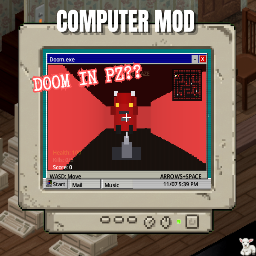
There are currently 24 playable games. Some computers may already have games installed, while others may have none.
Games can be installed in two ways:
- Game CDs: find a game CD, insert it into a computer, and install it through My Files.
- Internet downloads: open the browser, visit knoxshare.bbs, download a game, then install it from the Downloads folder.
Downloads take time. You do not need to stay next to the computer while downloading, but shutting the computer down cancels the download.
Playing games reduces boredom, stress, and sadness. Losing a game slightly increases stress.
[hr][/hr]
Applications
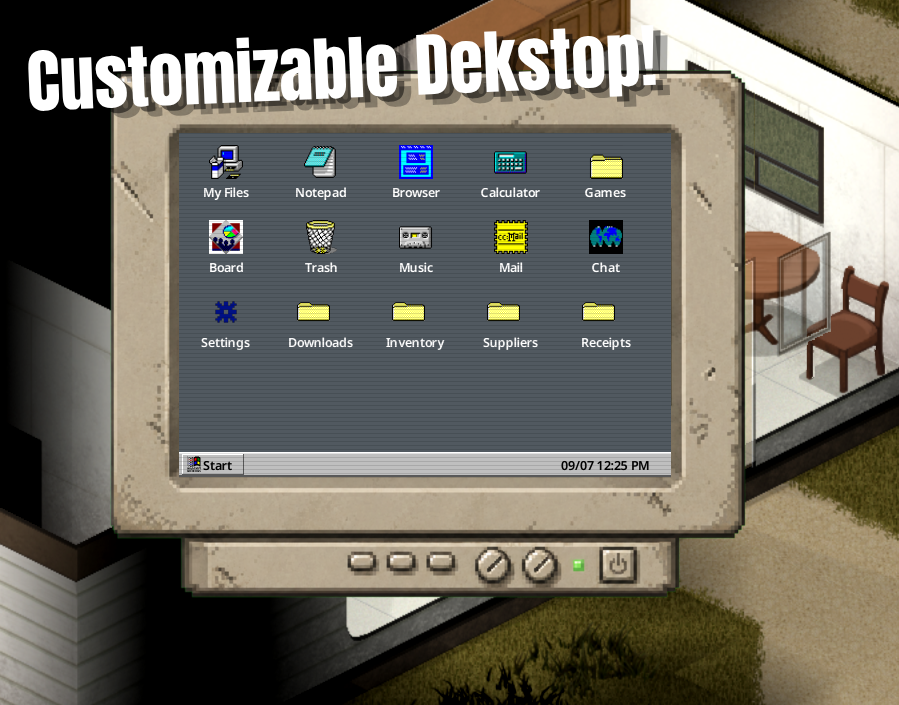
A fresh OS includes My Files, Notepad, Browser, Paint, Calculator, Mail, Board, Chat, Market, Settings, and Music Player.
Mail: create an account, log in from different computers, send mail, reply, and delete messages.
Board: post public messages that other players with computers can read.
Chat: create an account, send requests, and privately message other players.
Market: create an account, buy rotating shop items, and complete jobs for money. Shop items and jobs refresh over time and are shared across computers on the server.
Paint: draw simple images and save them as desktop files.
[hr][/hr]
Folders, Files and CDs
Create folders, rename them, delete them, move files, restore files from Trash, and organize the desktop. Folders can contain notes, paint files, magazines, newspapers, videos, and other readable or downloadable files.
Blank CDs can be found in the world. CDs can be opened from My Files, renamed, wiped, and used to store files or burn installed games. Removed CDs retain their name and stored content. Applications cannot be copied into folders or CDs, but files can.
[hr][/hr]
Magazines, Newspapers and Videos
Computers found in the world may contain recipe magazines, newspapers, or video files. Reading or watching them takes time and can affect your character.
Recipe magazines teach the same things as their physical versions. Some hidden websites also offer magazines or videos; their addresses may be found naturally in notes or emails.
[hr][/hr]
Passwords, BIOS and OS Installation
Some computers may be password protected. There are four ways to access them:
- Know the password.
- Find the password.
- Reset the disk from BIOS.
- Use a Password Hack CD.
To hack a password, insert a Password Hack CD and start the process from the login screen. Complete the mini-game to remove the password. By default, hacking requires Electrical level 1.
Warning: resetting the disk deletes the operating system and local data.
If a computer has no OS, it cannot boot normally. Find a PZ OS 3.1 CD, insert it, enter BIOS during startup, and install the operating system from the CD.
[hr][/hr]
Internet Outage System
Internet access can be affected by world power. If the power grid goes down, the internet backbone can go offline depending on sandbox settings.
To restore the network, players must find special relay terminals around the map and repair them with Electrical skill and electronic parts.
If relay power is required, the active relay must keep receiving electricity, such as from a generator. If that generator runs out of fuel, the network can go offline again. This system can be adjusted or disabled in sandbox options.
[hr][/hr]
Customization
Change the computer name, profile picture, password, desktop background color, date format, clock format, interface scale, and file layout. Desktop icons and folders can be moved on a grid.
[hr][/hr]
Languages
English, French, Italian, German, Spanish, Danish, Dutch, Hungarian, Norwegian, Polish, Portuguese, Russian, Turkish, Japanese, Simplified Chinese, Brazilian Portuguese, Finnish, Korean, Thai, Traditional Chinese, and Ukrainian.
[hr][/hr]
Roadmap and Known Bugs
[hr][/hr]
Permissions
Please do not reupload, redistribute, or share modified versions of this mod without my permission.
You are free to use this mod on your server through the original Steam Workshop page. Editing the files and distributing them through Discord, modpacks, private server packs, or any other platform without permission is not allowed.
Highlights
From source dataFootprint
Rated a light load on a server.
Last update
Its author last shipped an update 35d ago.
Computer Mod on Nxeon
From our catalogue- One-click install
- Supported on Nxeon Project Zomboid servers. We download it from Steam Workshop, place it, and restart the server.
- Server load
- light
- Smallest plan we suggest
- Project Zomboid — 6 GB (6 GB RAM). This follows our own load rating above, not a benchmark.
- Latest build
- 2026-09-29, released 2026-09-29
Game versions by loader
| Loader | Game versions | Newest |
|---|---|---|
| Workshop |
From 1 recorded build of Computer Mod.
Run Computer Mod on a Project Zomboid server
Pick a server or deploy a new one above; it is installed in one click.
What kind of mod it is
From the catalogQuality of life & UI
Small conveniences, tweaks and interface improvements players notice straight away.
Compatibility
- Game
- Project Zomboid
Verified at the source
- ✓Steam WorkshopOfficial listing, checked 2026-11-01Open ↗
- ✓Authorkumeji, as published on Steam Workshop
- ✓LicenseNot published by the sourceFree















