







About Decoholic
From Steam WorkshopOverview : Furniture may have multiple overlay graphics, but the displayed pattern is normally determined by its location rather than by the individual item. As a result, furniture may look different…
Overview :
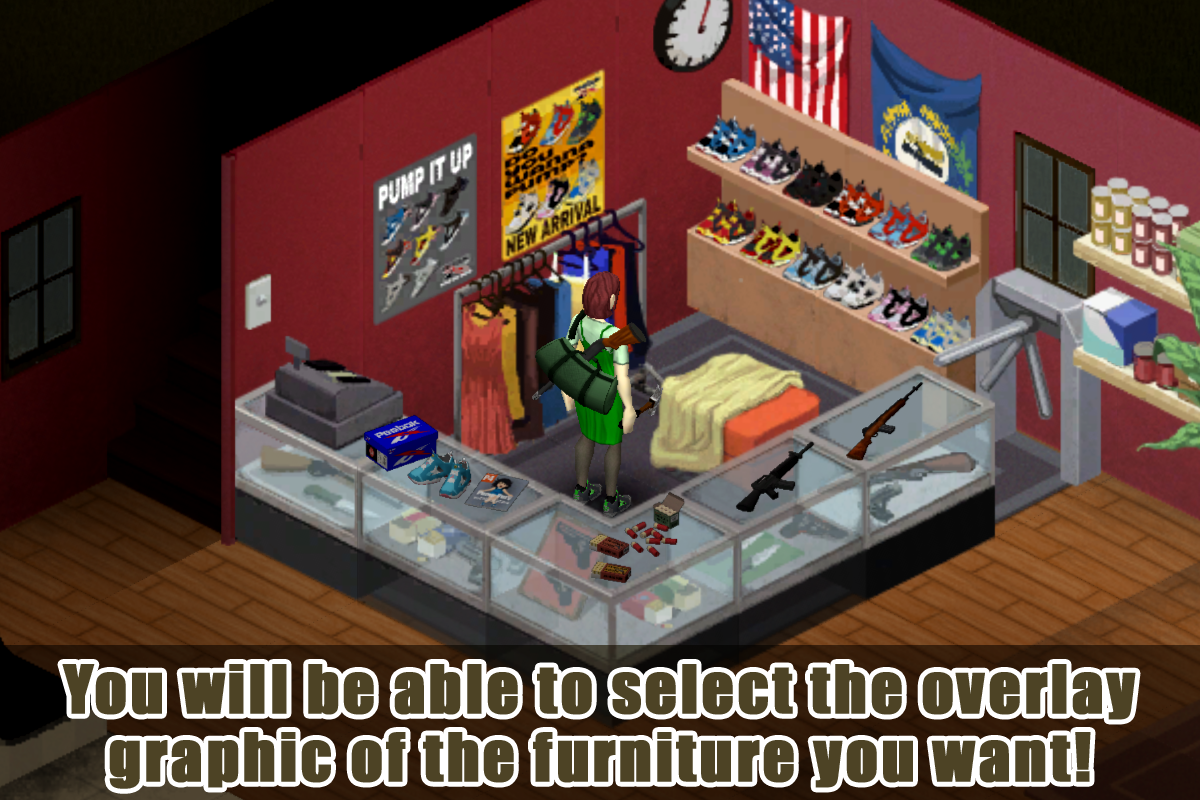
Furniture may have multiple overlay graphics, but the displayed pattern is normally determined by its location rather than by the individual item. As a result, furniture may look different after you pick it up and place it somewhere else. This mod allows you to freely select and preserve the overlay graphic used by supported furniture.
In Build 42, item position adjustment is provided by the vanilla "Extended 3D Placement" feature. This mod extends that feature by allowing you to expand its position offset range through the mod options.
This mod also includes a 3D model viewer that lets you preview supported inventory item models, textures, and variations without placing or modifying the item.
Confirmed to work with Build 41/42 Stable and in MP.
Features - 1.Change Furniture Display :
You can change the overlay graphic freely by following the steps below.
 (1) Execute "Change furniture display" from the item or world context menu.
 (2) You can select the graphics to display from the configuration window.
- Press the "Select" button below the graphic you want to display.
- The currently selected graphic will be marked with a red circle icon in the upper right corner.
- "Default" will return to the original display mode. In this setting, the graphics displayed will change depending on the coordinates of the placement.
Features - 2.Extended 3D Placement Expansion :
This mod allows you to access the vanilla "Extended 3D Placement" feature from the context menu of items placed in the world. It also provides a configurable movement range in single-player.

- Select "Adjust item position" from the item's context menu to access Extended 3D Placement.
- In single-player, the X, Y, and Z movement range can be expanded from the vanilla range of 0 to 1 into a configurable negative-to-positive range.
- The range can be configured from 1 to 10 in the mod options. The default value is 3.
Features - 3.3D Model Viewer :
This mod allows you to preview the 3D models of supported items without placing or modifying them. The viewer can be opened from the context menu of items in your inventory, containers, or on the ground.

- Select "View 3D model" from the item's context menu to open the viewer.
- Drag to rotate the model, right-drag to move it, and use the mouse wheel to zoom.
- Available model and texture variations can be selected from the viewer.
- The model's position and rotation can also be adjusted by entering values in the XYZ fields.
- The background color can be changed to make the model easier to see.
- The context-menu option can be hidden through the mod options.
Options :
These options are available. (Only B42)
- Offset Range : You can extend the item's position offset range to span from negative to positive values.
- Show "View 3D model" in the context menu : Adds "View 3D model" to the item context menu. Disable this option to hide it.
Options :
These options are available. (Only B42)
Sandbox Options :
These options are available in Sandbox Options. (Only B41)
- Meta > Enable Adjust Item Position : Enables Adjust Item Position. This option is intended for cases where you want to limit this features to users in MP.
Q&A :
- [h2]Which furniture can I select graphics?[/h2]
- This includes container-type furniture such as shelves and furniture with overlay graphics such as chairs covered with sheets.
- [h2]Can furniture from other mods be made to work?[/h2]
- It's possible, although it needs to be handled individually. Please request the mod name.
- [h2]How do I do a piece of large furniture that has been divided?[/h2]
- You can select graphics in each divided part.
- [h2]What happens if I rotate the furniture?[/h2]
- If the furniture is rotated, it will be processed as a different item. Therefore, please select the graphics for each direction. However, if the same direction is made again, the previous selection is kept.
- [h2]Already I have been selected, but before I know it, it's back to the default display..?[/h2]
- It may have reverted to the default display for an unknown reason. Try moving items in and out or re-placing furniture.
Supported Mods :
This mod supports overlay images added by the following mods.
Known Issues :
- Offset Range settings are not permitted in multiplayer mode, so values specified in the options settings will be ignored.
Future plans :
- Bug fix (if it exists)
Remarks :
- This mod requires that "DISPLAY > Textures > Double-sized Textures" in GAME OPTIONS is ON. If this option is OFF, the correct size will not be displayed. I don't plan to support this option now, but I will consider it if there are enough requests.
Release Notes :
- v1.20 - Added support for Build 42.20 (Unstable).
- v1.19 - Added a 3D model viewer.
- v1.18 - Added support for Build 42.20.
- v1.17 - Hotfix for Build 42.15.
- v1.16 - Hotfix for Build 42.13.
- Please refer to "Change Notes" for the older history.
Highlights
From source dataFootprint
Rated a light load on a server.
Last update
Its author last shipped an update 39d ago.
Decoholic on Nxeon
From our catalogue- One-click install
- Supported on Nxeon Project Zomboid servers. We download it from Steam Workshop, place it, and restart the server.
- Server load
- light
- Smallest plan we suggest
- Project Zomboid — 6 GB (6 GB RAM). This follows our own load rating above, not a benchmark.
- Latest build
- 2026-09-26, released 2026-09-26
Game versions by loader
| Loader | Game versions | Newest |
|---|---|---|
| Workshop |
From 1 recorded build of Decoholic.
Run Decoholic on a Project Zomboid server
Pick a server or deploy a new one above; it is installed in one click.
What kind of mod it is
From the catalogQuality of life & UI
Small conveniences, tweaks and interface improvements players notice straight away.
Compatibility
- Game
- Project Zomboid
Verified at the source
- ✓Steam WorkshopOfficial listing, checked 2026-11-01Open ↗
- ✓AuthorPePePePePeil, as published on Steam Workshop
- ✓LicenseNot published by the sourceFree















