






About Equipment UI – STABLE +
From Steam WorkshopEquipment UI – Build 42 A maintained Build 42 continuation of Equipment UI , originally created by Notloc . This Workshop item provides two versions: Equipment UI – Standalone – Recommended for most…
Equipment UI – Build 42
A maintained Build 42 continuation of Equipment UI, originally created by Notloc.
This Workshop item provides two versions:
- Equipment UI – Standalone – Recommended for most players.
- Equipment UI – Standalone for TETRIS – Compatibility version for mods requiring the original EQUIPMENT_UI Mod ID.
Both versions contain the same maintained features, fixes and improvements.
Notloc's original Equipment UI mod is not required.
IMPORTANT – CHOOSE ONLY ONE VERSION Recommended for most players: Equipment UI – Standalone Mod ID: EQUIPMENT_UI_B42 For TETRIS or legacy dependencies: Equipment UI – Standalone for TETRIS Mod ID: EQUIPMENT_UI Do not enable both versions together.
— FEATURES & IMPROVEMENTS —
The Standalone versions preserve the original Equipment UI functionality while providing continued Build 42 maintenance, performance improvements, bug fixes and additional customization.
- Paper-doll-style equipment interface.
- Drag & Drop equipment management.
- Support for vanilla and modded BodyLocations.
- Build 42 compatibility and ongoing maintenance.
- Improved performance and stability.
- Optimized clothing, equipment and Hotbar updates.
- Correctly scaled equipment icons.
- Support for larger icon textures without slot overflow.
- UI scaling from 0.5x to 4.0x with intermediate steps.
- Option to hide equipped items from the normal inventory.
- Option to hide the Equipment UI Hotbar.
- Option to lock detached window resizing.
- Keyboard and controller support.
- Updated localization support, including Japanese and Korean.
- Optional TwisTonFire Clothing BodyLocation integration.
Interface & Toggle Improvements
- Improved toggle button positioning for different screen resolutions and UI layouts.
- Toggle button automatically hides when the inventory is collapsed and reappears when expanded.
- Improved toggle button visibility and clickability.
- Prevents toggle buttons and saved Equipment UI windows from appearing outside the visible screen area.
- Improved handling of moved or recreated inventory windows.
- Fixed potential duplicate toggle buttons.
- Keyboard shortcuts remain functional independently of inventory visibility.
— TETRIS COMPATIBILITY —
The TETRIS version contains the same maintained Standalone code but uses the original:
Mod ID: EQUIPMENT_UI
This version exists because TETRIS and some other mods still require Notloc's original Equipment UI Mod ID.
Only use this version if another mod specifically requires EQUIPMENT_UI.
IMPORTANT – REMOVE THE ORIGINAL MOD Before using the TETRIS version, unsubscribe from Notloc's original Equipment UI Workshop item. Do not keep both Workshop items installed. Both provide the same Mod ID and overlapping Lua files. Keeping both installed can cause: [list] [*]Lua checksum errors in Multiplayer. [*]Different Lua files between server and client. [*]Unexpected load-order or dependency issues. [/list] Servers and clients must use the same Equipment UI version and Workshop setup.
— WHAT IS EQUIPMENT UI? —
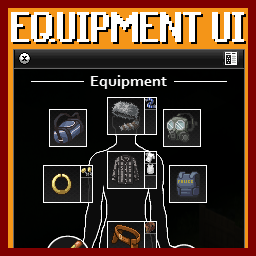
Equipment UI adds a dedicated paper-doll-style equipment interface inspired by games such as STALKER and Tarkov.
The Equipment UI window can be attached to the inventory or detached and positioned separately. Its position and layout are saved between sessions.
Equipment slots visually react to conflicts and support Drag & Drop for convenient equipment management.
The Equipment UI can be toggled using the button next to the expanded inventory window or through a configurable keyboard shortcut.
Mod Options
- Equipment UI scale.
- Hide equipped inventory items.
- Hide Equipment UI Hotbar.
- Lock detached window resizing.
- Configure controller binding.
Localization
Available languages:
Traditional Chinese, Simplified Chinese, Czech, German, English, Spanish, French, Japanese, Korean, Polish, Brazilian Portuguese, Russian, Thai, Turkish and Ukrainian.
— MULTIPLAYER & COMPATIBILITY —
Supported game modes:
- Singleplayer
- Multiplayer
- Project Zomboid Build 42
Equipment UI interacts with wearable items, clothing and BodyLocations.
Outdated clothing mods, invalid icons or incorrect BodyLocation definitions may cause Equipment UI errors even when Equipment UI itself is not responsible.
If you encounter problems, please check for conflicting Equipment UI modifications before reporting an issue.
Only one Equipment UI version should be active at a time.
— ORIGINAL MOD & LICENSE —
Original mod: Equipment UI – Paper Doll Equipment Interface by Notloc
https://steamcommunity.com/sharedfiles/filedetails/?id=2950902979
Notloc discontinued support for the original mod and released Equipment UI under the MIT License.
This maintained continuation builds upon the original work under the terms of that license. The original copyright and MIT License notice are included.
Original creator: Notloc Build 42 maintenance & improvements: TwisTonFire
Special Thanks from the Original Equipment UI
- dhert – BodyLocation information and equipped-item hiding.
- Burryaga – Controller feedback and testing.
— WHICH VERSION SHOULD I USE? —
Most players: Use EQUIPMENT_UI_B42.
TETRIS or another mod requires EQUIPMENT_UI: Use EQUIPMENT_UI and remove Notloc's original Workshop item first.
MAINTENANCE STATUS EQUIPMENT_UI_B42 – Actively maintained and recommended.
Highlights
From source dataFootprint
Rated a light load on a server.
Last update
Its author last shipped an update 7d ago.
Equipment UI – STABLE + on Nxeon
From our catalogue- One-click install
- Supported on Nxeon Project Zomboid servers. We download it from Steam Workshop, place it, and restart the server.
- Server load
- light
- Smallest plan we suggest
- Project Zomboid — 6 GB (6 GB RAM). This follows our own load rating above, not a benchmark.
- Latest build
- 2026-10-27, released 2026-10-27
Game versions by loader
| Loader | Game versions | Newest |
|---|---|---|
| Workshop |
From 5 recorded builds of Equipment UI – STABLE +.
Recent builds
| Build | Released | Game versions | Loaders |
|---|---|---|---|
| 2026-10-27 | 2026-10-27 | n/a | Workshop |
| 2026-10-20 | 2026-10-20 | n/a | Workshop |
| 2026-10-19 | 2026-10-19 | n/a | Workshop |
| 2026-10-16 | 2026-10-16 | n/a | Workshop |
| 2026-08-16 | 2026-08-16 | n/a | Workshop |
Run Equipment UI – STABLE + on a Project Zomboid server
Pick a server or deploy a new one above; it is installed in one click.
What kind of mod it is
From the catalogQuality of life & UI
Small conveniences, tweaks and interface improvements players notice straight away.
Compatibility
- Game
- Project Zomboid
Verified at the source
- ✓Steam WorkshopOfficial listing, checked 2026-11-01Open ↗
- ✓AuthorTwisTonFire, as published on Steam Workshop
- ✓LicenseNot published by the sourceFree















