






About Fix Inventory Tooltip lag
From Steam WorkshopFix Inventory Tooltip lag This mod fixes a performance issue in the game that causes it to freeze up for a period of time, most commonly whenever you rip up clothing. The problem becomes…
Fix Inventory Tooltip lag
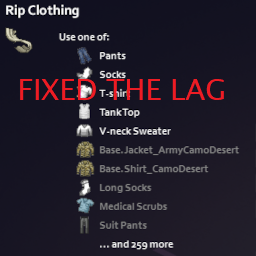
This mod fixes a performance issue in the game that causes it to freeze up for a period of time, most commonly whenever you rip up clothing.
The problem becomes exponentially worse with the more clothing item mods you have, hence why it's the primary culprit.
The code is a classic example of "accidentally quadratic" If you care about the details, read on. If not, just download it.
What the vanilla game does that causes this problem
The game wants to show you a tooltip of the top 10 items that are valid for a given recipe, so it:
1. Builds a complete list of all valid items, in no particular order.
2. Sorts this complete list to move all items you actually have to the top - O(n) complexity.
3. Removes any items that are considered duplicates by virtue of being applicable to different slots (e.g. Left/right handed wristwatch) - O(n^2) complexity!
4. Renders the top 10 items of the list, ignoring anything else.
This is wasteful because it processes the full list of items, even though we only care about the top 10.
What this mod makes it do
1. We build a complete list of valid items, but any items that exist in your inventory are sent to the start of the list, at the point of insertion.
2. The list is truncated to the first 10 items and only these are sorted. We store the original length of the list for later - O(1) complexity.
3. Deduplication occurs as in vanilla, but, again, the list is now only 10 items long - O(1) complexity.
4. We render the list again. If there were more than 10 items, we ensure that the "and X more" text is computed correctly from the pre-truncation list size.
Workshop ID: 2915430406 Mod ID: FixTooltipLag
Highlights
From source dataFootprint
Rated a light load on a server.
Last update
Its author last shipped an update 4 yr ago.
Fix Inventory Tooltip lag on Nxeon
From our catalogue- One-click install
- Supported on Nxeon Project Zomboid servers. We download it from Steam Workshop, place it, and restart the server.
- Server load
- light
- Smallest plan we suggest
- Project Zomboid — 6 GB (6 GB RAM). This follows our own load rating above, not a benchmark.
- Latest build
- 2023-01-09, released 2023-01-09
Game versions by loader
| Loader | Game versions | Newest |
|---|---|---|
| Workshop |
From 1 recorded build of Fix Inventory Tooltip lag.
Run Fix Inventory Tooltip lag on a Project Zomboid server
Pick a server or deploy a new one above; it is installed in one click.
What kind of mod it is
From the catalogQuality of life & UI
Small conveniences, tweaks and interface improvements players notice straight away.
Compatibility
- Game
- Project Zomboid
Verified at the source
- ✓Steam WorkshopOfficial listing, checked 2026-11-01Open ↗
- ✓Author[TECT$ECore] Olipro, as published on Steam Workshop
- ✓LicenseNot published by the sourceFree















