






About Hide Menu Debug + Remove Build Information
From Steam WorkshopHide Debug Menu This mod cleans up the right-click context menu in-game, removing unnecessary or obsolete options, as well as the game's build or version information (compatible with the unstable…
Hide Debug Menu
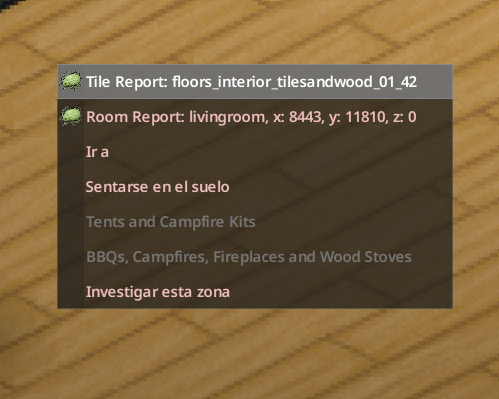
This mod cleans up the right-click context menu in-game, removing unnecessary or obsolete options, as well as the game's build or version information (compatible with the unstable Build 42).
[hr]
Features
• Enable/Disable Debug Options: Use the F10 key to enable or disable the debug context menu entries as desired.
Default: Debug options are hidden at game startup. Pressing F10 toggles between DEBUG Off and DEBUG On, with on-screen confirmation.
• Automatically Hide Debug Options: When debug mode is not enabled, debug entries are hidden by default.
• Remove camping options: This was removed in a game update. The mod's functionality was removed.
• Remove build information: Hides the section that displays the game's version or build number, ideal for a cleaner and more consistent experience.
[hr]
Why use this mod?
– Improves immersion by removing development or debugging remnants.
– Makes the right-click menu simpler and faster to navigate.
– Gives you full control: It works in both Normal Mode and Debug Mode, with quick switching between them.
– Lightweight and compatible: It only modifies context menu entries; it does not alter items, balance, or other mechanics.
[hr]
Notes
Subscribe to get 2 mods. The only difference between the two is the Hide Build Information function.
This is because it hides server information in multiplayer games, information that is necessary to verify the game connection.
[hr]
Workshop ID: 3554048011 Mod ID: HideDebugMenu Mod ID: JustHideDebugMenu
Highlights
From source dataFootprint
Rated a light load on a server.
Last update
Its author last shipped an update 8 mo ago.
Hide Menu Debug + Remove Build Information on Nxeon
From our catalogue- One-click install
- Supported on Nxeon Project Zomboid servers. We download it from Steam Workshop, place it, and restart the server.
- Server load
- light
- Smallest plan we suggest
- Project Zomboid — 6 GB (6 GB RAM). This follows our own load rating above, not a benchmark.
- Latest build
- 2026-02-26, released 2026-02-26
Game versions by loader
| Loader | Game versions | Newest |
|---|---|---|
| Workshop |
From 1 recorded build of Hide Menu Debug + Remove Build Information.
Run Hide Menu Debug + Remove Build Information on a Project Zomboid server
Pick a server or deploy a new one above; it is installed in one click.
What kind of mod it is
From the catalogQuality of life & UI
Small conveniences, tweaks and interface improvements players notice straight away.
Compatibility
- Game
- Project Zomboid
Verified at the source
- ✓Steam WorkshopOfficial listing, checked 2026-11-01Open ↗
- ✓AuthorSuperJetPlus, as published on Steam Workshop
- ✓LicenseNot published by the sourceFree















