






About Improved Hair Menu Build 42
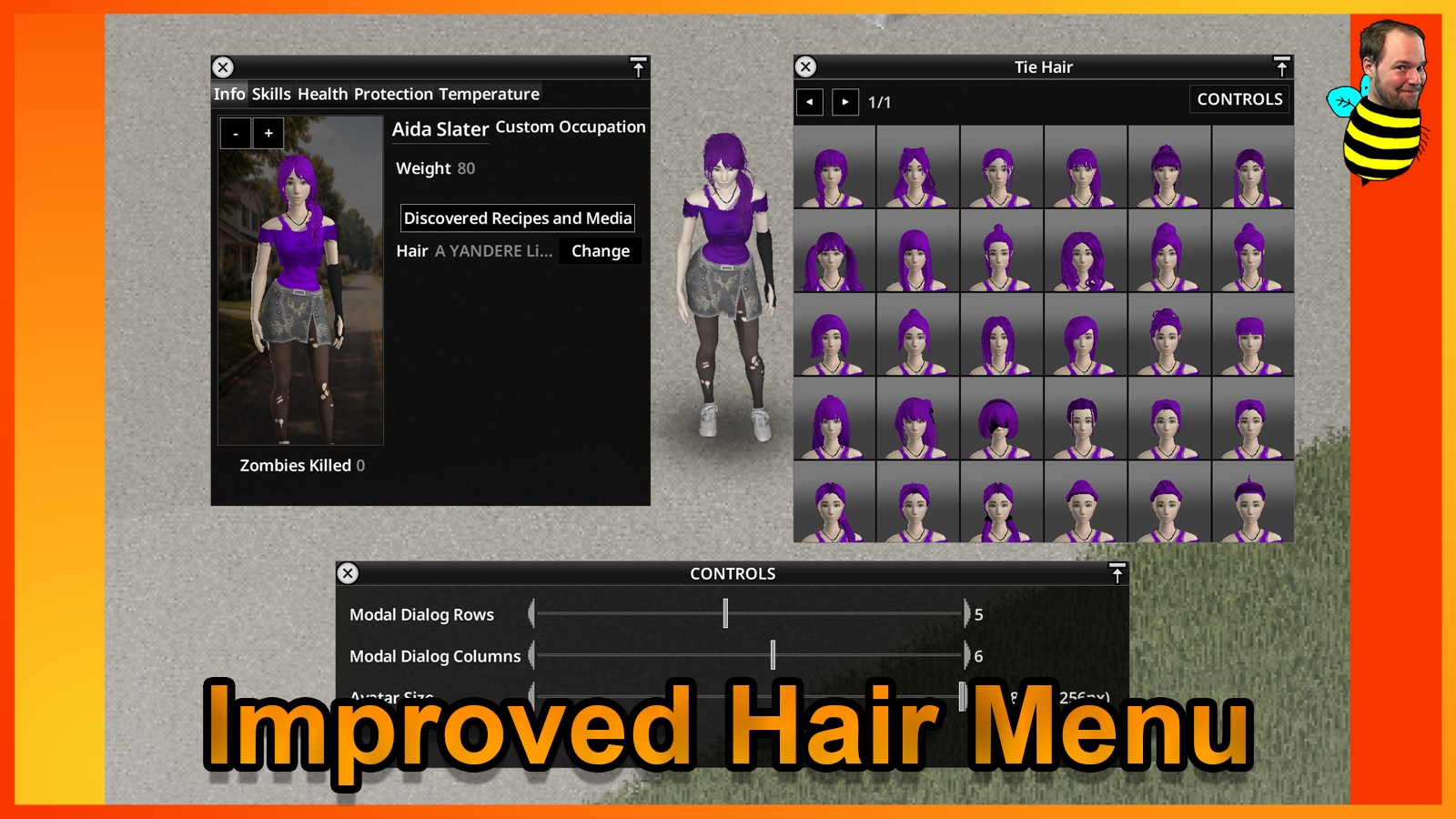
From Steam Workshophttps://imgur.com/BaUyxax.png https://imgur.com/RQYClYI.png Improved Hair Menu Build 42 A heavily updated Build 42 version of the original Improved Hair Menu. Makes choosing hair and beard styles…


Improved Hair Menu Build 42
- A heavily updated Build 42 version of the original Improved Hair Menu.
- Makes choosing hair and beard styles much easier in Character Creation and in the in-game Character screen.
- Built to be clearer, easier to browse, and more comfortable to use across different screen sizes.
What this mod does
- Replaces the small vanilla hair and beard lists with a much clearer visual menu.
- Lets you preview hairstyles and beards before choosing them, instead of guessing from names alone.
- Works in both Character Creation and the in-game haircut / beard trim menu.
- Keeps normal gameplay features such as hair tying, untying, cutting, and beard trimming.
- Shows useful tool icons directly on the previews.
- Includes hair stubble and beard stubble options in the menu.
- Includes an improved hair color picker option in Character Creation.
- Lets you adjust the menu layout and remembers your settings.
- Supports controller / joypad use.
Why this version is different
This mod started from duckduckquack’s original Improved Hair Menu, but the current Build 42 version has been reworked and expanded far beyond that older release.
- Updated for the current Build 42 UI.
- Expanded for both Character Creation and in-game use.
- Improved layout and spacing for modern resolutions.
- Includes compatibility work for several popular mods.
- Comes with much broader translation support than the original version.
The original idea is still respected, but this is now a much more expanded and modern version of that mod.
Load Order Recommendation
Place this mod fairly low in your load order.
That gives it a better chance to keep its buttons and menus visible when other UI mods also change the same screens.
- Place Improved Hair Menu Build 42 low in the load order.
- Do not use older or duplicate versions of Improved Hair Menu at the same time.
Compatibility Notes
- Made for Build 42.
- Includes compatibility work for mods such as Reorganized Info Screen, Grow Stubble, and Spongie Hair Unlocker.
- Should not be used together with older or duplicate versions of Improved Hair Menu.
- If another mod fully replaces the same character screen area after this mod loads, some buttons may get overwritten.
FAQ
Does this mod add new hairstyles? No. This mod improves the menu itself. For more hairstyles, install hairstyle mods.
Where do the extra hairstyles in the screenshots come from? They come from other hairstyle mods you may have installed.
Does this work in multiplayer? It is mainly a client-side UI mod, so it should usually be fine in multiplayer as long as the setup is correct.
What about the old Hair Color Picker addon? That was only needed for older Build 42 versions. On newer versions, the main mod already includes that functionality in Character Creation.
Translations
English, Deutsch, Español, Français, Português-BR, Русский, Türkçe, Polski, Українська, 日本語, 한국어, 简体中文, 繁體中文.
Credits
Original Author: duckduckquack https://steamcommunity.com/sharedfiles/filedetails/?id=2732662310
The original mod was the starting point. This Build 42 version was reworked, expanded, and continued further from there.
[h2]Compatibility[/h2] [table] [tr] [th]Mode[/th] [th]42.12[/th] [th]42.13[/th] [th]42.15[/th] [th]42.16[/th] [th]42.17[/th] [th]42.18[/th] [th]42.19[/th] [th]42.20[/th] [/tr] [tr] [td]Singleplayer[/td] [td]✅[/td] [td]✅[/td] [td]✅[/td] [td]✅[/td] [td]✅[/td] [td]✅[/td] [td]✅[/td] [td]✅[/td] [/tr] [tr] [td]Multiplayer[/td] [td]❌[/td] [td]✅[/td] [td]✅[/td] [td]✅[/td] [td]✅[/td] [td]✅[/td] [td]✅[/td] [td]✅[/td] [/tr] [/table]
Workshop ID: 3589548354 Mod ID: improvedhairmenubuild42
 Your support helps me keep going. Thank you very much in advance!
Highlights
From source dataFootprint
Rated a light load on a server.
Last update
Its author last shipped an update 22d ago.
Improved Hair Menu Build 42 on Nxeon
From our catalogue- One-click install
- Supported on Nxeon Project Zomboid servers. We download it from Steam Workshop, place it, and restart the server.
- Server load
- light
- Smallest plan we suggest
- Project Zomboid — 6 GB (6 GB RAM). This follows our own load rating above, not a benchmark.
- Latest build
- 2026-10-12, released 2026-10-12
Game versions by loader
| Loader | Game versions | Newest |
|---|---|---|
| Workshop |
From 2 recorded builds of Improved Hair Menu Build 42.
Recent builds
| Build | Released | Game versions | Loaders |
|---|---|---|---|
| 2026-10-12 | 2026-10-12 | n/a | Workshop |
| 2026-05-05 | 2026-05-05 | n/a | Workshop |
Run Improved Hair Menu Build 42 on a Project Zomboid server
Pick a server or deploy a new one above; it is installed in one click.
What kind of mod it is
From the catalogQuality of life & UI
Small conveniences, tweaks and interface improvements players notice straight away.
Compatibility
- Game
- Project Zomboid
Verified at the source
- ✓Steam WorkshopOfficial listing, checked 2026-11-01Open ↗
- ✓AuthorTwisTonFire, as published on Steam Workshop
- ✓LicenseNot published by the sourceFree















