






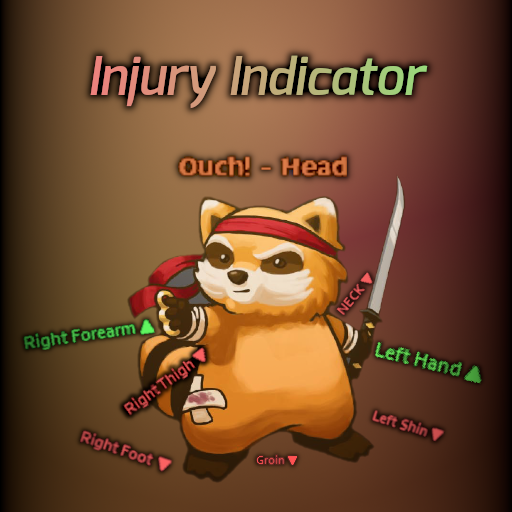
About Injury Indicator [B42]
From Steam WorkshopAdds pop-up text over the character's head when an injury occurs, indicating the injured body part. Detects injuries from all sources for all body parts. Heal notification is available as an option.…
Adds pop-up text over the character's head when an injury occurs, indicating the injured body part. Detects injuries from all sources for all body parts. Heal notification is available as an option. [hr][/hr]
Updated for B42
[hr][/hr]
Why this mod?
This mod aims to present information that should be more easily accessible. In other words, we should be able to tell where we were injured before we look at it. Since our character and our focus are mostly at the center of the screen, the pop-up text will swiftly inform us about our injuries.
How does it work?
It scans all body parts and checks if any of them are injured. If so, it fires a notification text.
Has 3 options: - Notification when an injury occurs (on by default) - 2 different pop-up styles (Skill up/Speech text) - Notification when an injury is healed
To do
(maybe...)
- Indication of the injury type
- (bubby_pz33 provided code, will take a look)
- Translation text as variables(%1%2)
- (For speech text, so it's possible to use possessive adjectives)
Notes
- There should be no conflicts with anything.
- Safe to add/remove mid-save.
- Multiplayer? No idea.
- Feedback/Suggestions are welcome.
Supported Languages
- English
- Türkçe (by Anonymous)
- 한국어 (by MyaMya)
- ไทย (by Riko Prushka)
- Português brasileiro (by Gabiluino)
- Español (by mrquechop)
- 繁體中文 (by Mark誌)
- Français (by Mandaløre)
- Русский язык (by nameless)
- Українська мова (by q587p)
- 简体中文 (by 无聊的栀子)
- (feel free to send your translations in the discussion thread)
[hr][/hr]
Check out my other mods


[hr][/hr] 
 [hr][/hr] Workshop ID: 3565698092 Mod ID: InjuryIndicator
Highlights
From source dataFootprint
Rated a light load on a server.
Last update
Its author last shipped an update 2 mo ago.
Injury Indicator [B42] on Nxeon
From our catalogue- One-click install
- Supported on Nxeon Project Zomboid servers. We download it from Steam Workshop, place it, and restart the server.
- Server load
- light
- Smallest plan we suggest
- Project Zomboid — 6 GB (6 GB RAM). This follows our own load rating above, not a benchmark.
- Latest build
- 2026-08-31, released 2026-08-31
Game versions by loader
| Loader | Game versions | Newest |
|---|---|---|
| Workshop |
From 1 recorded build of Injury Indicator [B42].
Run Injury Indicator [B42] on a Project Zomboid server
Pick a server or deploy a new one above; it is installed in one click.
What kind of mod it is
From the catalogQuality of life & UI
Small conveniences, tweaks and interface improvements players notice straight away.
Compatibility
- Game
- Project Zomboid
Verified at the source
- ✓Steam WorkshopOfficial listing, checked 2026-11-01Open ↗
- ✓AuthorBOBcat, as published on Steam Workshop
- ✓LicenseNot published by the sourceFree















