






About Item Condition Overlay (BUILD 42 STABLE)
From Steam WorkshopA clean, performance-friendly UI mod that displays visual condition indicators on your inventory items. Safe to add to or remove from an existing save at any time. Client-side UI only, nothing is…
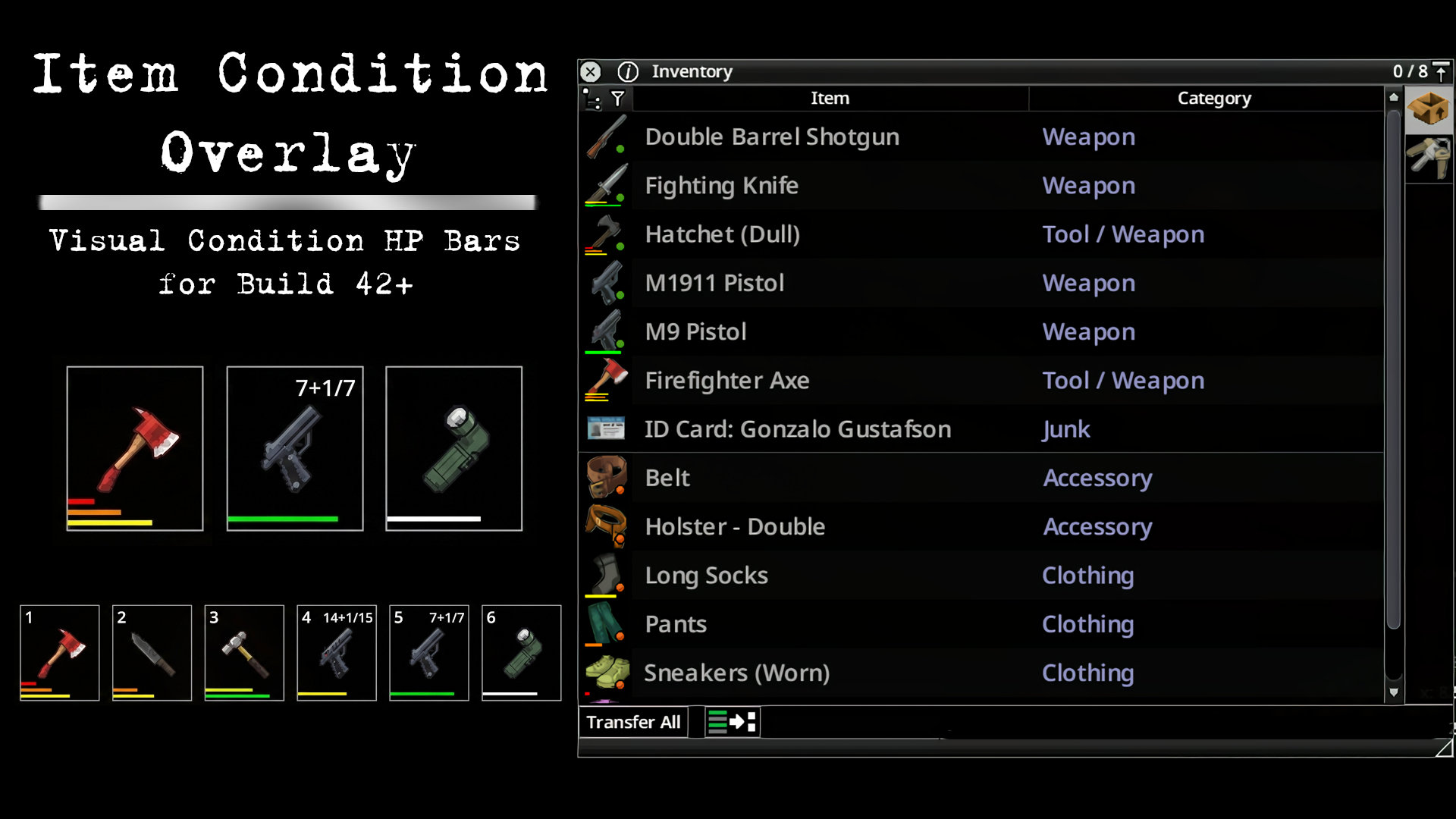
A clean, performance-friendly UI mod that displays visual condition indicators on your inventory items.
Safe to add to or remove from an existing save at any time. Client-side UI only, nothing is stored in your save. Works in single-player and multiplayer.
FEATURES • Color-coded condition bars - Know the state of your items at a glance - Green: Excellent (75-100%) - Yellow: Good (50-75%) - Orange: Fair (25-50%) - Red: Poor (0-25%)
• Full Build 42 support - Multi-bar display for weapons (Handle, Head, Sharpness) - Ammo counter on hotbar firearms (Off / Simple / Advanced) - Battery bar for flashlights and gun lights
• Water containers show their fill level - Bar is colored by what is inside: water, petrol, bleach, tea, all distinguishable at a glance
• Adjustable hotbar size (75% to 250%) - Slots, icons, bars and ammo text all scale together - Made for 1440p, 4K, ultrawide and TV setups
• NEW: Controller support - Optional: keep the hotbar on screen while playing with a controller, with condition bars and ammo counters working - Made for handhelds and couch setups
• Smart filtering system - Hotbar: Always shows bars - Inventory: Damaged items always; refillable items can keep their bar when full so full and empty are distinguishable
• Nine mod options - Options > Mods > Item Condition Overlay
• Performance optimized - Zero FPS impact
Tested on Build 42.20. Workshop ID 3641048285.
Workshop ID: 3641048285 Mod ID: ItemCondition_KingEJ
Highlights
From source dataFootprint
Rated a light load on a server.
Last update
Its author last shipped an update 3 mo ago.
Item Condition Overlay (BUILD 42 STABLE) on Nxeon
From our catalogue- One-click install
- Supported on Nxeon Project Zomboid servers. We download it from Steam Workshop, place it, and restart the server.
- Server load
- light
- Smallest plan we suggest
- Project Zomboid — 6 GB (6 GB RAM). This follows our own load rating above, not a benchmark.
- Latest build
- 2026-08-09, released 2026-08-09
Game versions by loader
| Loader | Game versions | Newest |
|---|---|---|
| Workshop |
From 1 recorded build of Item Condition Overlay (BUILD 42 STABLE).
Run Item Condition Overlay (BUILD 42 STABLE) on a Project Zomboid server
Pick a server or deploy a new one above; it is installed in one click.
What kind of mod it is
From the catalogQuality of life & UI
Small conveniences, tweaks and interface improvements players notice straight away.
Compatibility
- Game
- Project Zomboid
Verified at the source
- ✓Steam WorkshopOfficial listing, checked 2026-11-01Open ↗
- ✓AuthorKing EJ, as published on Steam Workshop
- ✓LicenseNot published by the sourceFree















