







About Jumbo Tree Indoor Fix
From Steam WorkshopJumbo Tree Indoor Fix Update policy This mod is feature-complete. Future updates will only cover compatibility with game updates and bug fixes Only fixes for critical issues such as crashes are…
Jumbo Tree Indoor Fix
Update policy
- This mod is feature-complete. Future updates will only cover compatibility with game updates and bug fixes
- Only fixes for critical issues such as crashes are released immediately
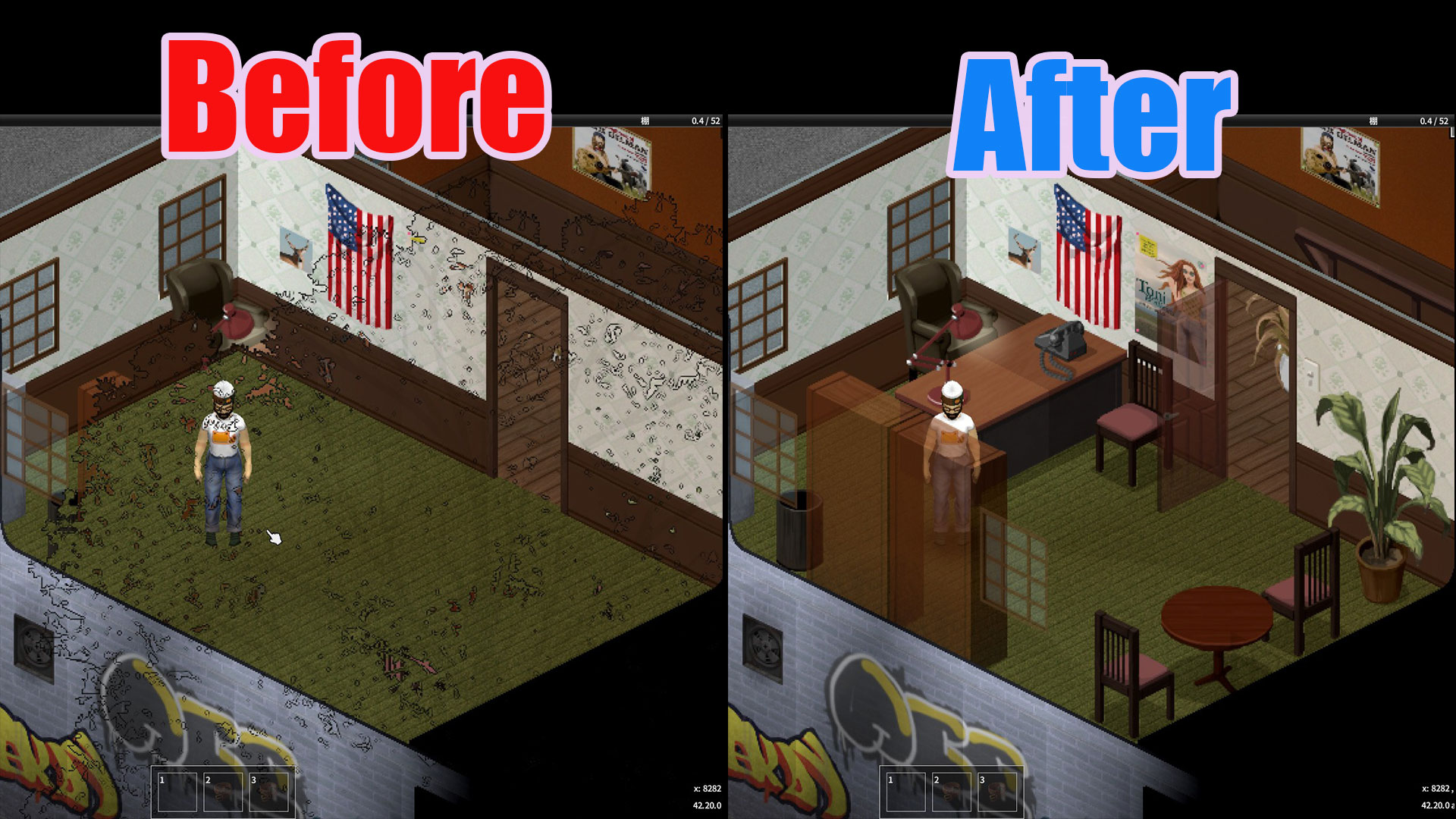
[hr][/hr] Build 42.20 added jumbo trees, and their canopies leave sketch-like outlines over rooms even while you are indoors, obscuring furniture and windows. This rendering bug is a known issue on the official forums, and this mod is a stopgap until it is fixed. While you are indoors, nearby jumbo trees are removed from rendering, and they come back the moment you step outside. Canopies that block your view while driving or on foot are thinned as well.
What changed in v1.6
- Indoors is unchanged — nearby jumbo trees are still hidden completely, so furniture and windows stay visible
- While driving and on foot, canopies now fade instead of disappearing — they are drawn translucent, thinning toward the top and returning to full density near the trunk. This is the default. The old look, with canopies removed entirely, is still available under "Canopy hiding style" in Mod Options
- The look-ahead distance while driving is unchanged — only the look has changed
- On-foot movement is now covered too — while you move through a forest, canopies around you are thinned in all directions. They return to normal when you stand still
- L-size trees can now be included on foot (added in v1.6.2) — a Mod Options setting (off by default) also fades the smaller L-size jumbo trees
[hr][/hr]
Features
- While driving, only the canopies of XL / XXL trees covering the road ahead are affected. Trunks stay visible, so anything you could hit remains in view. Higher speed extends the look-ahead distance, so wrecks and zombies hidden under a canopy are far less likely to catch you by surprise
- While moving on foot, canopies of XL / XXL trees around you are thinned in all directions. They return to normal when you stand still
- L-size jumbo trees are not affected by default while driving and on foot to keep the forest scenery intact (indoors covers all three sizes). While on foot, a Mod Options setting can include them
- When you stop, trees return starting with the ones closest to you. Trees you have already passed are restored automatically as well
- Trees that do not block your view — such as those on the far side of the road — stay visible
- Entering a building automatically hides jumbo trees (L / XL / XXL sizes) within 24 tiles. They reappear immediately when you go back outside
- Normal-sized trees are not affected. Nothing is written to your save — safe to add or remove at any time
Mod Options
- Hide view-blocking jumbo trees (default: on) — master switch covering indoors, driving and on foot. Turn it off and apply to restore vanilla rendering instantly for comparison
- Canopy hiding style (Fade / Trunk only, default: Fade) — how canopies look while driving and on foot
- Hide road-covering canopies while driving (default: on) — only the canopy is affected; the trunk stays visible
- Look-ahead distance while driving (Long / Short, default: Long) — choose how far ahead canopies are affected
- Hide canopies around you while on foot (default: on)
- On-foot hide range (Standard / Narrow / Minimal, default: Standard) — choose how far around you canopies are affected
- Include smaller jumbo trees while on foot (default: off) — also fades L-size jumbo trees in addition to XL / XXL. Works with the Fade style only, since L-size trees have no separate trunk sprite
If you turned the driving option off in v1.4.1, that setting is still in effect. Turn it on in Mod Options if you want the feature.
Compatibility
- Build 42.20
- Client-side rendering only. Game state and saves are never touched
- In multiplayer, the effect applies only to your own screen
Known limitations
- In local split screen, trees hidden for one player also disappear on the other player's screen, because both players share one rendering of the world. On a multiplayer server this does not apply — each client renders independently
- Trees keep their normal collision — with trunks visible, what you can hit is what you see. Note that some trees can be walked through in vanilla anyway; this mod never changes collision
If you find any issues, please let me know in the comments.
If the world turns black in multiplayer
Vanilla 42.20 multiplayer has a bug, reported on the official forums (topic 98025 / topic 98035), where world streaming stops and everything beyond the loaded area shows black (white in fog). It happens with or without this mod, and removing the mod does not stop it. This mod changes client-side rendering only and writes nothing to the save or the network.
[hr][/hr]
Permissions
Please do not reupload this mod or reuse its code and assets in other mods without my permission. If you want to build on it, ask in the comments.
Workshop ID: 3774826484 Mod ID: JumboTreeIndoorFix
Highlights
From source dataFootprint
Rated a light load on a server.
Last update
Its author last shipped an update 3 mo ago.
Jumbo Tree Indoor Fix on Nxeon
From our catalogue- One-click install
- Supported on Nxeon Project Zomboid servers. We download it from Steam Workshop, place it, and restart the server.
- Server load
- light
- Smallest plan we suggest
- Project Zomboid — 6 GB (6 GB RAM). This follows our own load rating above, not a benchmark.
- Latest build
- 2026-08-13, released 2026-08-13
Game versions by loader
| Loader | Game versions | Newest |
|---|---|---|
| Workshop |
From 1 recorded build of Jumbo Tree Indoor Fix.
Run Jumbo Tree Indoor Fix on a Project Zomboid server
Pick a server or deploy a new one above; it is installed in one click.
What kind of mod it is
From the catalogQuality of life & UI
Small conveniences, tweaks and interface improvements players notice straight away.
Compatibility
- Game
- Project Zomboid
Verified at the source
- ✓Steam WorkshopOfficial listing, checked 2026-11-01Open ↗
- ✓Authormovin, as published on Steam Workshop
- ✓LicenseNot published by the sourceFree















