About Just Let Me Hang It!
From Steam WorkshopJust Let Me Hang It! Hang your own images on the walls. Right-click a painting, framed photo or poster, pick a picture, done. How it works Put .png files in Zomboid/Lua/PictureFrames . The folder is…
Just Let Me Hang It!
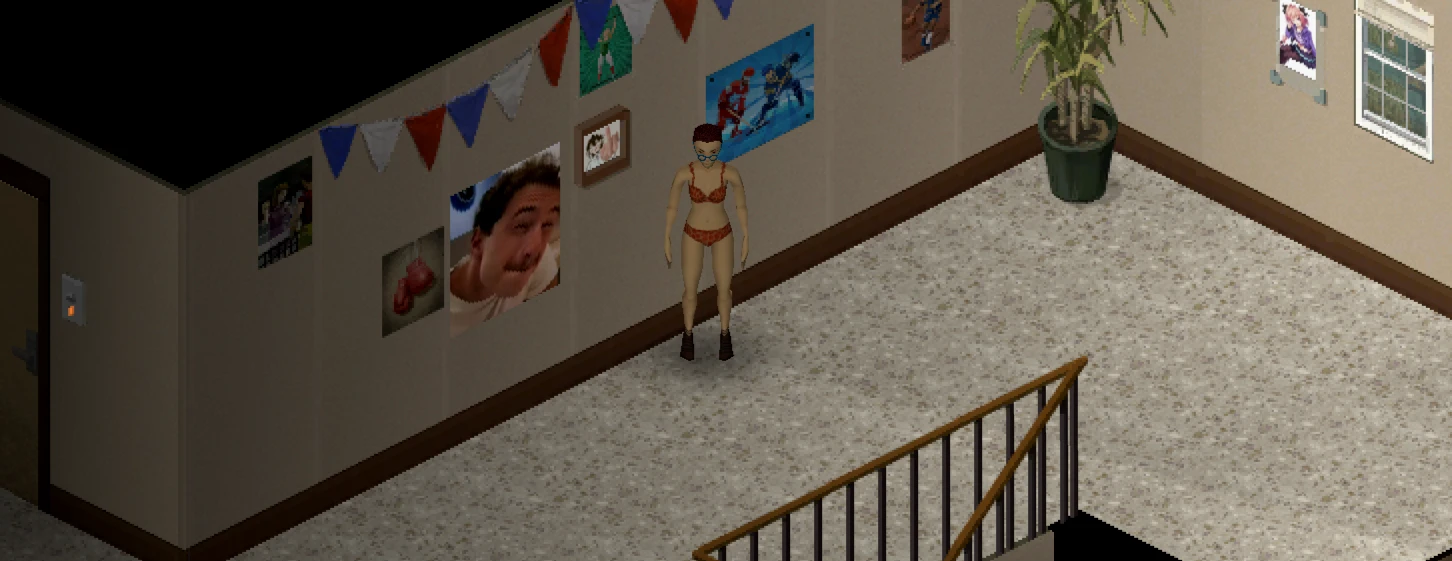
Hang your own images on the walls. Right-click a painting, framed photo or poster, pick a picture, done.
How it works
- Put .png files in Zomboid/Lua/PictureFrames. The folder is made the first time you load a game with the mod, with a README inside.
- Right-click wall art and choose Picture Frame > Choose picture.
- Choose Fill frame (crops to fit) or Whole image (shows all of it).
- Pick the art up and move it - the picture goes with it. Big multi-tile paintings and art on player-built walls can't carry it and go back to the vanilla art (in Realistic you get the picture back as an item).
Features
- Works on almost all vanilla wall art: paintings, photos, posters, wall-glued art and the big multi-tile paintings.
- Multiplayer: images go through the server, so everyone sees the same pictures. Each image is downloaded once and cached.
- Transparent PNGs get a plain backing instead of the old art showing through.
- Several pictures close together? Hover an entry in the right-click menu to see a preview of that picture, and it lights up in the world.
- Pictures survive saving and reloading. Remove the mod and the vanilla art is simply back.
Two mods in one download - enable ONE
Just Let Me Hang It! - simple: anyone can hang any picture from their folder.
Just Let Me Hang It! (Realistic) - pictures come from the world:
- Images in the folder (the server's folder in multiplayer) turn up already hanging on wall art, and now and then as a loose Picture item in desks, dressers and wardrobes.
- Take out picture gets the picture from a frame as an item. Put in picture hangs one from your inventory - the old one comes back out, nothing is lost.
- Hover a Picture item to see it, or right-click it to look at it.
- A picture is never lost: if the art or its wall is smashed or disassembled, or the art can't carry the picture when moved, the picture comes out as an item.
- Only admins (in singleplayer: debug mode) can hang pictures straight from the folder.
- Spawn chances are in the sandbox options.
The mod manager won't let you tick both. On a server, list only one of them.
Sandbox options
- Max image size (default 1024 KB) and how many images the server stores (default 1000).
- Realistic only: chance for wall art to spawn with a picture (default 25%) and loose Picture loot chance (default 3%).
Notes
- PNG only - Build 42 can't load JPG safely. Save a JPG as PNG first (Paint: File > Save as > PNG).
- 256 to 512 pixels on the long side looks best. Up to 2048 x 2048.
- Build 42.21 or newer.
Server info
Workshop ID: 3828043209 Mod ID: PictureFrames Mod ID: PictureFramesRealistic
Use ONE Mod ID, not both: PictureFrames for the simple version, PictureFramesRealistic for the realistic one. In multiplayer the pictures come from the server, so put the images in the server's Zomboid/Lua/PictureFrames folder (realistic) or let players upload their own (simple). Clients need nothing in their folder to see them.
Realistic: the server reads its folder when it starts, so restart after adding images. Each piece of wall art gets one chance, the first time its area loads, so new images show up in unexplored areas and in new loot.
Written with AI
Highlights
From source dataFootprint
Rated a light load on a server.
Last update
Its author last shipped an update 8d ago.
Just Let Me Hang It! on Nxeon
From our catalogue- One-click install
- Supported on Nxeon Project Zomboid servers. We download it from Steam Workshop, place it, and restart the server.
- Server load
- light
- Smallest plan we suggest
- Project Zomboid — 6 GB (6 GB RAM). This follows our own load rating above, not a benchmark.
- Latest build
- 2026-10-27, released 2026-10-27
Game versions by loader
| Loader | Game versions | Newest |
|---|---|---|
| Workshop |
From 1 recorded build of Just Let Me Hang It!.
Run Just Let Me Hang It! on a Project Zomboid server
Pick a server or deploy a new one above; it is installed in one click.
What kind of mod it is
From the catalogBuilding & decoration
Blocks, furniture, decorations and building tools.
Compatibility
- Game
- Project Zomboid
Verified at the source
- ✓Steam WorkshopOfficial listing, checked 2026-10-27Open ↗
- ✓AuthorDox, as published on Steam Workshop
- ✓LicenseNot published by the sourceFree