






About Mod Load Order Sorter [b42]
From Steam Workshop[url=https://steamcommunity.com/sharedfiles/filedetails/?id=3180893708]Mod version for build 41 of Project Zomboid This mod changes the logic of the automatic sorting of mods added in build 42 of…
Mod version for build 41 of Project Zomboid
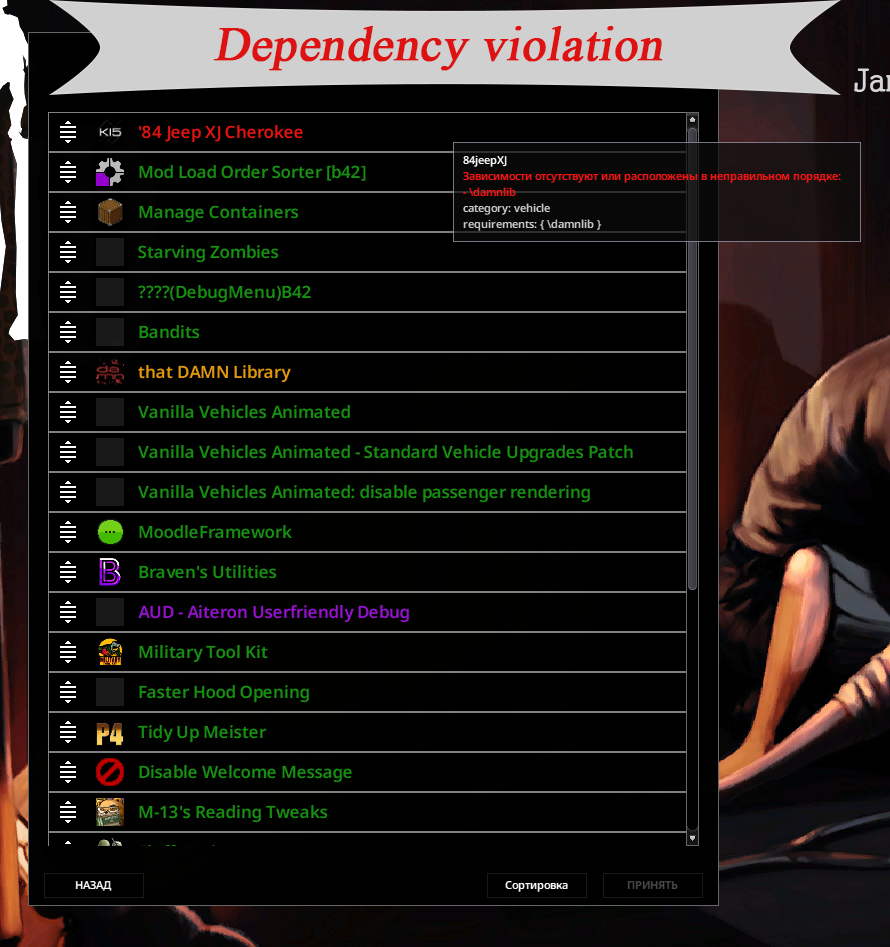
This mod changes the logic of the automatic sorting of mods added in build 42 of ProjectZomboid. Now the automatic sorting supports sorting rules, as well as highlights all found violations of the mod loading order.
How to use:
All you need to do is enable this mod and apply the changes. Then activate all the mods you want, go to the mod load order and click the "Sort" button at the bottom of the screen. Apply the changes. Done! If necessary, you can manually change the mod load order or set your own rules using the sorting rules editor.
Warning:
Any change in the order of loading mods in the middle of the game can lead to loss of the current save. Do so at your own risk.
Features:
- Automatic sorting:
- The list of Active mods is pre-sorted alphabetically and also grouped in the following order:
- [olist]
- Framework/API/Tweak mods,
- Resources/Textures,
- Maps/Locations,
- Vehicles,
- Code-only mods,
- Clothing,
- Interface,
- Other mods,
- Localization
- [/olist]
- Subsequent application of the topological sorting algorithm can detect and correct incorrect order of mods according to the requirements of each mod.
- Support for Sorting Rules. Sorting Rules Editor
- Highlighting mods with detected violations
- Search by mod name or mod ID
- Support for multiple file selection to manually edit the order of loading mods.
- When running the game in debug mode, additional information about the mod on which the mouse cursor is hovered will be displayed.
Disclamer
This mod is not a cure for all conflicts in the order of loading mods. Some conflicts can only be resolved manually.
Questions and Answers:
Q: What should I do if a mod doesn't appear in the mod list? A: 1) Please make sure you are subscribing to the correct version of the mod: In the main menu of the game at the bottom is written the version of the game. This version of the mod is only for version b42. For version 41 of the game use the mod of the corresponding version https://steamcommunity.com/sharedfiles/filedetails/?id=3180893708 2) If you already have some mods enabled and this mod doesn't appear in the list, try disabling all mods and rechecking the list (there are mods that change how mods appear in the mod list). 3) If this mod still doesn't appear, try deleting the Steam\steamapps\workshop\content\108600 folder , and then verify the integrity of the game files. WARNING: All mods you subscribed to will be redownloaded.
Workshop ID: 3423660713 Mod ID: ModLoadOrderSorter_b42
Workshop ID: 3423660713 Mod ID: ModLoadOrderSorter_b42
Highlights
From source dataFootprint
Rated a light load on a server.
Last update
Its author last shipped an update 12d ago.
Mod Load Order Sorter [b42] on Nxeon
From our catalogue- One-click install
- Supported on Nxeon Project Zomboid servers. We download it from Steam Workshop, place it, and restart the server.
- Server load
- light
- Smallest plan we suggest
- Project Zomboid — 6 GB (6 GB RAM). This follows our own load rating above, not a benchmark.
- Latest build
- 2026-10-23, released 2026-10-23
Game versions by loader
| Loader | Game versions | Newest |
|---|---|---|
| Workshop |
From 3 recorded builds of Mod Load Order Sorter [b42].
Recent builds
| Build | Released | Game versions | Loaders |
|---|---|---|---|
| 2026-10-23 | 2026-10-23 | n/a | Workshop |
| 2026-10-21 | 2026-10-21 | n/a | Workshop |
| 2026-08-07 | 2026-08-07 | n/a | Workshop |
Run Mod Load Order Sorter [b42] on a Project Zomboid server
Pick a server or deploy a new one above; it is installed in one click.
What kind of mod it is
From the catalogQuality of life & UI
Small conveniences, tweaks and interface improvements players notice straight away.
Compatibility
- Game
- Project Zomboid
Verified at the source
- ✓Steam WorkshopOfficial listing, checked 2026-11-01Open ↗
- ✓AuthorREfRigERatoR, as published on Steam Workshop
- ✓LicenseNot published by the sourceFree















