






About Mod Manager: Load From Collection
From Steam WorkshopNow you can paste a link to your Steam collection and mods from it will be automatically activated. This addon for [url=https://steamcommunity.com/sharedfiles/filedetails/?id=2694448564]Mod Manager…
Now you can paste a link to your Steam collection and mods from it will be automatically activated.
This addon for Mod Manager and Mod Manager: Server makes it much easier to activate mods from a Steam collection.
Now you don’t need to constantly Alt-Tab, copy the name of the mod and search for it in the mod list, repeating this a couple of hundred times.
How to use
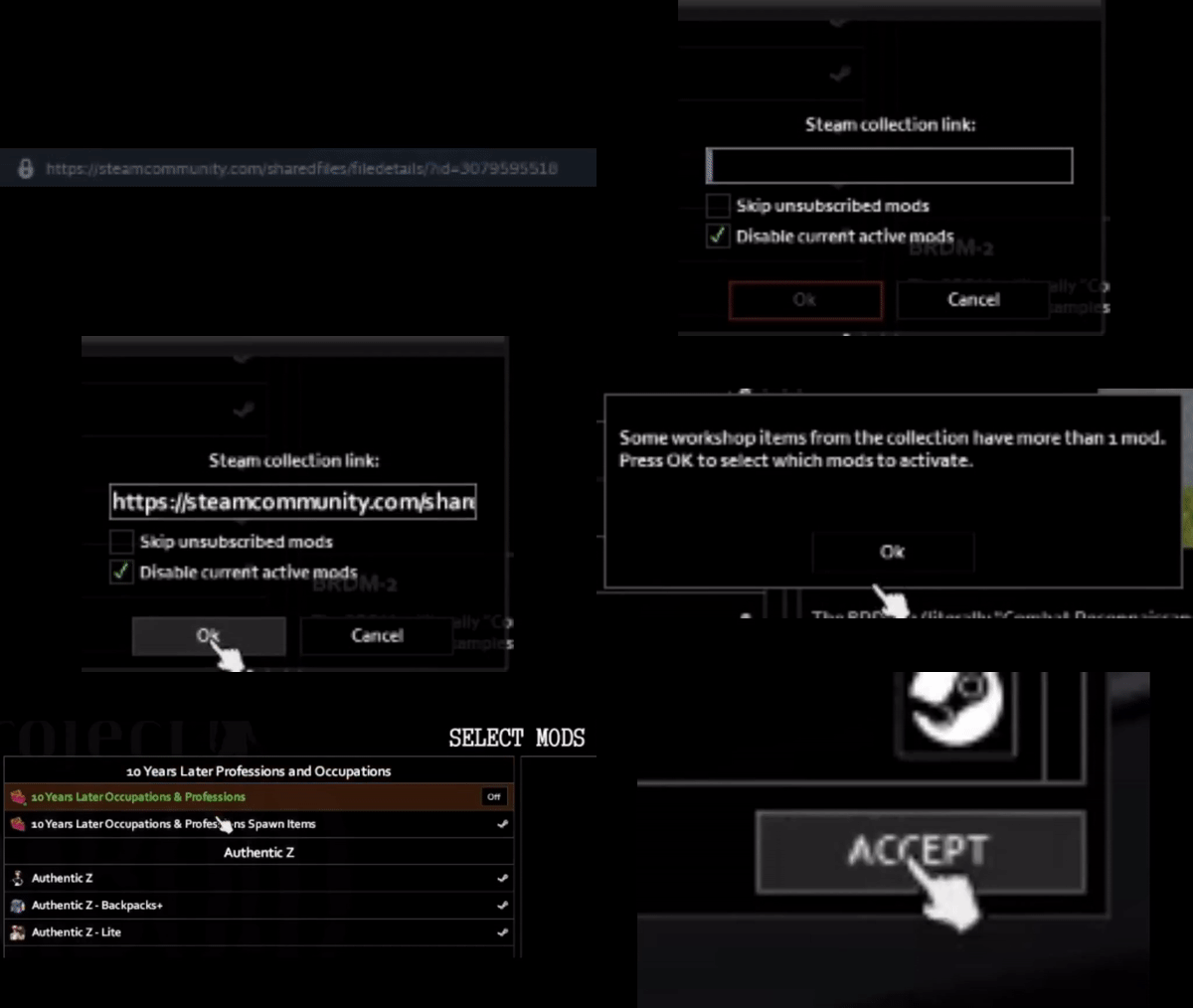
[olist] [*]Install and activate Mod Manager or Mod Manager: Server. If you use Mod Manager: Server, place it before the addon in the mod load order. [*]Make sure your Steam collection is Public or Unlisted. [*]Click on the "From collection" button in the Mod Manager.
- If you're not subcribed to all of the mods from the collection, enable the "Skip unsubscribed mods" option.
- If you want to keep current active mods, disable the "Disable current active mods" option.
[*]Paste your Steam collection link and click "OK". If your collection has many items, be patient, don't click or press anything. Mods from collection will be activated automatically. [*]If there are some workshop items that have more than one mod, you'll be asked to manually activate the mods you need from a separate list of mods, which is divided into categories with workshop item names. [/olist]
Note
If you subscribe to mods from collection while in Zomboid, you'll need to restart the game to refresh mod list.
Compatibility
Compatible with Mod Manager: Enhanced Load Order and any other mods.
Contact
@paranoid in the Project Zomboid Discord Server.
Credits
NoctisFalco for creating Mod Manager and for the clean, readable code.
I do not claim ownership of Mod Manager and Mod Manager: Server. All credit for the original mods goes to NoctisFalco.


Workshop ID: 3112199765 Mod ID: ModManagerLoadFromCollection
Highlights
From source dataFootprint
Rated a light load on a server.
Last update
Its author last shipped an update 2 yr ago.
Mod Manager: Load From Collection on Nxeon
From our catalogue- One-click install
- Supported on Nxeon Project Zomboid servers. We download it from Steam Workshop, place it, and restart the server.
- Server load
- light
- Smallest plan we suggest
- Project Zomboid — 6 GB (6 GB RAM). This follows our own load rating above, not a benchmark.
- Latest build
- 2024-11-03, released 2024-11-03
Game versions by loader
| Loader | Game versions | Newest |
|---|---|---|
| Workshop |
From 1 recorded build of Mod Manager: Load From Collection.
Dependencies
- Required: Mod Manager
Declared by the newest build that lists any. Required ones are installed with it on one-click installs.
Run Mod Manager: Load From Collection on a Project Zomboid server
Pick a server or deploy a new one above; it is installed in one click.
What kind of mod it is
From the catalogQuality of life & UI
Small conveniences, tweaks and interface improvements players notice straight away.
Compatibility
- Game
- Project Zomboid
Verified at the source
- ✓Steam WorkshopOfficial listing, checked 2026-11-01Open ↗
- ✓Authorparanoid, as published on Steam Workshop
- ✓LicenseNot published by the sourceFree















