






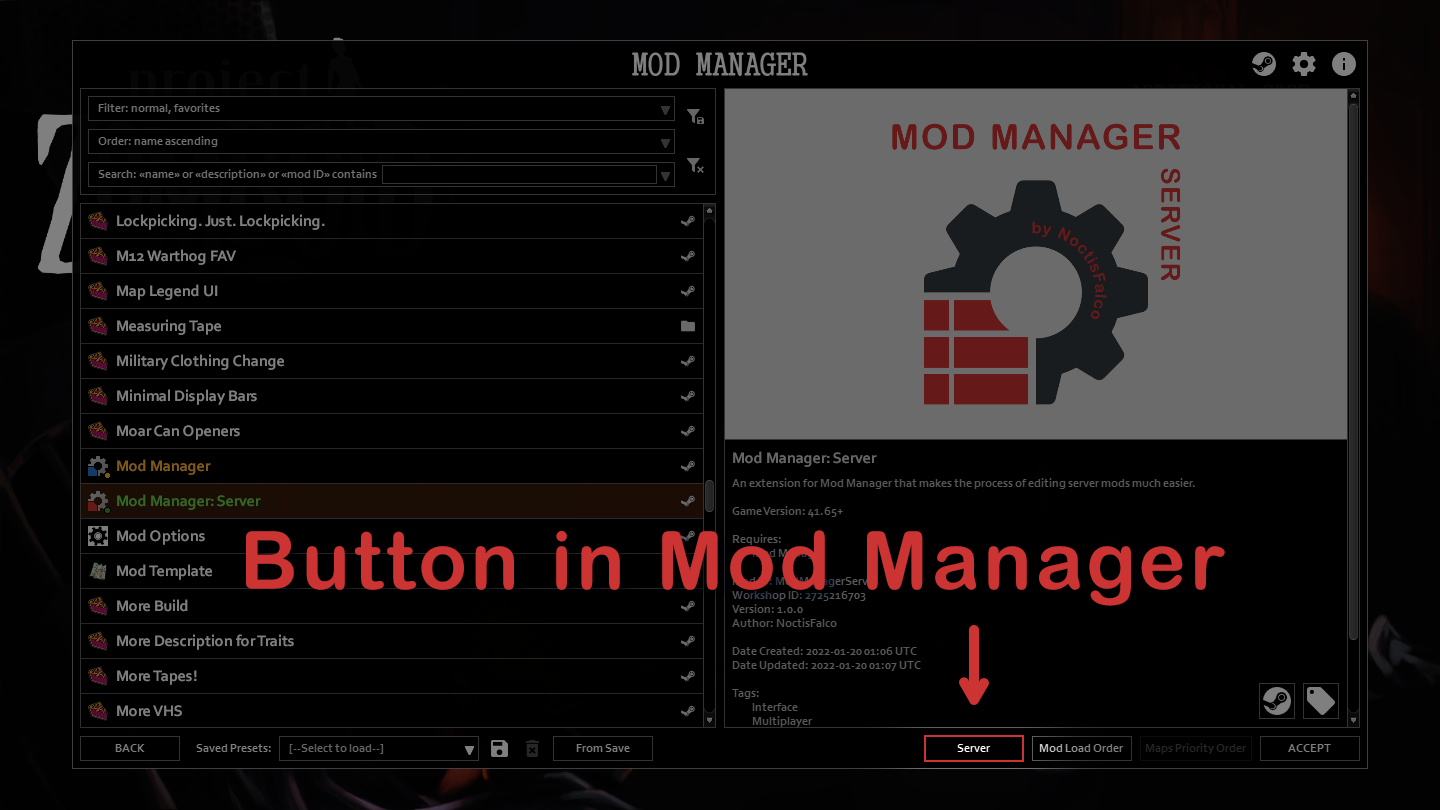

About Mod Manager: Server
From Steam WorkshopAn extension for [url=https://steamcommunity.com/sharedfiles/filedetails/?id=2694448564]Mod Manager that makes the process of editing server mod lists much easier and faster. Now you will never…
An extension for Mod Manager that makes the process of editing server mod lists much easier and faster. Now you will never forget to add required mods to your server's config!
If you appreciate my work, please support me:


Features
- Filters, sorting and search;
- Separate presets for server mods;
- Keyboard navigation;
- And more.
Details
Left panel: mods that you have. Mods from the Workshop are prioritized: if you have mods with the same ID in your Steam mods folder and in Zomboid/Workshop or Zomboid/mods, Mod Manager: Server will display the mod from your Steam mods folder. Other functionality is the same as in Mod Manager. Middle panel: Workshop IDs in your server config. Hover your mouse over to see a tooltip with its name in the Workshop and currently added mod IDs. Right panel: mod IDs in your server config. Hover your mouse over to see a tooltip with its name and Workshop ID.
Changes can be saved using the Save button (cannot be undone). Selecting a different server config or going Back cancels all changes (unless you saved them earlier).
You can add mods you are not subscribed to by typing their Workshop ID and mod ID in the text input fields below the server mod lists. If your server config contains mods that you are not subscribed to, they will be colored red. This doesn't mean they are broken, just makes it easier to manage the list.
Presets
Presets are saved in the same format as the server config ini files. So you can just copy two lines from the presets file and paste them in your config. Note: when loading a preset Mod Manager: Server will NOT warn you about broken or missing mods.
Saved presets location: c:\Users\<user>\Zomboid\Lua\saved_modlists_server.txt
Maps and Spawn Regions
IMPORTANT: This mod doesn't change maps used by the server and spawn regions! If you add or remove mods containing maps and/or spawn regions, you have to edit the Map and/or Spawn Regions sections of your server config manually in the vanilla Manage Server Settings window (or directly the ini config if you know what you're doing).
Compatibility
Game version: Build 41.65+ Requires: Mod Manager Controller is not supported.
If you want to translate the mod check this discussion.
FAQ
You do NOT need to add this mod (and Mod Manager too) to your server's mod list. It only works in the main menu and does nothing when you play.
If you get an error when clicking the Server button in Mod Manager, make sure you have the latest version of it (currently 2.1.1, you can check it in Mod Manager itself). If not, then unsubscribe from Mod Manager, wait before Steam finishes downloading (it says so even when uninstalling) and subscribe again, restart the game.
- How to edit a dedicated server's config - How to import presets from Mod Manager to Mod Manager: Server
My Discord server: 
My other mods: 


⛔ Permissions Redistribution of this mod without explicit permission from the creator is prohibited under any circumstances. This includes, but not limited to, uploading this mod to the Steam Workshop or any other site, distribution as part of another mod or modpack, distribution of modified versions. © 2022 NoctisFalco
Workshop ID: 2725216703 Mod ID: ModManagerServer
Highlights
From source dataFootprint
Rated a light load on a server.
Last update
Its author last shipped an update 5 yr ago.
Mod Manager: Server on Nxeon
From our catalogue- One-click install
- Supported on Nxeon Project Zomboid servers. We download it from Steam Workshop, place it, and restart the server.
- Server load
- light
- Smallest plan we suggest
- Project Zomboid — 6 GB (6 GB RAM). This follows our own load rating above, not a benchmark.
- Latest build
- 2022-01-22, released 2022-01-22
Game versions by loader
| Loader | Game versions | Newest |
|---|---|---|
| Workshop |
From 1 recorded build of Mod Manager: Server.
Dependencies
- Required: Mod Manager
Declared by the newest build that lists any. Required ones are installed with it on one-click installs.
Run Mod Manager: Server on a Project Zomboid server
Pick a server or deploy a new one above; it is installed in one click.
What kind of mod it is
From the catalogQuality of life & UI
Small conveniences, tweaks and interface improvements players notice straight away.
Compatibility
- Game
- Project Zomboid
Verified at the source
- ✓Steam WorkshopOfficial listing, checked 2026-11-01Open ↗
- ✓AuthorNoctisFalco, as published on Steam Workshop
- ✓LicenseNot published by the sourceFree















