







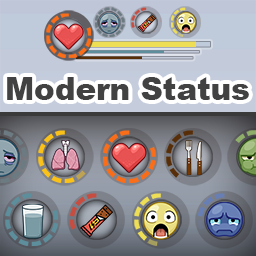
About Modern Status [B42]
From Steam WorkshopBuild Support: B42.12.3–B42.22.x — Build 42 only Modern Status is a flexible, highly customizable status HUD for Project Zomboid Build 42. Turn your character’s condition into circular indicators,…
Build Support: B42.12.3–B42.22.x — Build 42 only
Modern Status is a flexible, highly customizable status HUD for Project Zomboid Build 42.
Turn your character’s condition into circular indicators, horizontal or vertical bars, and compact matrix layouts with alarms, auto-hide, Detailed Info, Quick Actions, presets, and performance controls.
Safe to enable or disable in new or existing saves. Modern Status is a UI/HUD mod. It reads character status data and does not add items, traits, recipes, world data, or permanent save changes.
[hr]
Required Mod / Load Order
- NeatUI Framework is required.
- Load NeatUI Framework before Modern Status.
For MP servers: NeatUI Framework — Workshop ID: 3508537032 Modern Status — Workshop ID: 3451167732
[hr]
Quick Guide / Support
Modern Status — Quick Guide / FAQ
[hr]
Main Features
- Circular, horizontal, and vertical indicators.
- Multiple independent matrices with configurable position, size, spacing, growth direction, style, order, and Fill Hidden Gaps.
- All Indicators panel with filtering, sorting, bulk controls, and drag-and-drop reordering.
- Values, thresholds, alarms, gradients, icons, names, monochrome icons, and value inversion.
- Per-indicator Auto Hide and optional vanilla moodle hiding.
- Drag positioning, Multi Drag, locking, and grid snapping.
- Bundled presets plus custom saved presets.
- Double-click Quick Actions for supported indicators.
- Tooltips with values, moodle information, action hints, and optional Detailed Info.
- Performance modes and per-indicator update intervals.

[hr]
Quick Access
Right-click the Health / heart button on the left sidebar:
Modern Status > Global Settings / Presets / Multi Drag / Performance / Hide Vanilla Moodles
The old blue cog button can still be enabled in Mod Options, but is disabled by default.
Recommended setup:
- Load a bundled preset.
- Open All Indicators.
- Hide indicators you do not need.
- Use Auto Hide for situational indicators.
- Arrange the rest individually or in matrices.
- Save the finished layout as a custom preset.
Saving a preset occasionally is recommended so a custom layout can be restored easily if its configuration is ever reset or corrupted.
[hr]
Matrices
Each matrix can have its own:
- Position and indicator size.
- Columns, sort direction, and row/column spacing.
- Horizontal Growth: Left / Right.
- Vertical Growth: Up / Down.
- Fill Hidden Gaps.
- Style and shared settings.
Matrices appear as separate rows in All Indicators. Filtering a specific matrix lets you reorder its indicators directly by dragging rows.
[hr]
Tooltips and Quick Actions

Tooltips can show current values, thresholds, moodle state, Quick Action hints, and contextual Detailed Info.
Supported Quick Actions include:
- Drinking for Thirst.
- Eating for Hunger and nutrition.
- Sitting/resting when appropriate.
- Medication or health actions.
- Drying Wetness.
- Washing Dirtiness or Bloodiness.
Available actions depend on the player’s state, inventory, and game context.
[hr]
Performance
Performance modes:
- Responsive — faster updates.
- Balanced — default balance between responsiveness and performance.
- Lightweight — lower update frequency for heavy modlists or lower-end systems.
- Custom — used when update intervals are adjusted manually.
Modern Status batches large UI/configuration changes and uses optimized rendering paths to reduce unnecessary per-frame work.
For additional UI performance: ESC > Options > User Interface > UI Offscreen Rendering
You can also lower UI Rendering FPS.
[hr]
Supported Main Indicators

- Health, Bleeding, Bloodiness, Hunger, Thirst, Food Healing, Fatigue, Endurance
- Stress, Panic, Boredom, Discomfort, Unhappiness, Anger
- Drunkenness, Muscle Strain, Pain, Poison, Sickness
- Wetness, Windchill, Temperature, Catch a Cold
- Weight, Calories, Carbohydrates, Protein, Fat
- Dirtiness, Carry Weight / Encumbrance
- Medication duration: Antibiotics, Painkillers, Sleeping Pills, Beta Blockers
- Noxious Smell / Noxious Exposure
[hr]
Supported Mod Integrations
- Wash or Rot / Wash or Rot SP/MP — Grime
- LifeStyle: Hobbies — Hygiene Need, Bladder Need
- Take A Bath And Shower — Body Grime
- Excrementum — Stomach, Colon, Urine, Smell, Shame
- Nature’s Call — Bladder, Bowel, Gut Health, Soilage, Digestive Effects
Modded indicators only appear when the corresponding mod is active and the required data is available.
[hr]
Troubleshooting
If Modern Status does not appear, settings do not save, moodles behave strangely, or the UI looks broken after an update:
With Project Zomboid closed:
- Unsubscribe from Modern Status.
- Wait until Steam removes the old Workshop download.
- Subscribe again.
- Verify Project Zomboid files through Steam.
Then test a new or backup save with only: NeatUI Framework + Modern Status
If that works, add other mods back in small groups to identify the interaction.
To reset only the current Modern Status layout/settings, close the game and rename or remove:
Highlights
From source dataFootprint
Rated a light load on a server.
Last update
Its author last shipped an update 4d ago.
Modern Status [B42] on Nxeon
From our catalogue- One-click install
- Supported on Nxeon Project Zomboid servers. We download it from Steam Workshop, place it, and restart the server.
- Server load
- light
- Smallest plan we suggest
- Project Zomboid — 6 GB (6 GB RAM). This follows our own load rating above, not a benchmark.
- Latest build
- 2026-10-30, released 2026-10-30
Game versions by loader
| Loader | Game versions | Newest |
|---|---|---|
| Workshop |
From 4 recorded builds of Modern Status [B42].
Recent builds
| Build | Released | Game versions | Loaders |
|---|---|---|---|
| 2026-10-30 | 2026-10-30 | n/a | Workshop |
| 2026-10-20 | 2026-10-20 | n/a | Workshop |
| 2026-10-09 | 2026-10-09 | n/a | Workshop |
| 2026-09-16 | 2026-09-16 | n/a | Workshop |
Dependencies
- Required: NeatUI Framework [B42]
Declared by the newest build that lists any. Required ones are installed with it on one-click installs.
Run Modern Status [B42] on a Project Zomboid server
Pick a server or deploy a new one above; it is installed in one click.
What kind of mod it is
From the catalogQuality of life & UI
Small conveniences, tweaks and interface improvements players notice straight away.
Compatibility
- Game
- Project Zomboid
Verified at the source
- ✓Steam WorkshopOfficial listing, checked 2026-11-01Open ↗
- ✓AuthorRocco, as published on Steam Workshop
- ✓LicenseNot published by the sourceFree















