






About Navigator | Navigation Mod for Project Zomboid B42
From Steam WorkshopNavigator In-car GPS navigation and road route planner for Project Zomboid Build 42.20. Builds road routes in two modes: Short finds the shortest path, while Optimal considers turns, road width, and…
Navigator
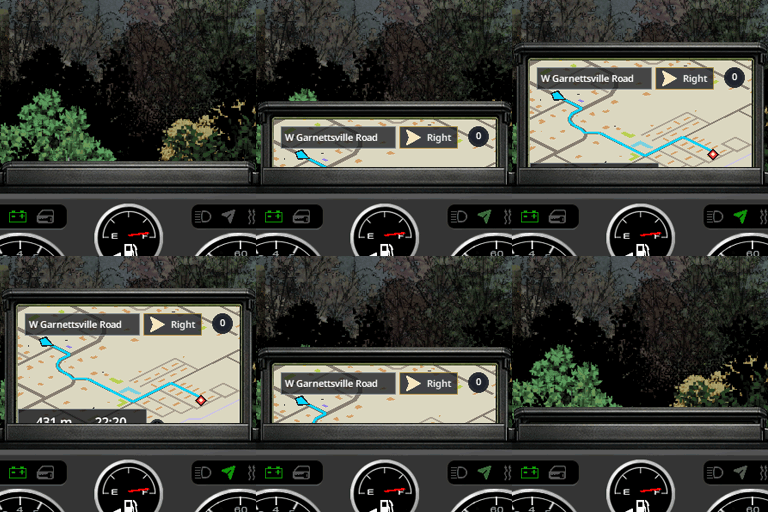
In-car GPS navigation and road route planner for Project Zomboid Build 42.20. Builds road routes in two modes: Short finds the shortest path, while Optimal considers turns, road width, and surface type. Automatically builds routes on roads, shows turn-by-turn directions with ETA, reroutes automatically, and displays the route on the dashboard minimap and world map. Russian and English voice guidance; supports singleplayer, host, dedicated servers, and multiplayer.
How to enable navigation
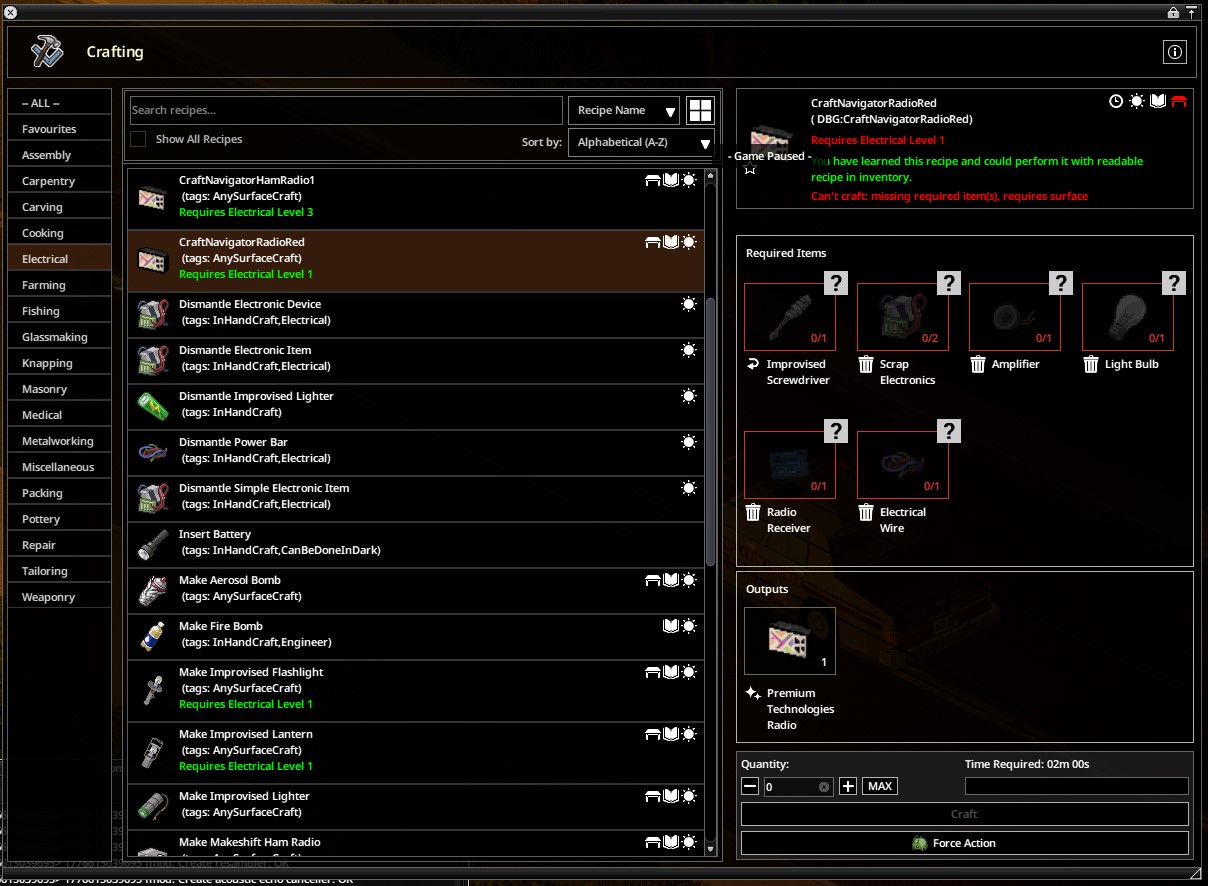
Quick start: install “Navigator” or “Navigator. Micro” in the Radio slot, turn the screen on with the power button, then build a route by right-clicking the minimap or world map.[/quote] For the navigator to appear, the vehicle must have a supported Navigator radio installed in the Radio slot. Get into the vehicle with the radio installed, turn the screen on with the power button on the navigator panel, then open the minimap or world map and right-click -> Build route. These are not new items: the mod changes two existing in-game radios. “Premium Technologies Radio” becomes “Navigator”, and “Premium Technologies Ham Radio” becomes “Navigator. Micro”. This is why some vehicles may already have a navigator installed. [hr][/hr] [list] [*]Supported radios: “Navigator” and “Navigator. Micro”. [*]Crafting recipes: “Make Navigator Radio” and “Make Navigator HAM Radio”. [*]Where the route is shown: navigator screen, minimap, and world map. [/list] [h2]Route building modes[/h2] [quote]Choose the route type in the Navigator settings. Short is used by default.
[hr][/hr]
- Short: builds the shortest route over available roads, matching previous Navigator versions.
- Optimal: may be slightly longer, but considers the number and sharpness of turns, road width, and surface type. It prefers wider roads, asphalt, and routes with fewer difficult maneuvers.
Road data
Ready to use: Navigator already includes road data for the vanilla Project Zomboid map.[/quote] A separate mod for editing roads and route graphs will be released later. Its link and instructions will appear here when this description is updated. [hr][/hr] [h2]Settings[/h2] [quote]Navigator can be configured both in Sandbox and in-game, so you can tune it for a server setup or your own driving style.
- Navigator Sandbox — “Enable fog of war”: controls fog of war on the navigator map and the world map opened through it. The standard Sandbox map settings are not used.
- Interface: show the street name and bottom route panel.
- Voice guidance: adjust the volume of spoken maneuver prompts.
- Routing: choose the route type and whether gravel roads and railways may be used. Asphalt is always available for route building.
- [hr][/hr]
Voice localizations
[table][tr][th]Language[/th][th]Author[/th][th]Voice pack[/th][/tr][tr][td]Russian[/td][td]Lordenn[/td][td]Included with Navigator[/td][/tr][tr][td]English[/td][td]Lordenn[/td][td]Included with Navigator[/td][/tr][tr][td]Chinese[/td][td]Lordenn[/td][td]Separate mod[/td][/tr][tr][td]German[/td][td]Lordenn[/td][td]Separate mod[/td][/tr][tr][td]Spanish[/td][td]Lordenn[/td][td]Separate mod[/td][/tr][/table]
Compatibility and load order
This release is made for Project Zomboid Build 42.20.
Vehicle dashboard modifications: place these mods above Navigator in the load order so they load first. Navigator must be below them to attach its navigation screen and radio icon correctly to the modified dashboard.
Realistic Dashboard and Gauges (RealisticDash): compatible. Place RealisticDash above Navigator in the mod load order.
- Singleplayer.
- Host.
- Dedicated Server.
- Multiplayer.
Workshop ID: 3708816224 Mod ID: Navigator
Highlights
From source dataFootprint
Rated a light load on a server.
Last update
Its author last shipped an update 2 mo ago.
Navigator | Navigation Mod for Project Zomboid B42 on Nxeon
From our catalogue- One-click install
- Supported on Nxeon Project Zomboid servers. We download it from Steam Workshop, place it, and restart the server.
- Server load
- light
- Smallest plan we suggest
- Project Zomboid — 6 GB (6 GB RAM). This follows our own load rating above, not a benchmark.
- Latest build
- 2026-09-02, released 2026-09-02
Game versions by loader
| Loader | Game versions | Newest |
|---|---|---|
| Workshop |
From 1 recorded build of Navigator | Navigation Mod for Project Zomboid B42.
Run Navigator | Navigation Mod for Project Zomboid B42 on a Project Zomboid server
Pick a server or deploy a new one above; it is installed in one click.
What kind of mod it is
From the catalogQuality of life & UI
Small conveniences, tweaks and interface improvements players notice straight away.
Compatibility
- Game
- Project Zomboid
Verified at the source
- ✓Steam WorkshopOfficial listing, checked 2026-11-01Open ↗
- ✓AuthorLordenn, as published on Steam Workshop
- ✓LicenseNot published by the sourceFree















