






About Neat Building [B42]
From Steam WorkshopBuild Support: B42.12+ — Build 42 only Neat Building replaces the vanilla Build menu with a cleaner, more compact and easier-to-navigate interface for Project Zomboid Build 42. Browse, search and…
Build Support: B42.12+ — Build 42 only
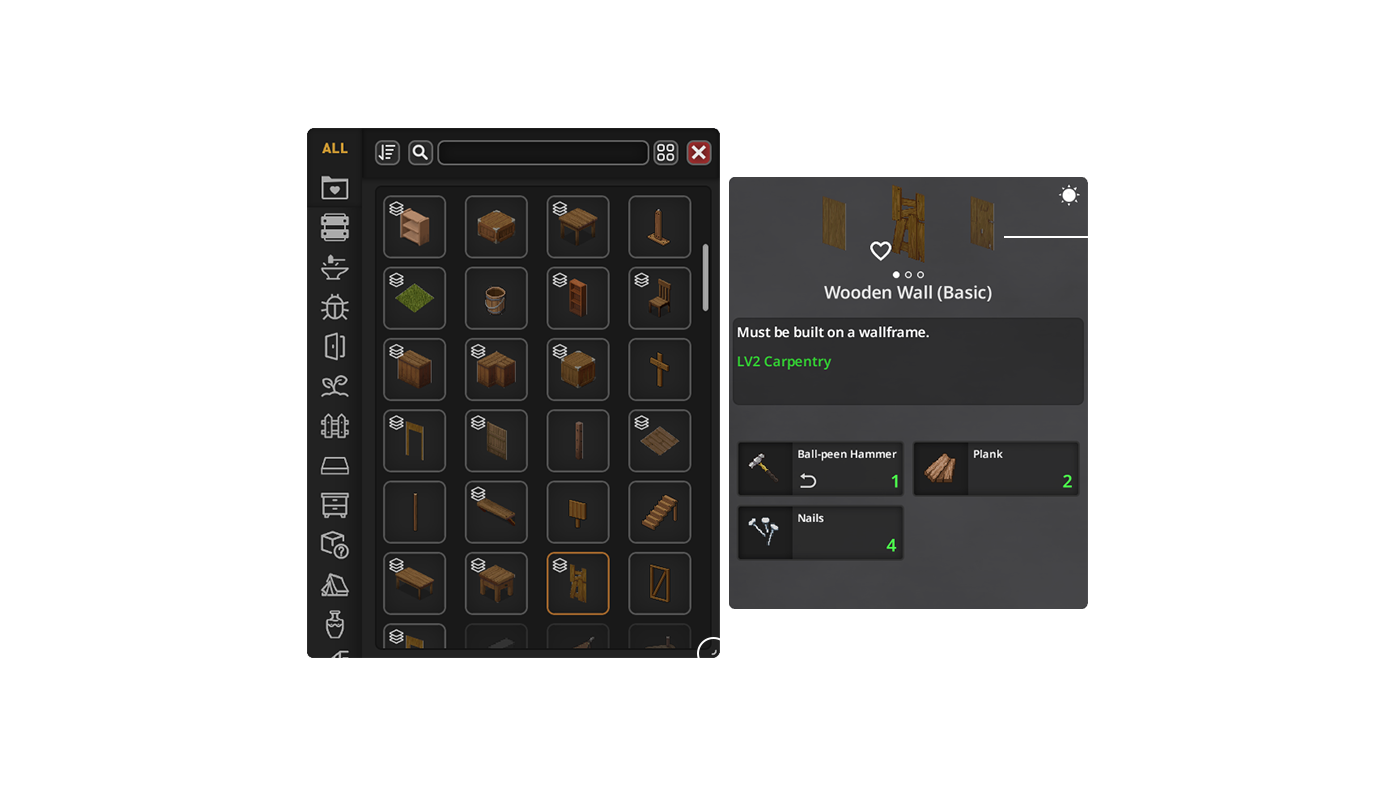
Neat Building replaces the vanilla Build menu with a cleaner, more compact and easier-to-navigate interface for Project Zomboid Build 42.
Browse, search and filter construction recipes, inspect requirements, choose compatible materials, and customize the interface while keeping access to the vanilla Build menu.
Required for the UI: NeatUI Framework must load before Neat Building / UI Only. [hr]
Choose the Right Variant
- Neat Building — UI + extra buildables + railings
- Neat Building - UI Only — UI only; no buildable entities
- Neat Building - Buildables - SES Compatibility — extra buildables without railings conflicting with Stairs East & South
- Neat Building - Railings — separated metal railing buildables
Do not enable full Neat Building together with the modular buildable variants.
Recommended setups Existing world using full Neat Building:
- NeatUI Framework
- Neat Building
Using Stairs East & South:
- NeatUI Framework
- Stairs East & South
- Neat Building - UI Only
- Neat Building - Buildables - SES Compatibility
Modular setup without Stairs East & South:
- NeatUI Framework
- Neat Building - UI Only
- Neat Building - Buildables - SES Compatibility
- Neat Building - Railings
If you only want the interface, use Neat Building - UI Only.
[hr]
Existing Saves / Servers
Back up your world before changing mods or variants.
Buildable variants register recipes, entities and WorldDictionary data. If a save previously used one and you remove it, enable the matching: Neat Building – Safe Uninstall Support
[table] [tr][th]Previously used[/th][th]Use after removing[/th][/tr] [tr][td]Neat Building[/td][td]Safe Uninstall Support[/td][/tr] [tr][td]Buildables - SES Compatibility[/td][td]Safe Uninstall Support - SES Compatibility[/td][/tr] [tr][td]Railings[/td][td]Safe Uninstall Support - Railings[/td][/tr] [/table]
UI Only adds no buildable entities and does not require Safe Uninstall Support.
[hr]
Main Features
- Compact replacement for the vanilla Build interface
- List / Grid recipe views
- Search by recipe name or required item
- Sort plus Can Build / Skill / Known filters
- Back / Forward navigation
- Refresh materials, recipe state and build conditions
- Persistent search, filters, sorting, layout and window geometry
- Dedicated Neat Building Settings panel
- Auto-collapse mode
- Persistent Recipe Details while a recipe is selected
- Resizable / movable interface
- Controller / gamepad navigation
- Optional extra buildables depending on variant
- All supported PZ languages except STREW
[hr]
Required Items & Item Picker
Required-item slots show available / required quantities, partial-use items, item condition, remaining uses and other relevant stats.
- Double arrows — another valid item type is available
- ? — other valid item types exist but are not currently available
Click a Required Item slot to open the Item Picker.
- Inspect compatible item types and individual inventory items
- Double-click an item type to automatically select enough matching items
- Double-click an individual item to prioritize it and complete the remaining requirement
- Supports quantities, partial-use items and preserved tools
Magnifier
- Left-click — find Crafting recipes that produce that exact item type
- Right-click — find Crafting recipes that produce/use it, or Building recipes that require it
With Neat Crafting enabled, searches integrate with it; otherwise the available vanilla Crafting / Building UI is used.
[hr]
Search, Filters & Settings
The bars provide Back/Forward, Search Mode, Search, Sort, Can Build, Skill, Known, Refresh, List/Grid, Settings and window controls.
The magnifying-glass button beside the search bar changes Search Mode. If a search returns no results, check the mode/category or use ALL.
If Neat Crafting & Neat Building – XP & Mod Display is installed, its XP and source-mod filters integrate into the same bar.
[hr]
How to Build
Double-click a recipe in List/Grid view to start placement.
The placement ghost can preview a construction even when requirements are missing. Before building starts, Neat Building rechecks requirements from the character's actual position and can cancel if they are no longer met.
Switch back to the vanilla Build UI without removing the mod:
- ESC → Options → Mods → Neat Building
- Right-click the vanilla Build sidebar button
[hr]
Controller / Gamepad (WIP)
- RB + D-Pad — move between subpanels
- Horizontal navigation for toolbars
- Vertical navigation for lists
- Matrix navigation for recipe grids and Required Items
- X on an Item Picker type — main magnifier search
[hr]
Multiplayer
Supports SP, MP Host and Dedicated Server.
For MP:
- Add required mods to both Mods= and WorkshopItems=
- Keep server and clients on the same Workshop files
- Fully restart the server after mod changes
[hr]
Compatibility
Known conflicts / special cases:
- [B42] Buildables Expansion
- Rebalanced Prop Moving
Highlights
From source dataFootprint
Rated a light load on a server.
Last update
Its author last shipped an update 1d ago.
Neat Building [B42] on Nxeon
From our catalogue- One-click install
- Supported on Nxeon Project Zomboid servers. We download it from Steam Workshop, place it, and restart the server.
- Server load
- light
- Smallest plan we suggest
- Project Zomboid — 6 GB (6 GB RAM). This follows our own load rating above, not a benchmark.
- Latest build
- 2026-11-03, released 2026-11-03
Game versions by loader
| Loader | Game versions | Newest |
|---|---|---|
| Workshop |
From 4 recorded builds of Neat Building [B42].
Recent builds
| Build | Released | Game versions | Loaders |
|---|---|---|---|
| 2026-11-03 | 2026-11-03 | n/a | Workshop |
| 2026-10-30 | 2026-10-30 | n/a | Workshop |
| 2026-10-09 | 2026-10-09 | n/a | Workshop |
| 2026-09-29 | 2026-09-29 | n/a | Workshop |
Dependencies
- Required: NeatUI Framework [B42]
Declared by the newest build that lists any. Required ones are installed with it on one-click installs.
Run Neat Building [B42] on a Project Zomboid server
Pick a server or deploy a new one above; it is installed in one click.
What kind of mod it is
From the catalogQuality of life & UI
Small conveniences, tweaks and interface improvements players notice straight away.
Compatibility
- Game
- Project Zomboid
Verified at the source
- ✓Steam WorkshopOfficial listing, checked 2026-11-03Open ↗
- ✓AuthorRocco, as published on Steam Workshop
- ✓LicenseNot published by the sourceFree















