







About Neat Crafting [B42]
From Steam WorkshopBuild Support: Project Zomboid Build 42 — SP / MP Host / Dedicated Neat Crafting replaces the default Build 42 crafting interface with a cleaner, faster and highly configurable alternative. Browse…
Build Support: Project Zomboid Build 42 — SP / MP Host / Dedicated
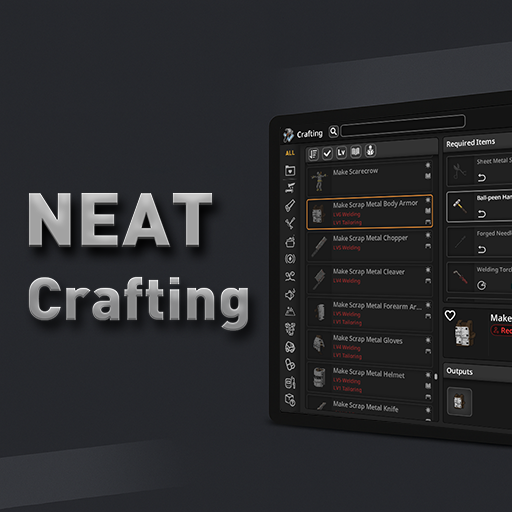
Neat Crafting replaces the default Build 42 crafting interface with a cleaner, faster and highly configurable alternative.
Browse large recipe lists, search by names or ingredients, choose exact items, follow crafting chains, manage large batches, and move between Crafting and Building searches.
Designed for vanilla and heavily modded games.
[hr]
Required Mod
NeatUI Framework is required and must load before Neat Crafting.
NeatUI Framework
Neat Crafting
Neat Crafting addons
[hr]
Main Features
- List and Grid recipe browser
- Search by Recipe Name, Required Items or Output Items
- Category, craftability and recipe filters
- Recipe sorting with optional remembered states
- Back / Forward navigation for recipes and crafting stations
- Live nearby-container refresh while moving
- Improved Required Items panel and Item Picker
- Exact item selection for recipes with multiple alternatives
- Batch crafting up to 1000 executions
- ALL mode for compatible consumables
- Per-craft and batch time estimates
- Crafting ↔ Building item search navigation
- Entity Craft support for stations and workbenches
- Resizable, movable and scalable interface
- Top or bottom title bar and auto-collapse
- Mouse, keyboard and controller support
[hr]
Batch Crafting
Neat Crafting can execute batches above Project Zomboid's normal 100-craft UI limit, up to 1000 executions when enough valid materials are available.
By default, MAX respects the selected consumable type. Enable ALL to continue with other compatible consumables after that type is exhausted.
200 red watches + 92 black watches
Selected type only → MAX 200
ALL enabled → MAX 292
Tools and other non-consumed Keep inputs are excluded from the ALL consumable pool. Batches that change inputs or consume fluids are processed progressively so availability is reevaluated between crafts.
[hr]
Vanilla Input Transfers
By default, Neat Crafting follows vanilla Crafting behavior for items stored in backpacks or other accessible containers:
- Required items move to the main inventory before crafting
- Each new batch input is transferred before use
- Tools and other PutBack items return to their original container when the batch finishes
Enable the sandbox option Craft directly from accessible containers to restore the older Neat Crafting behavior without those transfer actions.
Placed tools taken from the ground can return to their original placed position instead of being simply dropped. If an interrupted craft leaves one in the main inventory, Return to Original Place can restore it.
[hr]
Required Items & Item Picker
The Item Picker helps manage recipes with multiple valid inputs. You can inspect alternatives, choose exact item types or instances, navigate grouped items, and double-click an item/type to fill the remaining requirement.
The magnifier beside an item type searches using its exact FullType:
!Base.Hammer[/code]

Right-click the magnifier for:
[list]
[*][b]Crafting - Required Items[/b]
[*][b]Crafting - Output Items[/b]
[*][b]Building - Required Items[/b]
[/list]

Building searches work with the vanilla Building menu and do [b]not[/b] require Neat Building.

[hr]
[h2]Crafting Time Information[/h2]
The Outputs title shows the estimated [b]in-game equivalent time per craft[/b]. Hover over it to see in-game and real-time estimates per craft and for the selected batch.

In-game estimates take the current sandbox [b]Day Length[/b] into account.

[hr]
[h2]Search, Layout & Settings[/h2]
Each new game/server session starts with empty search text, [b]Recipe Name[/b] mode and category [b]ALL[/b].

Search, filters, List/Grid mode and sorting can remember their states.

The in-window Settings panel includes:
[list]
[*]Window opacity
[*]UI scale and text size
[*]Title-bar position and height
[*]Auto-collapse behavior
[*]Category-label direction
[*]Recipe List / Grid layout
[/list]

Window size and position are remembered between play sessions.

[hr]
[h2]Controller / Gamepad Support[/h2]
Controller navigation is supported throughout categories, recipe lists, Required Items, Item Picker, inputs, outputs, search, filters, recipe actions, Settings and main crafting controls.

[hr]
[h2]Optional XP & Mod Display Addon[/h2]

[url=https://steamcommunity.com/sharedfiles/filedetails/?id=3540503606][b]Neat Crafting & Neat Building – XP & Mod Display[/b][/url] adds optional recipe XP, XP multipliers, source-mod information and related filters.

[hr]
[h2]Compatibility[/h2]
Neat Crafting is maintained for [b]Project Zomboid Build 42[/b] and has been reviewed against recent versions including B42.22, while retaining compatibility helpers for earlier supported builds.

Known compatible mods include [b]Craft and Build Category Translate [B42][/b], [b]The Shortcut[/b] and [b]Project Cook[/b].

[b]what can i craft[/b] and [b]what can i craft addon[/b] are known incompatible. Other mods that replace the same crafting interface may also conflict.

For NeatUI-dependent mods, [b]NeatUI Framework must load first[/b].

[hr]
[h2]Existing Saves & Safe Uninstall[/h2]
[b]Do not load an existing world that previously used Neat Crafting after removing both Neat Crafting and its Safe Uninstall Support.[/b]

Build 42 may retain registered references such as:
[code]NC_HandCraftPanelLayoutHighlights
From source dataFootprint
Rated a light load on a server.
Last update
Its author last shipped an update today.
Neat Crafting [B42] on Nxeon
From our catalogue- One-click install
- Supported on Nxeon Project Zomboid servers. We download it from Steam Workshop, place it, and restart the server.
- Server load
- light
- Smallest plan we suggest
- Project Zomboid — 6 GB (6 GB RAM). This follows our own load rating above, not a benchmark.
- Latest build
- 2026-11-03, released 2026-11-03
Game versions by loader
| Loader | Game versions | Newest |
|---|---|---|
| Workshop |
From 4 recorded builds of Neat Crafting [B42].
Recent builds
| Build | Released | Game versions | Loaders |
|---|---|---|---|
| 2026-11-03 | 2026-11-03 | n/a | Workshop |
| 2026-10-31 | 2026-10-31 | n/a | Workshop |
| 2026-10-15 | 2026-10-15 | n/a | Workshop |
| 2026-09-29 | 2026-09-29 | n/a | Workshop |
Dependencies
- Required: NeatUI Framework [B42]
Declared by the newest build that lists any. Required ones are installed with it on one-click installs.
Run Neat Crafting [B42] on a Project Zomboid server
Pick a server or deploy a new one above; it is installed in one click.
What kind of mod it is
From the catalogQuality of life & UI
Small conveniences, tweaks and interface improvements players notice straight away.
Compatibility
- Game
- Project Zomboid
Verified at the source
- ✓Steam WorkshopOfficial listing, checked 2026-11-03Open ↗
- ✓AuthorRocco, as published on Steam Workshop
- ✓LicenseNot published by the sourceFree















