







About Neat Rocco's UI [B42]
From Steam WorkshopBuild Support: B42.17 to B42.21 - Build 42 only (Build 42 only: Singleplayer tested / Multiplayer not tested) Redesigns in-game vanilla menus with a clean, modern interface inspired by the NeatUI…
Build Support: B42.17 to B42.21 - Build 42 only
(Build 42 only: Singleplayer tested / Multiplayer not tested)
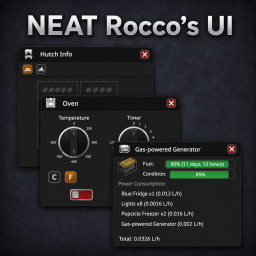
Redesigns in-game vanilla menus with a clean, modern interface inspired by the NeatUI style. Icon buttons, consistent colors, and a layout that stays out of your way.
[hr]
Controller support
Every window follows the vanilla controller mapping, window by window: the D-pad reaches every button, and the NeatUI icons show the A/B/X/Y glyph of the action they trigger.
[hr]
Requires:
NeatUI Framework must be enabled and loaded before this mod.
[hr]
Why Rocco's UI?
"Rocco's UI" is a tribute to Rocco, the creator of these mods and whose work made this mod possible:
[hr]
What does this mod replace?
Animals & Livestock
- Animal info window
- Animal tracks info
- Butcher hook
- Chicken coop (hutch)
- Feeding trough window
- Livestock zone panels (manage your animal zones)
- Trailer loading window
Cooking
- BBQ
- Microwave
- Oven
Farming & Foraging
- Foraging search panel
- Plant info panel
Character
- Character info window (stats, health, skills, clothing)
- Clothing viewer
- Fitness training window
- Learning window (books, recipes, media, farming)
Media & Radio
- Radio, television, walkie-talkie, HAM radio and CD player window
- Vehicle radio
- CD and VHS back cover
Vehicles
- Vehicle mechanics panel
World objects
- Fluid container info
- Fluid transfer panel
- Generator info
Popups & Dialogs
- Alarm clock dialog
- Bomb timer dialog
- Color picker
- Confirmation dialogs (yes/no, ok)
- Digital code lock
- Info / rich text popups
- Text input dialogs
[hr]
Toggle on or off at any time
You can switch back to the vanilla UI without disabling the mod: Options → Mod Options → Neat Rocco's UI → Use Neat Rocco's UI
Each NeatUI window can also be enabled or disabled individually in the same menu, in case a specific window conflicts with another mod.
[hr]
Interface scale & text size
In the same menu, three settings adjust every Neat Rocco window when you click Apply:
- Interface scale, from 80% to 200%
- Title bar height, from 80% to 140%
- Text size: Auto, Small, Medium or Large. Auto follows the interface scale
[hr]
Mod Compatibility
Mods that add content to the vanilla windows replaced by this mod may not be fully compatible. To request compatibility with a specific mod, post in the Mod Compatibility Requests discussion.
[hr]
Credits
Mod by ArtNod
Visually inspired by Neat Crafting and Neat Building by Rocco and Afyrmo. UI components provided by NeatUI Framework by Rocco. Many thanks to Rocco and Afyrmo for their open framework and design work.
Permissions
You are free to extract and use any content from this mod without asking for permission. If you want to republish this mod, you need to follow these rules: 1. There must be substantial and important improvements. 2. If this mod has not been updated for a long time and has caused many issues, you may modify and republish it.
Workshop ID: 3723726293 Mod ID: Neat_Rocco
Highlights
From source dataFootprint
Rated a light load on a server.
Last update
Its author last shipped an update 9d ago.
Neat Rocco's UI [B42] on Nxeon
From our catalogue- One-click install
- Supported on Nxeon Project Zomboid servers. We download it from Steam Workshop, place it, and restart the server.
- Server load
- light
- Smallest plan we suggest
- Project Zomboid — 6 GB (6 GB RAM). This follows our own load rating above, not a benchmark.
- Latest build
- 2026-10-25, released 2026-10-25
Game versions by loader
| Loader | Game versions | Newest |
|---|---|---|
| Workshop |
From 2 recorded builds of Neat Rocco's UI [B42].
Recent builds
| Build | Released | Game versions | Loaders |
|---|---|---|---|
| 2026-10-25 | 2026-10-25 | n/a | Workshop |
| 2026-09-20 | 2026-09-20 | n/a | Workshop |
Dependencies
- Required: NeatUI Framework [B42]
Declared by the newest build that lists any. Required ones are installed with it on one-click installs.
Run Neat Rocco's UI [B42] on a Project Zomboid server
Pick a server or deploy a new one above; it is installed in one click.
What kind of mod it is
From the catalogQuality of life & UI
Small conveniences, tweaks and interface improvements players notice straight away.
Compatibility
- Game
- Project Zomboid
Verified at the source
- ✓Steam WorkshopOfficial listing, checked 2026-11-01Open ↗
- ✓AuthorArtNod, as published on Steam Workshop
- ✓LicenseNot published by the sourceFree















